6-15
3. Calculating and Graphing Paired-Variable
Statistical Data (Curve Fitting)
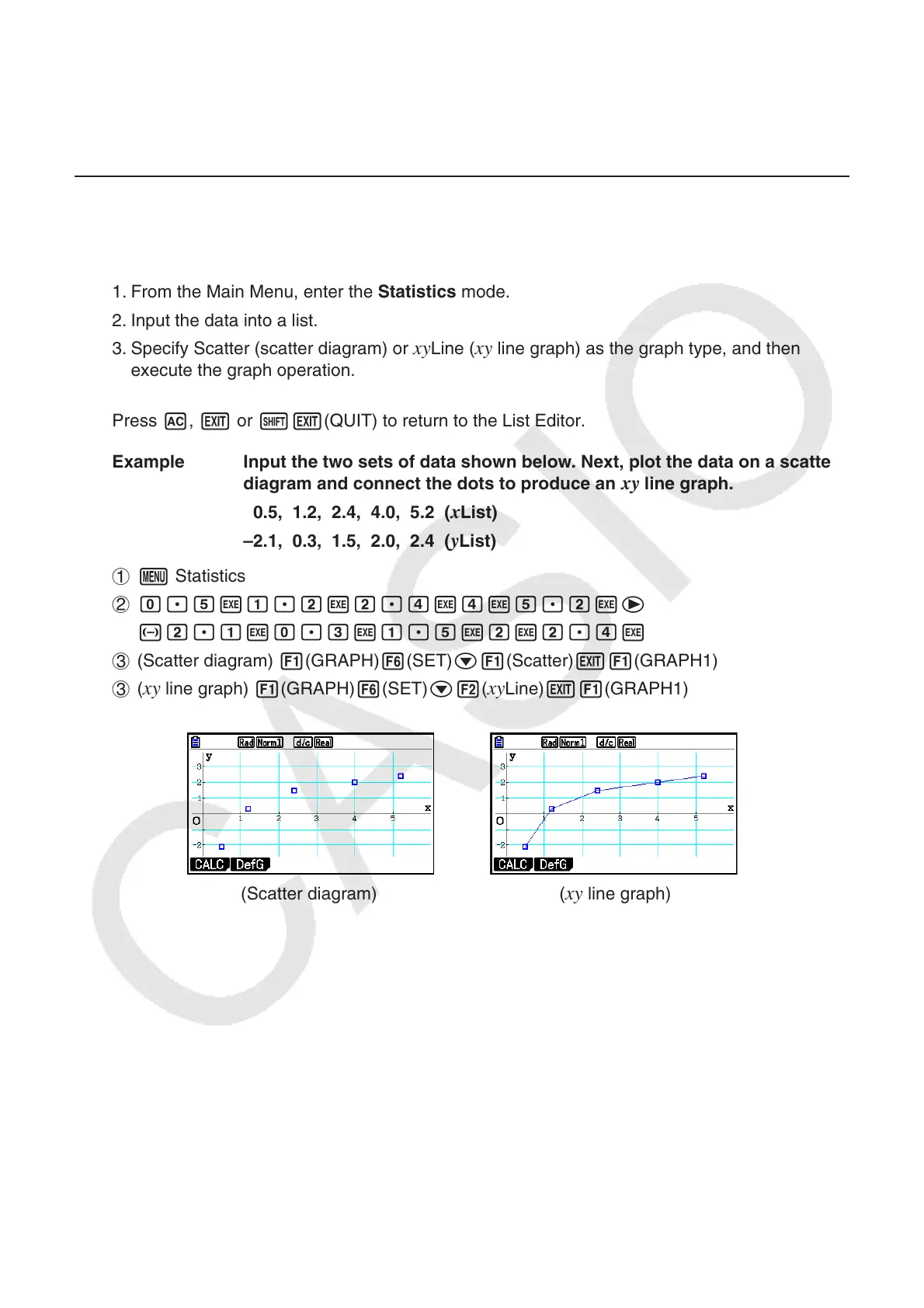
k Drawing a Scatter Diagram and xy Line Graph
The following procedure plots a scatter diagram and connects the dots to produce an xy line
graph.
1. From the Main Menu, enter the Statistics mode.
2. Input the data into a list.
3. Specify Scatter (scatter diagram) or
xy Line ( xy line graph) as the graph type, and then
execute the graph operation.
Press A, J or !J(QUIT) to return to the List Editor.
Example Input the two sets of data shown below. Next, plot the data on a scatter
diagram and connect the dots to produce an
xy line graph.
0.5, 1.2, 2.4, 4.0, 5.2 ( x List)
–2.1, 0.3, 1.5, 2.0, 2.4 (
y List)
1 m Statistics
2 a.fwb.cwc.ewewf.cwe
-c.bwa.dwb.fwcwc.ew
3 (Scatter diagram) 1(GRAPH) 6(SET) c1(Scatter) J1(GRAPH1)
3 (
xy line graph) 1(GRAPH) 6(SET) c2( xy Line) J1(GRAPH1)
(Scatter diagram) (
xy line graph)



 To Next Page
 Loading...









