Linear Transducer and Rotary Attachments
4-18 72A-1898 Rev. A 11/01
Monday, November 26, 2001 1:09 pm
Rotary Motion To configure for rotary motion:
1. Remove the Rotary Chuck from its storage location on the Chuck
Holder Plate by rotating it counterclockwise.
The Chuck Key can be inserted into the Rotary Chuck for added
torque.
2. Remove the Chuck Holder Plate from the Transducer by loosening
the two captive screws.
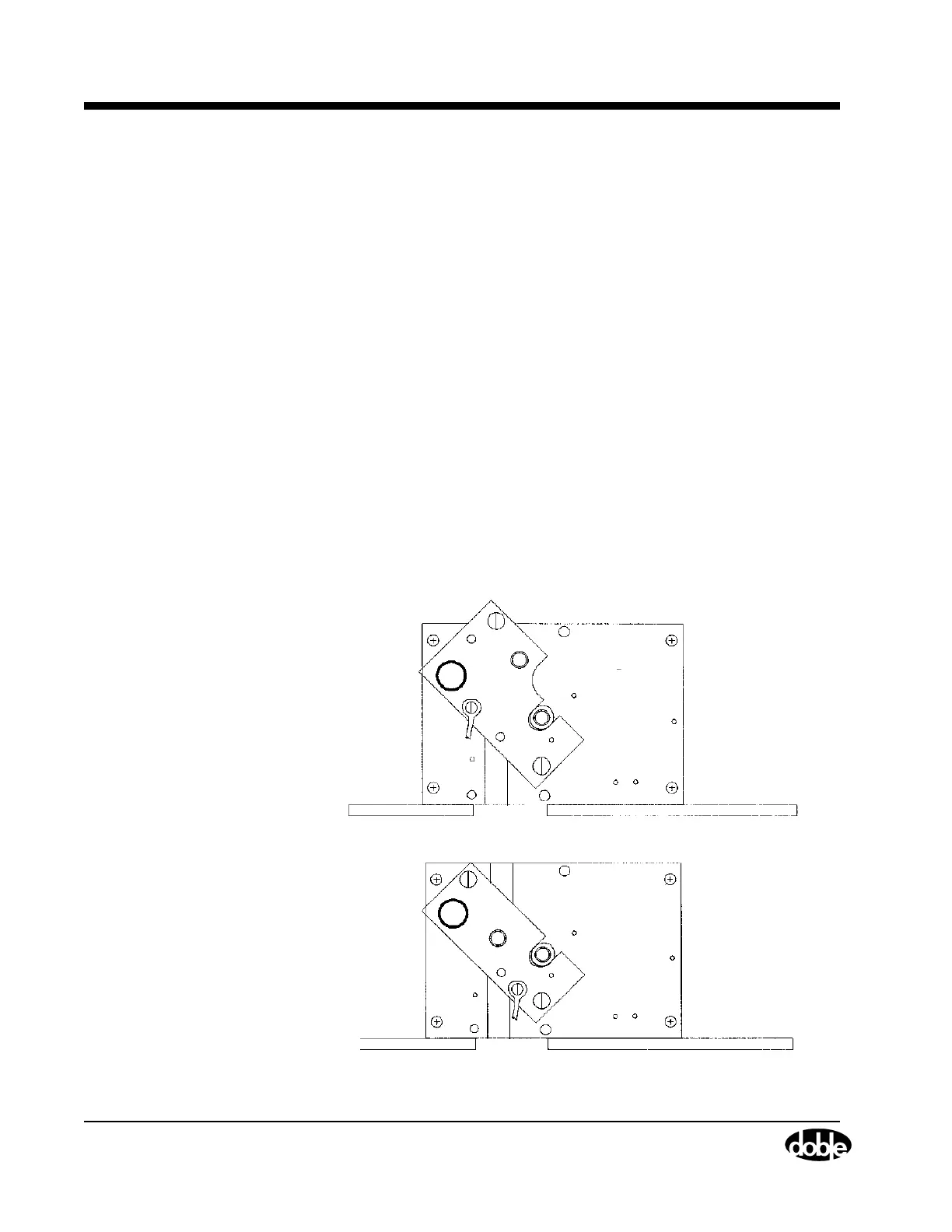
3. Position the wrench portion of the Chuck Holder Plate on the Rotary
Shaft (see Figure 4.6).
4. Thread the Rotary Chuck onto the Rotary Shaft and hand tighten,
using the Chuck Holder Plate to keep the Rotary Shaft from moving.
5. Insert the Chuck Key into the Rotary Chuck.
6. Hold the Chuck Holder Plate against the Transducer and use a light
object to tap the Chuck Key until it rotates the Rotary Chuck
clockwise, tightening the Rotary Chuck on the Rotary Shaft.
7. Remove the Chuck Key from the Rotary Chuck.
Figure 4.6 Chuck Holder Plate Mounting to Tighten Rotary Chuck
Version 1
Version 2



 To Next Page