Configuring Test Plans
4-42 72A-1898 Rev. A 11/01
Monday, November 26, 2001 1:09 pm
Power-Up
Diagnostics and
Channel Activation
Checks
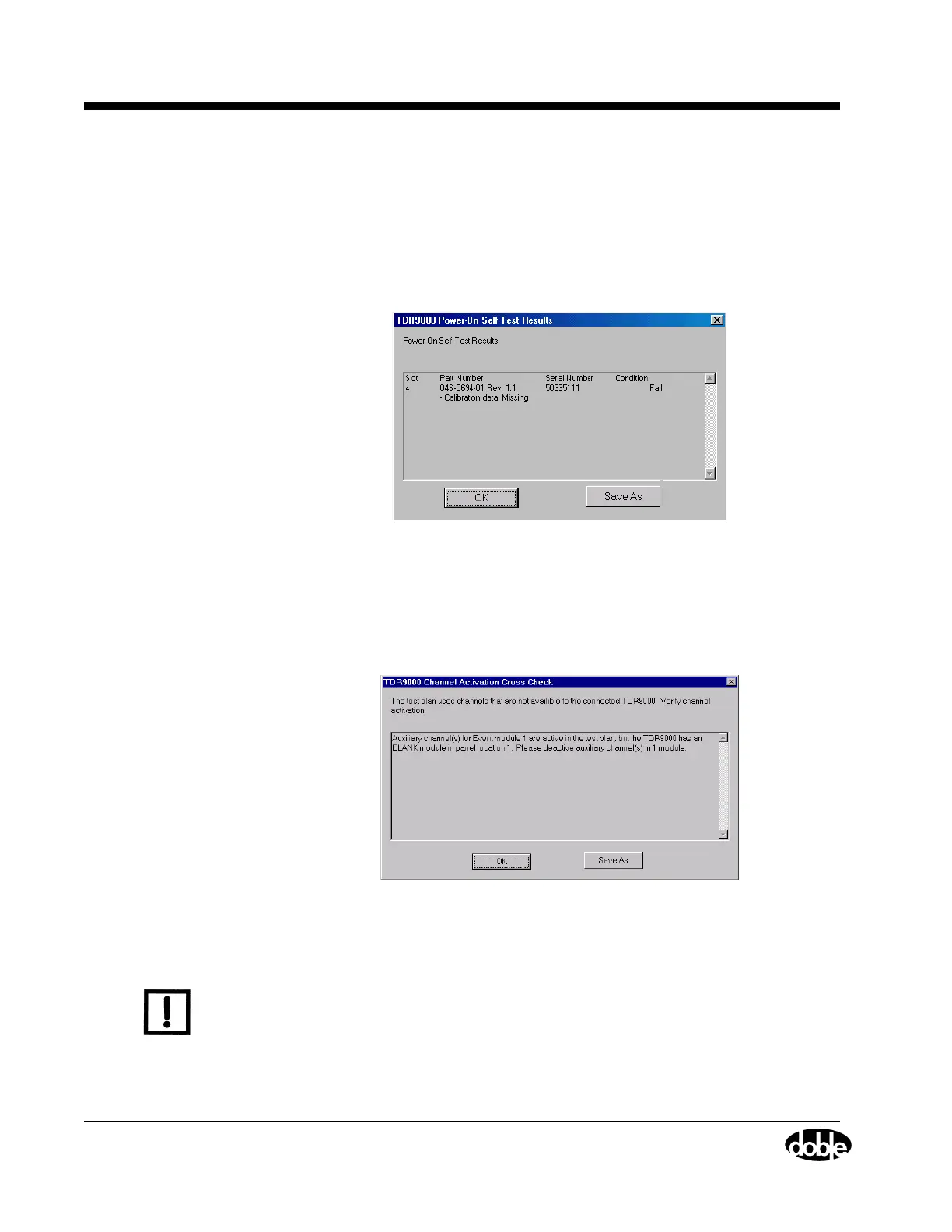
The TDR9000 performs power up diagnostics. If an error is detected,
a dialog box containing diagnostic results is displayed, as shown in
Figure 4.17. The results contained in this dialog box are useful for
troubleshooting. If there is a problem, save the dialog box results to
a text file using the Save As button for Doble Customer Service
(email: customerservice@doble.com).
Figure 4.17 Power-Up Diagnostics
If the TRXField software detects that a channel designated for use is not
supported or that a Test Plan field is configured in a way that causes
conflicts with other configured items, a dialog window appears
(Figure 4.18).
Figure 4.18 Channel Activation Check
Use the Save As button to save the results to a text file and then click OK.
N
OTE
Using the Save As button does not solve the problem. The problem must
be resolved on the Test Plan, TDR9000 tab or in the equipment test
setup. If the problem is not resolved, Test Results may be affected, or
the test may not be allowed.


 To Next Page