154
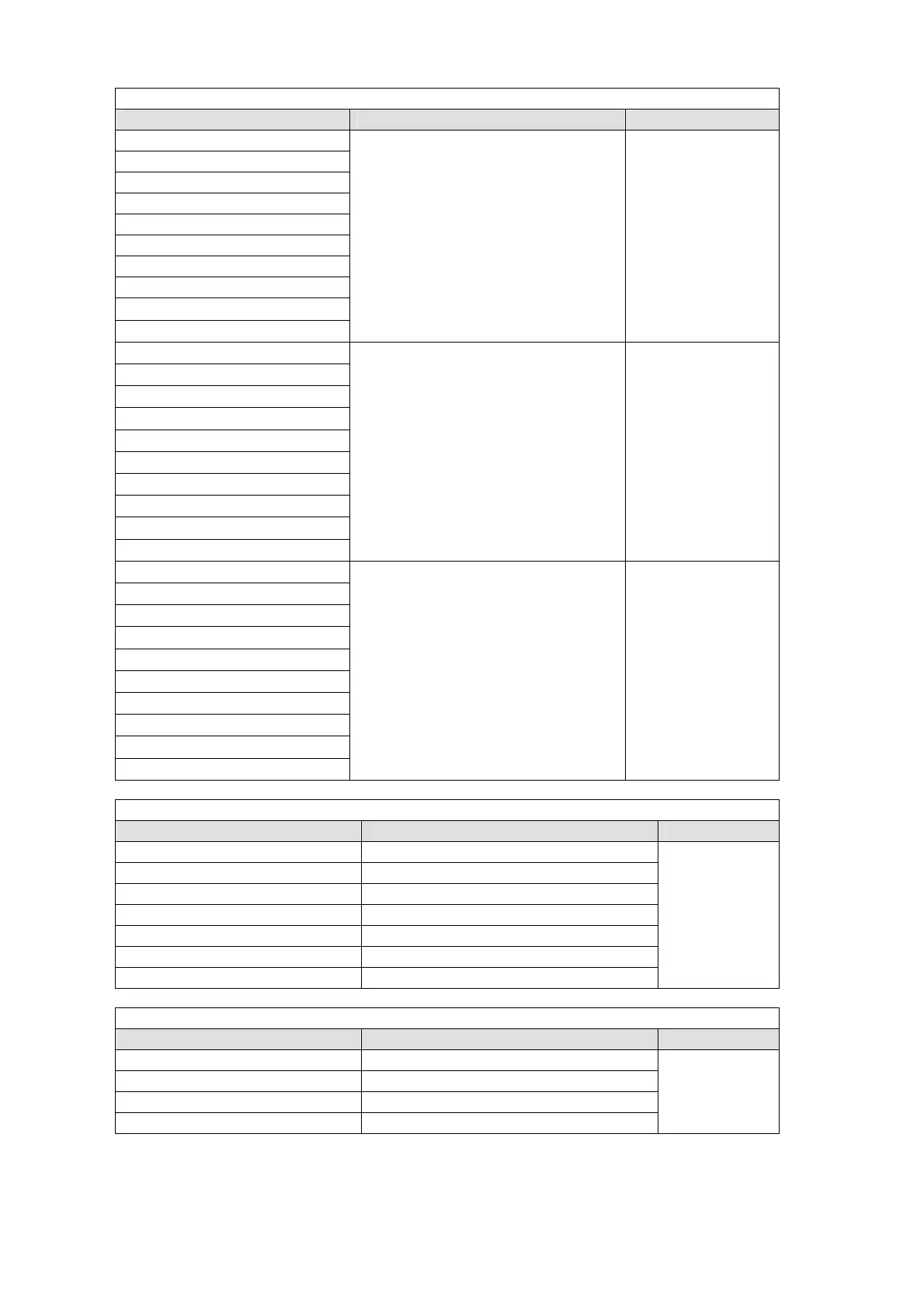
When USTRS (User Transition) is selected for TYPE:
Setting Function Button Indication
KEY1-2 SCALER
Performs the user transition for KEY.
On-Air: Lit orange,
Off-Air: Unlit
KEY1-2 MIX
KEY1-2 SLIDE LEFT
KEY1-2 SLIDE RIGHT
KEY1-2 SLIDE TOP
KEY1-2 SLIDE BOTTOM
KEY1-2 WIPE LEFT
KEY1-2 WIPE RIGHT
KEY1-2 WIPE TOP
KEY1-2 WIPE BOTTOM
DSK1-4 SCALER
Performs the user transition for DSK.
On-Air: Lit orange,
Off-Air: Unlit
DSK1-4 MIX
DSK1-4 SLIDE LEFT
DSK1-4 SLIDE RIGHT
DSK1-4 SLIDE TOP
DSK1-4 SLIDE BOTTOM
DSK1-4 WIPE LEFT
DSK1-4 WIPE RIGHT
DSK1-4 WIPE TOP
DSK1-4 WIPE BOTTOM
PINP1-2 SCALER
Performs the user transition for PinP1.
On-Air: Lit orange,
Off-Air: Unlit
PINP1-2 MIX
PINP1-2 SLIDE LEFT
PINP1-2 SLIDE RIGHT
PINP1-2 SLIDE TOP
PINP1-2 SLIDE BOTTOM
PINP1-2 WIPE LEFT
PINP1-2 WIPE RIGHT
PINP1-2 WIPE TOP
PINP1-2 WIPE BOTTOM
When KEYER is selected for TYPE:
Setting Function Button Indication
KEY 1-2 2D DVE ENABLE Sets 2D DVE On/Off.
ON: Lit orange,
OFF: Unlit
KEY 1-2 BOX MASK AND ENABLE Sets AND type BOX MASK On/Off.
KEY 1-2 BOX MASK OR ENABLE Sets OR type BOX MASK On/Off.
KEY 1-2 EDGE NORMAL ENABLE Sets Normal Edge On/Off.
KEY 1-2 EDGE OUTLINE ENABLE Sets Outline Edge On/Off.
KEY 1-2 FIELD FREEZE ENABLE Sets Field Freeze On/Off.
KEY 1-2 FRAME FREEZE ENABLE Sets Frame Freeze On/Off.
When DSK is selected for TYPE:
Setting Function Button Indication
DSK 1-4 2D DVE ENABLE Sets 2D DVE On/Off.
ON: Lit orange,
OFF: Unlit
DSK 1-4 BOX MASK AND ENABLE Sets AND type BOX MASK On/Off.
DSK 1-4 FIELD FREEZE ENABLE Sets OR type BOX MASK On/Off.
DSK 1-4 FRAME FREEZE ENABLE Sets Normal Edge On/Off.



 To Next Page