195
30. Status Information
The STATUS menu indicates the current status of the cooling fan, power and genlock and the
versions of hardware and software.
30-1. Checking Alarm Status
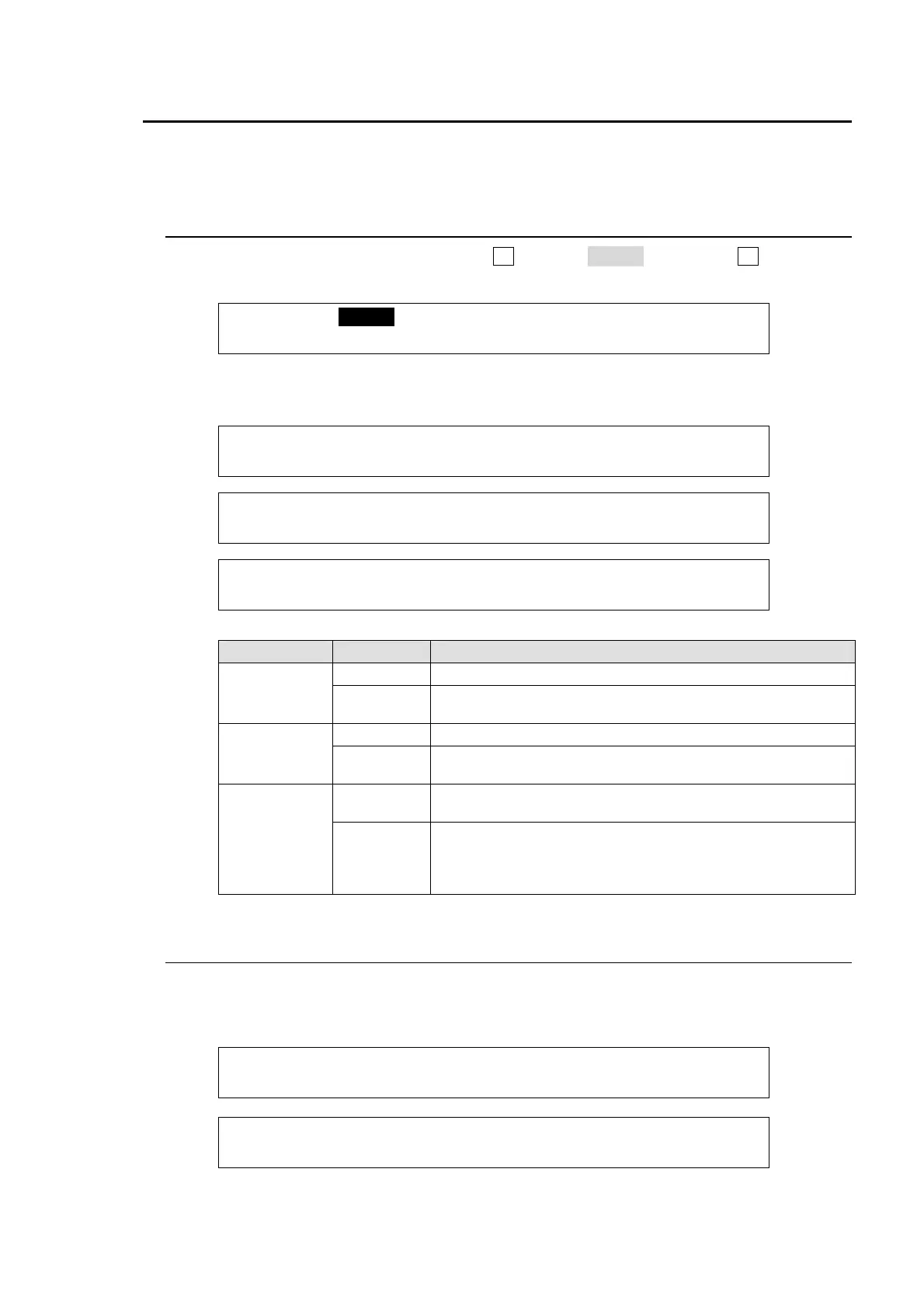
(1) Open the [SETUP-STATUS] menu. Turn F1 to select ALARM, then press F1 or the page
down button to display the submenu.
SETUP :>ALARM >VERSION >OPTION
STATUS :
(2) The STATUS submenus display the current status of the cooling fan, power and genlock as
shown below.
STATUS :FAN1:NOR 2:NOR 3:NOR : 1/3
MU ALARM: PS1:NOR 2:NOR :
STATUS : GENLOCK:External Lock : 2/3
MU ALARM: :
STATUS : PS1:NOR 2:NOR : 3/3
OU ALARM: :
Item Display Description
FAN1 - FAN3
NOR Indicates that FAN works properly.
ERR
Indicates that FAN has failed. Power off the switcher and
consult your FOR-A reseller.
PS1, PS2
NOR Indicates that POWER works properly.
ERR
Indicates that POWER has failed. Power off the switcher
and consult your FOR-A reseller.
GENLOCK
External
Lock
Indicates that a valid reference signal is present and video
signals are properly locked to the reference signal.
Internal
Lock
Indicates that the internal reference is being used.
In this case, a reference signal is not present, its level is too
low. or a reference signal with a different format from the
switcher is present.
30-2. Verifying Versions
To verify the version of software and FPGA firmware installed in the HVS-350HS, open the
[SETUP-STATUS-VERSION] menu. Before upgrading the switcher, be sure to check the
relevant version in this menu.
STATUS :SOFT MU:v1.00.0 OU:v1.00.0 : 1/5
VERSION : RU1:v1.00.0 RU2:v1.00.0 :
STATUS :FPGA CNFG:v01-00 CPU :v01-00 : 2/5
VERSION :(MU) SDI1:v01-00 SDI2:v01-00 :



 To Next Page