19
3-5. System Signal Format Selection at Initial Use
When first switching on your unit, please select a signal format as shown below.
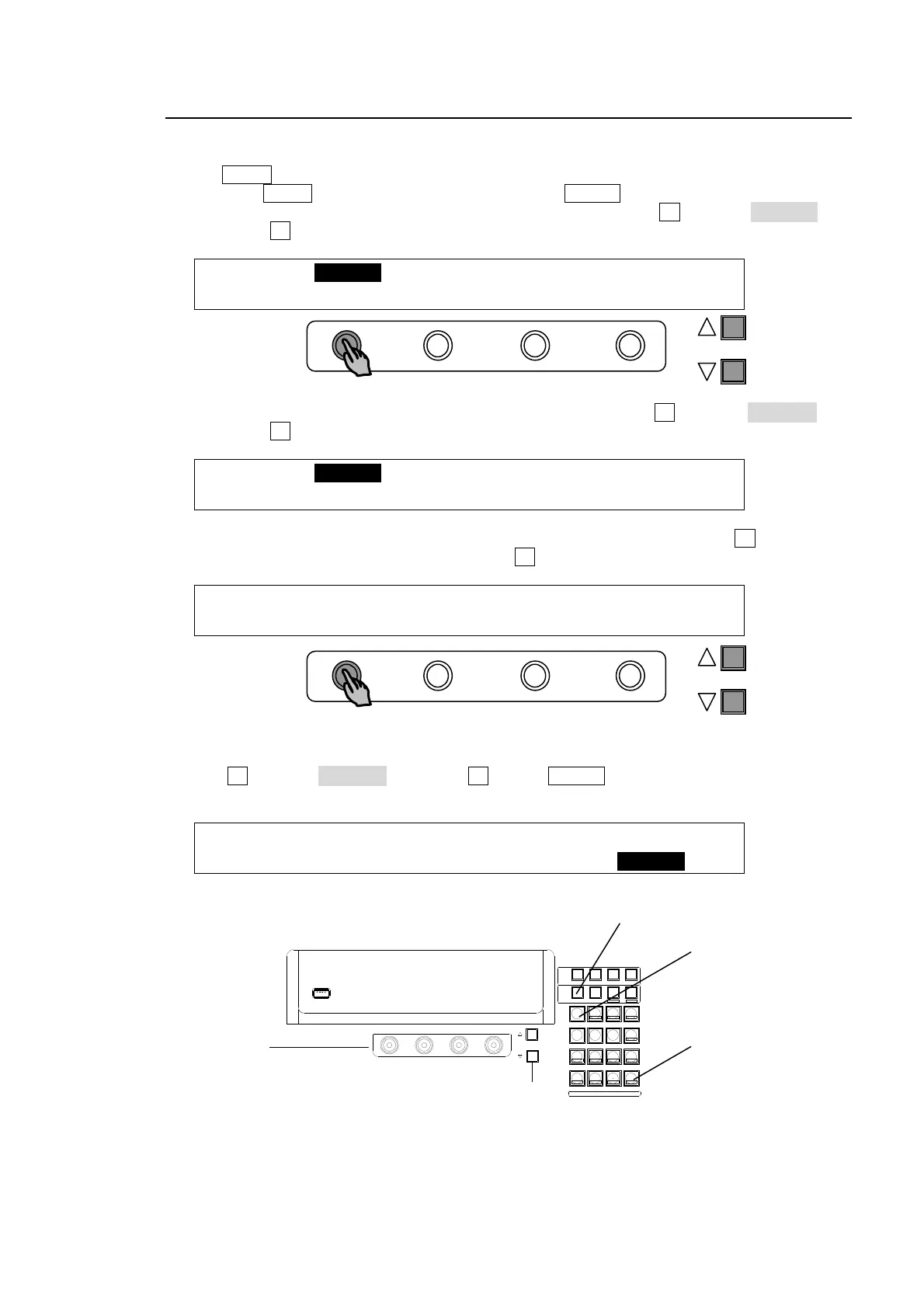
(1) The MENU control button at the right of the menu display should light up at power ON.
(2) Press the MENU control button and then press the SETUP button.
(3) The SETUP menu's top page appears in the menu display. Turn F1 to select SYSTEM and
then press F1.
SETUP :>SYSTEM >INPUT >OUTPUT >PANEL
MENU :>GPI/TLY >FUNCTION>EXT I/F >STATUS
(4) The [SETUP - SYSTEM] menu as shown below appears. Turn F1 to select FORMAT and
then press F1.
SETUP :>FORMAT >REF I/O >ARCNET >ETHERNET
SYSTEM :>TIME >INIT >REBOOT
(5) The [SETUP - SYSTEM - FORMAT] menu as shown below appears. Turn F1 to select the
signal format used in the switcher. Then turn F3 to select the aspect ratio.
SYSTEM : FORMAT :ASPECT :SW TMNG: 1/1
FORMAT : =1080/59.94i : =16:9 : =ANY :
(6) Press the page up button to return to the [SETUP - SYSTEM] menu.
(7) Turn F1 to select REBOOT and press F1. Press ENTER in the SELECT/KEYPAD block to
reboot the switcher
SETUP :>FORMAT >REF I/O >ARCNET >ETHERNET
SYSTEM :>RS-422 >TIME >INIT >REBOOT
(8) The selected format and aspect are applied after restarting the switcher.
PAGE
PAGE
USB MEMORY
F4
F3F2
F1
PAGE
SELECT / KEYPAD
MEMORY
CONTROL
WIPE
MENU
INC
DEC
+/-
PLAY
STOP
CLEAR
2D DVE
USER BUTTON
7
4
1
CUT
0
COPY
EVENT
COPY/SWAP
8
SWAPCOPY
5
RECALL
PASTE
SEQUENCE
SEQ EDIT
9
NEW
6
INS
3
ADD
STORE
ENTER
OVWR
SETUP STILL MATT FILE
KEY1 KEY2 P IN P1 P IN P2
DSK1 DSK2 DSK3 DSK4
WIPE
2
DEL
ENTER
MENU
SETUP
F1-F4
PAGE UP
PAGE DOWN



 To Next Page