169
24. VTR / VDCP Control
The switcher can control video tape or video disk recorders via RS-422 using the VTR or VDCP
protocol. Up to 4 channels are available. Connect a device to a desired RS-422 port, configure the
port and select a channel for VTR or VDCP following the procedures in this chapter.
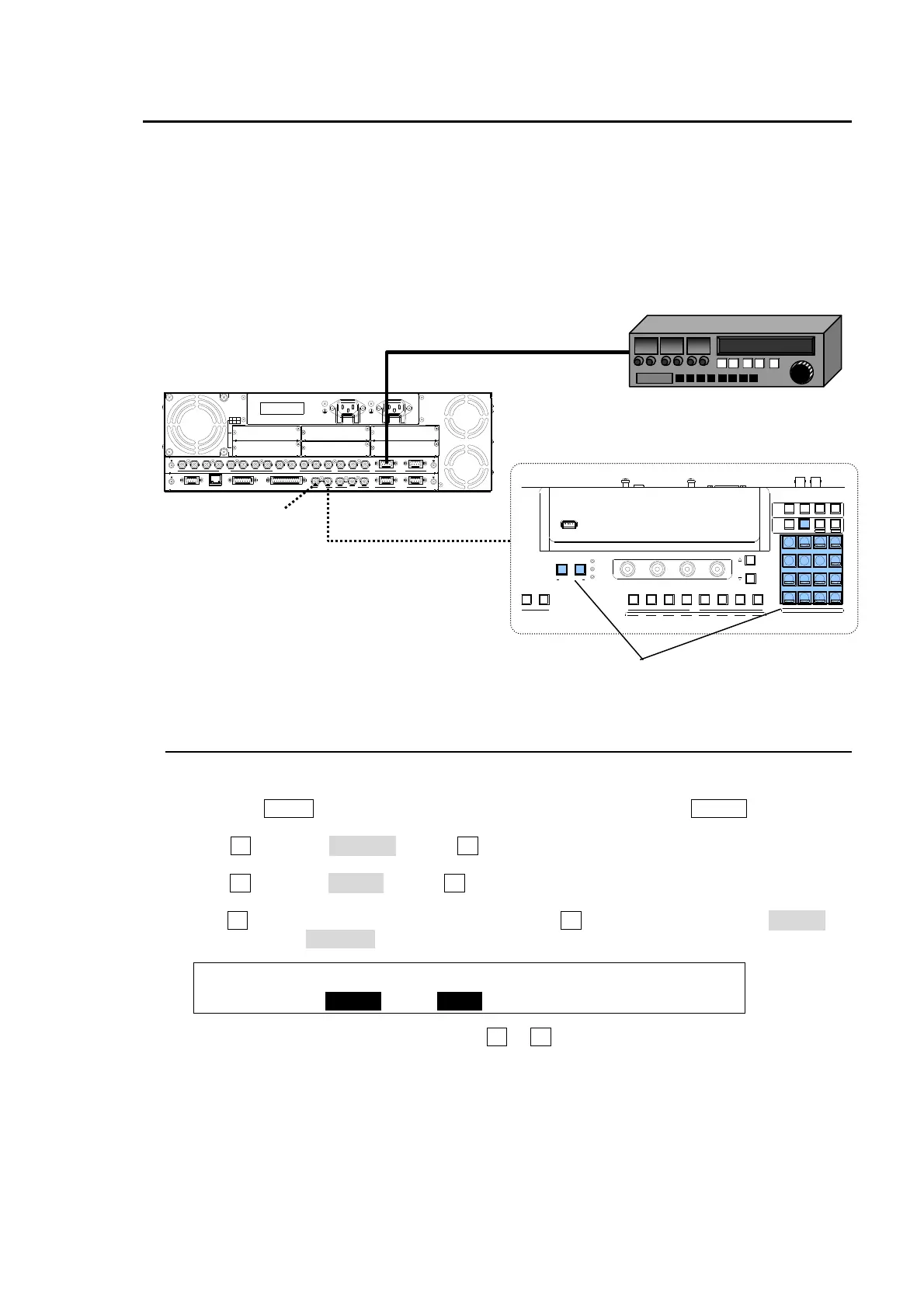
System Configuration Example
1) Connect HVS-350HS to a VTR using an RS-422 port and configure the port. (See section 22-1.)
2) Assign a VTR channel to the RS-422 port. (See section 22-2.)
3) Control the VTR using the VTR/VDCP menu (see section 22-3) or using USER buttons (see
section 22-4).
24-1. Assigning a VTR or VDCP Channel to an RS-422 Port
At first assign a VTR or VDCP channel to an RS-422 port as shown below.
(1) Press the MENU control button above the KEYPAD, and then press SETUP to display the
[SETUP] top menu.
(2) Turn F1 to select SYSTEM. Press F1 or the page down button to go to the [SETUP -
SYSTEM] menu.
(3) Turn F1 to select RS-422. Press F1 or the page down button to display the [SETUP –
SYSTEM- RS-422] menu.
(4) Turn F1 to select a desired RS-422 port. Then turn F2 to select a VTR channel (VTR1-4) or
VDCP channel (VDCP1-4).
SYSTEM :SELECT :FUNC :BAUD :PARITY : 1/1
RS-422 : =PORT1 : =VTR1: =38400: =ODD :
(5) Change BAUDRATE and PARITY using F3 or F4, if needed.
RATING LABEL
DB
ECA
OPTION SLOT
F
I
/O
4
3
2
1
S
D
I
IN
P
U
T
6
7
8
5
A
U
X
2
R
S
-
4
2
2
1
P
G
M
P
G
M
M
/E
P
/
P
4
1
2
3
5
6
C
P
U
/
G
E
N
L
O
C
K
T
O
O
U
G
E
N
L
O
C
K
R
E
F
I
N
R
E
F
O
U
T
G
P
I I
N
E
D
IT
O
R
G
P
I/
T
A
L
L
Y
O
U
T
4
R
S
-
4
2
2
3
21
A
C
1
0
0
V
-
2
4
0
V
5
0
/
6
0
H
z
I
N
A
C
1
0
0
-
2
4
0
V
5
0
/6
0
H
z
I
N
L
A
N
HVS-350HS
USB ME MO RY
AUX
2345678134
12
USER BUTT ON
ALARM
POW ER1
POW ER2
F4
F3F2F1
PAGE
SELECT / KEYPAD
MEMORY
CONTRO L
WIPE
MENU
INC
DEC
+/-
PLAY
STOP
CLEAR
2D DVE
USER BUTTON
7
4
1
CUT
0
COPY
EVENT
COPY/SW AP
8
SWAPCOPY
5
RECA LL
PASTE
SEQUENCE
SEQ EDIT
9
NEW
6
INS
3
ADD
STORE
ENTER
OVW R
SETUP ST ILL MATT FILE
KEY1 KE Y2 P I N P1 P IN P2
DSK1 DSK2 DSK 3 D SK4
WIPE
2
DEL
HVS-350OU
RS-422
VTR
Controlling VTR using
the VTR/VDCP menu.
Controlling VTR using user buttons
75Ωtermination



 To Next Page