192
29-3. Image Data Transfer
The HVS-350HS series can send and receive image data used for stills and video clip through
an Ethernet. The FTP protocol is used for
transferring files between the switcher and the computer.
The main unit works as an FTP server.
29-3-1. Setup Before Connection
PC Requirements
An Ethernet port (100BASE-TX/1000BASE-T) and a browser (Internet Explorer 6.0 or
higher) are required for the personal computer. Any type of computer or OS can be used. In
this section a WindowsXP or 7-installed PC is used as an example.
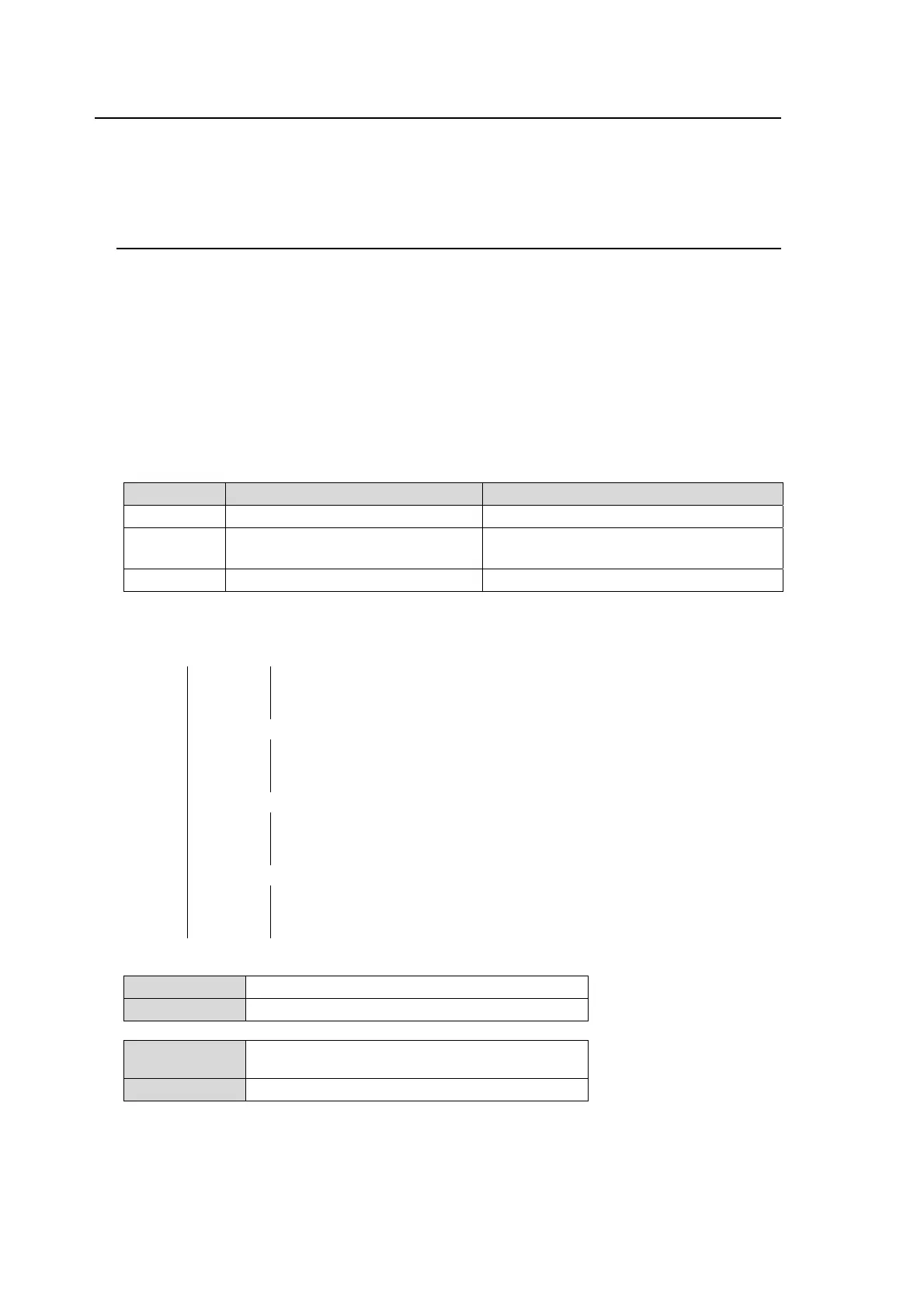
Available Image files
Image File Format: JPEG, TARGA and BITMAP (See the table below.)
Image Size: Less than 1920x1080 [pixels]
File Name Format: (any file name).jpg, (any file name).tga and (any file name).bmp
Use the three-letter extension after the period. Any length of any
characters can be used for file names.
File Format Description Limitation (unavailable data)
JPG JPEG Compression data Grey-scale image data
TGA TARGA data
RLE compression data
Data with Alpha channel (*1)
BMP BITMAP data RLE compression data
(*1) TGA with alpha channel files are available in CPU FPGA version 02-00 or later.
Still Directory Structure in the Main Unit
(Root)― +(still1)―
still.jpg
still.tga
still.bmp
Used for saving STILL1 images in JPEG, TGA and BMP
format. To send an image file to the switcher, specify this
directory.
+(still2)―
still.jpg
still.tga
still.bmp
Used for saving STILL2 images in JPEG, TGA and BMP
format. To send an image file to the switcher, specify this
directory.
+(still3)―
still.jpg
still.tga
still.bmp
Used for saving STILL3 images in JPEG, TGA and BMP
format. To send an image file to the switcher, specify this
directory.
+(still4)―
still.jpg
still.tga
still.bmp
Used for saving STILL4 images in JPEG, TGA and BMP
format. To send an image file to the switcher, specify this
directory.
Network Setting
IP Address 192. 168.0.10 (default)
Main unit
Subnet mask 255. 255. 255.0(default)
IP Address 192. 168.0.1 to 192. 168.0.254
(Do not set the same IP as the main unit)
Computer
Subnet mask 255. 255. 255.0
Refer to the procedure below to open the setting dialog and change the computer network
settings, if necessary.


 To Next Page