64
8-9-2. Setting the AUTO Button Function
In the factory default setting, the function of the AUTO buttons is set to CUT.
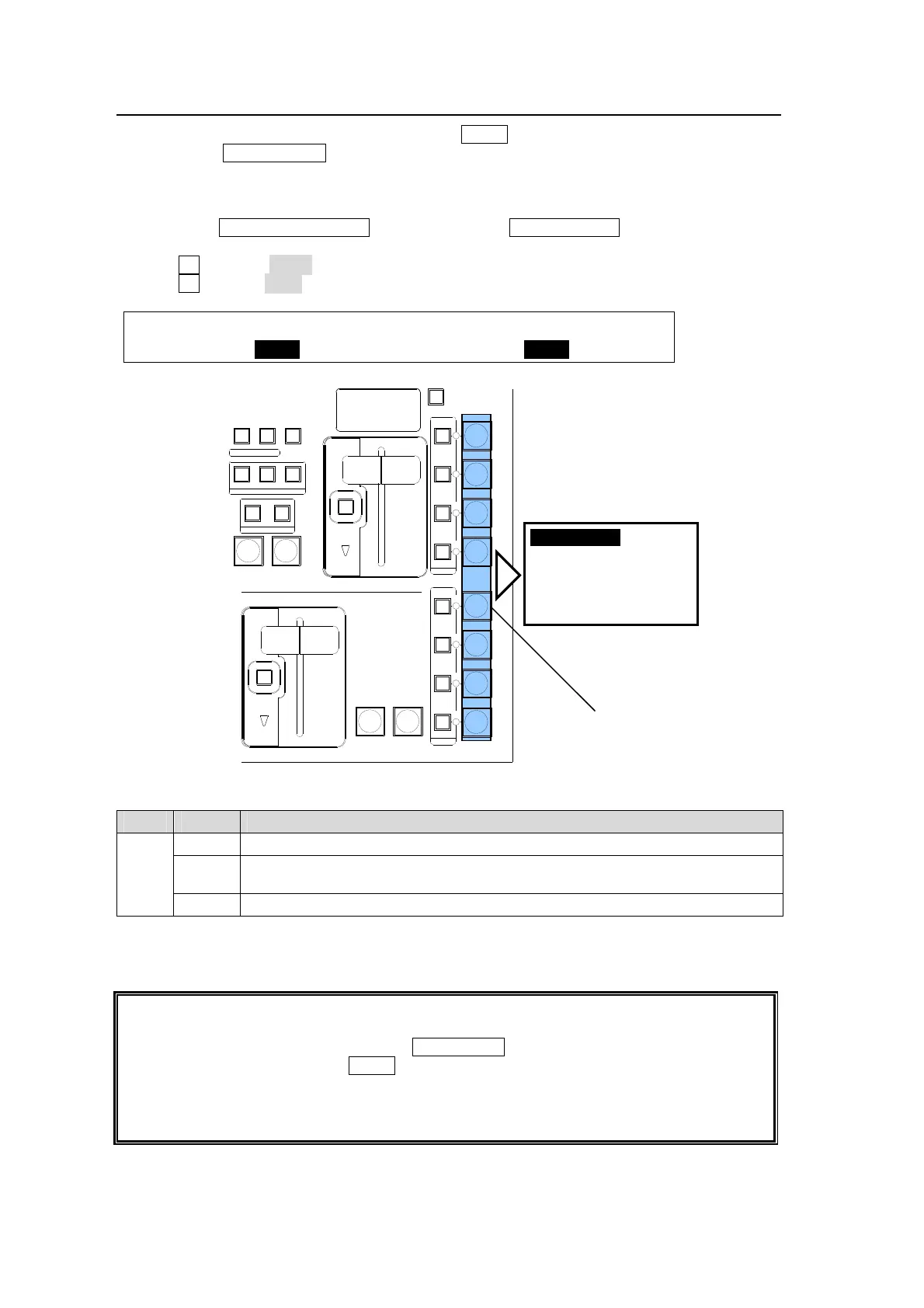
To change the DSK1 ON AIR button function so that the CUT transitions can be performed by
briefly pressing the button and the AUTO (MIX) transitions cab be performed by pressing and
holding down the button, proceed as follows:
(1) Press the TRANSITION RATE button above the PinP1 ON AIR button to display the
[TRANS] menu.
(2) Turn F1 to select DSK1 at SELECT.
(3) Turn F4to select C/AT.
TRANS :SELECT : USER TRANS :ADV CTL: 4/6
USER/ADV: =DSK1 : =CUT : =C/AT :
AUTO Button Setting
Item Setting Description
ADV
CTL
AUTO Always performs MIX transitions regardless of how long the button is pressed.
C/AT
Performs Cut transitions when button is briefly pressed.
Performs MIX transitions when button is pressed and held down.
OFF Disables the button function.
The transition time for MIX transitions can be set under RATE in the [TRANS] (1/6)-(3/6)
menus. See section 8-10-2. "Transition Rate" for details.
Users can perform KEY1 and KEY 2 transitions in the NEXT TRANSITION block in the
same way as those for the M/E background. Therefore, if KEY1 is set up to MIX or WIPE in
the NEXT TRANSITION block, pressing KEY1 AUTO performs the MIX or WIPE transition
in the same way as that for the AUTO button in the NEXT TRANSITION.
The DVE lamps for KEY1 and KEY2 light up red to indicate that the key uses a DVE
pattern. This is useful for checking the currently used DVE channels, because only two
DVE channels can be used at the same time.
Buttons turn on while On-Air.
(Light color varies by output bus)
Buttons turn off while Off-Air.
AUTO CUT
AUTO CUT
DSK 2
DSK 1
DVE
DVE
DVE
DVE
DVE
DVE
FADER LIMIT
FADER LIMIT
DIRECTION
ON AIR
P IN P
1
P IN P
2
KEY 1
KEY 2
DSK 3
DSK 4
ON AIR
REV
BKGD
NOR/REV
KEY1
NEXT TRANSITION
TRANSITION TYPE
PATTERN
KEY2
WIPEMIX
TRANSITION
RATE
UTO button
OFF
MIX (default)
CUT (press)
MIX (press and hold)



 To Next Page