80
10-4. KEY INSERT AUX
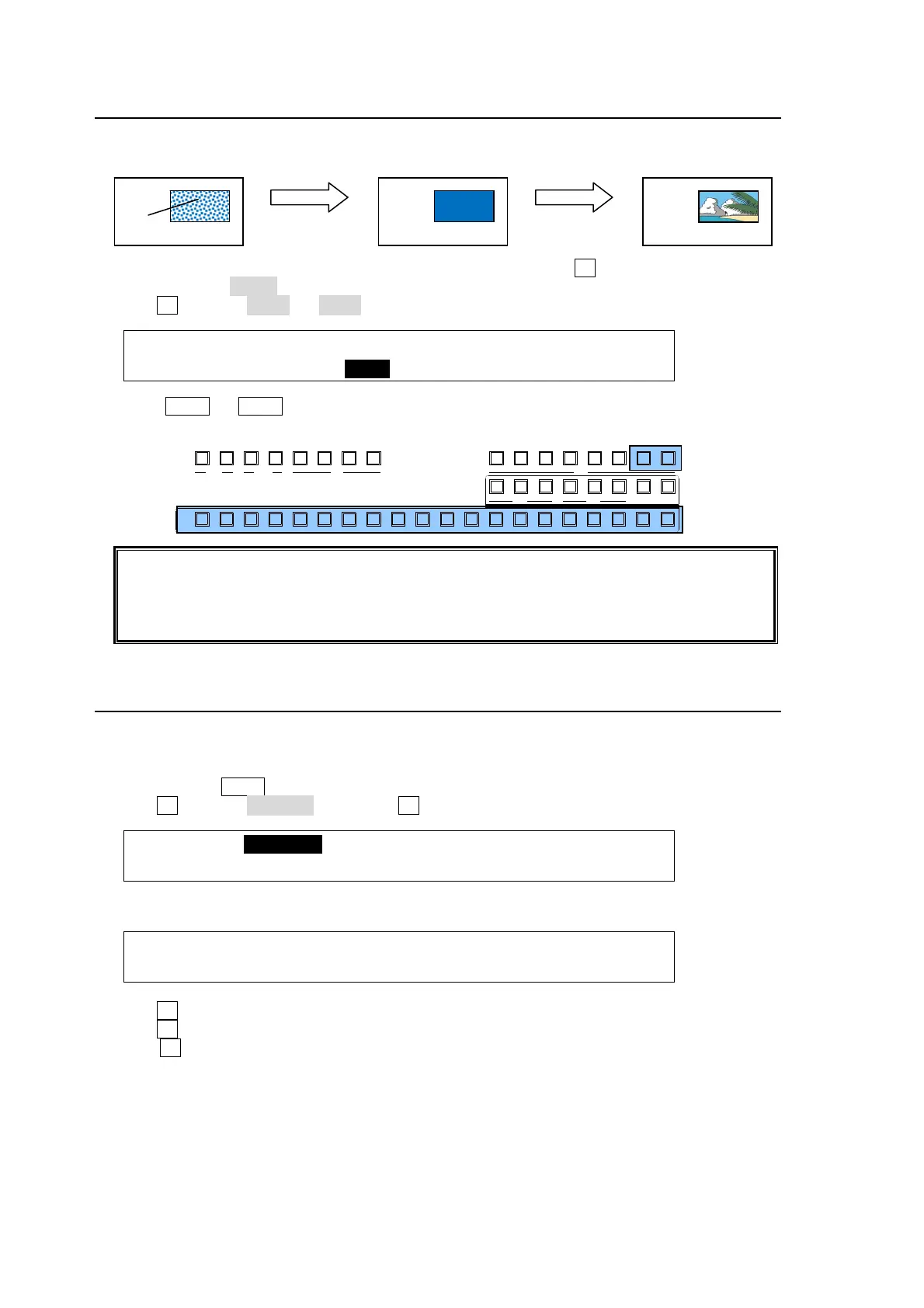
The KEY INSERT AUX allow users to replace key fill images using the AUX7 or AUX8 bus,
changing only inside images while maintaining key shapes.
(1) Set up a bus referring to Section "10-3. Bus Key". Then press F2 in the [KEY1 - INS/SRC]
menu to select InMAT (insert matt) under INSERT.
(2) Turn F2 to select AUX7 (or AUX8).
KEY1 : TYPE :INSERT :SOURCE :INVERT : 1/3
INS/SRC : =BUS : >AUX7 : =IN02 : =OFF :
(3) Press AUX7 (or AUX8) in the BUS SELECT section.
(4) Select a video signal for the key fill on the KEY/AUX bus.
Note that if an internally generated signal such as program, preview clean or multi-view
(stills and matts are available) is selected for AUX7 or 8, key images will appear black. KEY
LINK is not available when using AUX7 or 8.
The KEY INSERT AUX function can be applied to bus-, full- and chroma-keys.
10-5. Adjusting the Key Signal
Clip and Gain allows users to adjust the key signal and its composition over the background.
The transparency of the KEY can also be adjusted.
(1) Quickly press KEY1 twice in BUS SELECT, and display the [KEY1 SETUP] menu.
(2) Turn F1 to select INS/SRC, and press F1 or the page down button.
KEY1 :>INS/SRC >EDGE >MASK >CK
SETUP :>POS/SIZ >BORDER >SUB EFF >INIT
(3) The [KEY1- INS/SRC] menu is displayed. Press the page down button to go to PAGE2.
KEY1 : GAIN : CLIP :TRANSP :FAM : 2/3
PROC AMP: =1.0 : =6.2 : =0.0 : =OFF :
(4) Turn F1 to adjust GAIN
(5) Turn F2 to adjust CLIP for adjusting the key.
(6) Turn F3 to set the transparency of the key. Increasing the value makes the key more
transparent.
AUX
PREV M V1CLEAN MV2
2345 67891011121
KEY/AUX
PGMPREV CLEANPGM
M/E
2345 6781
P/P
DSK
2341
KEYER
212
P IN P
1
13 14 15 16 17 18 19 20
Change KEY INSERT
to AUX7.
Change the AUX7
image.
KEY
ON



 To Next Page