4
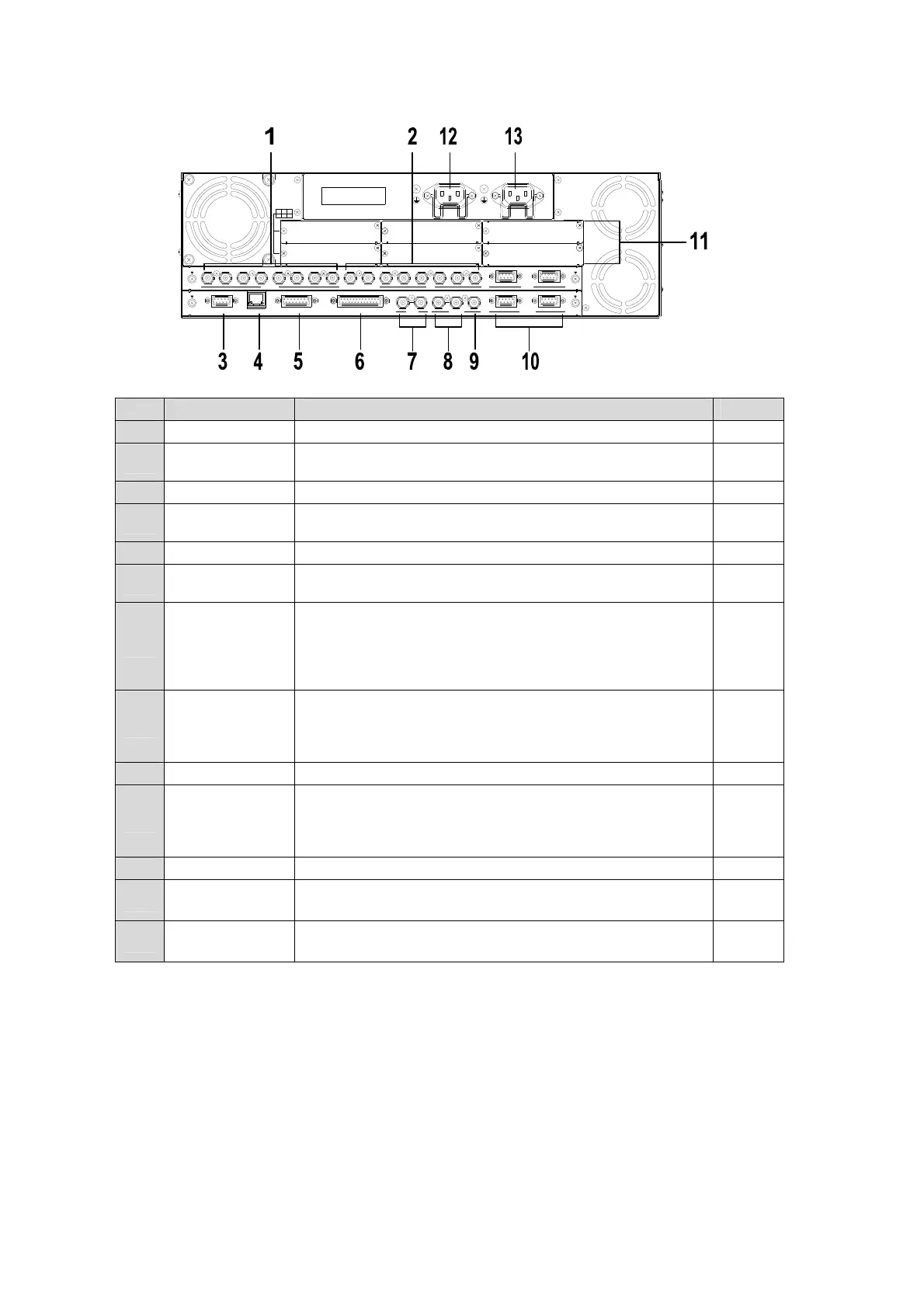
Rear Panel
No. Name Description Refer to
1 SDI INPUT Used to input HD/SD SDI video signal. 8 inputs (BNC) 5
2 SDI OUTPUT
Used to output HD/SD SDI video signal. 8 outputs (M/E
PGM, P/P PGM and 6 auxiliary outputs) (BNC)
6
3 EDITOR Used for editor connection. (9-pin D-sub, female) 20-3
4 LAN
Used for 100BASE-TX/1000BASE-T Ethernet connection.
(RJ-45)
2-4-1
5 GPI IN Used for GPI input. (15-pin D-sub, female) 2-4-3
6 GPI/TALLY OUT
Used for GPI output and Tally output. (25-pin D-sub,
female)
2-4-3
7 TO OU
Used for HVS-35OU/35ROU connection via Arcnet. It can
also be used to connect the Hanabi AUX control boxes.
(BNC)
One of two terminals is used for loop-through connection. It
must be 75-ohm terminated if not looped-through.
2-3
8 REF IN
Used to input a genlock signal; tri-level sync or black burst.
(BNC)
The center terminal is used for loopthrough connection. It
must be 75-ohm terminated if not looped-through.
3
9 REF OUT Used to output a reference signal 3
10 RS-422
4 ports (9-pin D-sub, female)
Used to connect external devices such as Hanabi tally
units, HVS-30RU, VTR/VDCP devices, routers and audio
mixers.
2-4-2
11 Option Slots Used to install optional input/output expansion cards. 3
12 AC IN1
Power 1 connection with ground terminal
(AC100V-240V 50/60 Hz)
13 AC IN2
Power 2 connection with ground terminal
(AC100V-240V 50/60 Hz)
RATING LABEL
DB
ECA
OPTION SLOT
F
I
/O
4
3
2
1
S
D
I
I
N
P
U
T
6
7
8
5
A
U
X
2
R
S
-
4
2
2
1
P
G
M
P
G
M
M
/E
P
/
P
4
1
2
3
5
6
C
P
U
/
G
E
N
L
O
C
K
T
O
O
U
G
E
N
L
O
C
K
R
E
F
I
N
R
E
F
O
U
T
G
P
I
I
N
E
D
IT
O
R
G
P
I/
T
A
L
L
Y
O
U
T
4
R
S
-
4
2
2
3
21
A
C
1
0
0
V
-
2
4
0
V
5
0
/
6
0
H
z
I
N
A
C
1
0
0
-
2
4
0
V
5
0
/
6
0
H
z
I
N
L
A
N



 To Next Page