101
Open Correction
Correction range limitation function (to shorten the correction time)
In All correction, correction is performed for the entire frequency range. By setting the minimum and
maximum correction frequencies with this function, you can reduce the time required to perform the
correction process. The DC on/off setting as well as the correction minimum and maximum fre-
quency settings apply to both open and short correction.
For more information about the sequence of screens until the AREA key is displayed, see "All cor-
rection" (p. 100), and (p. 106).
1
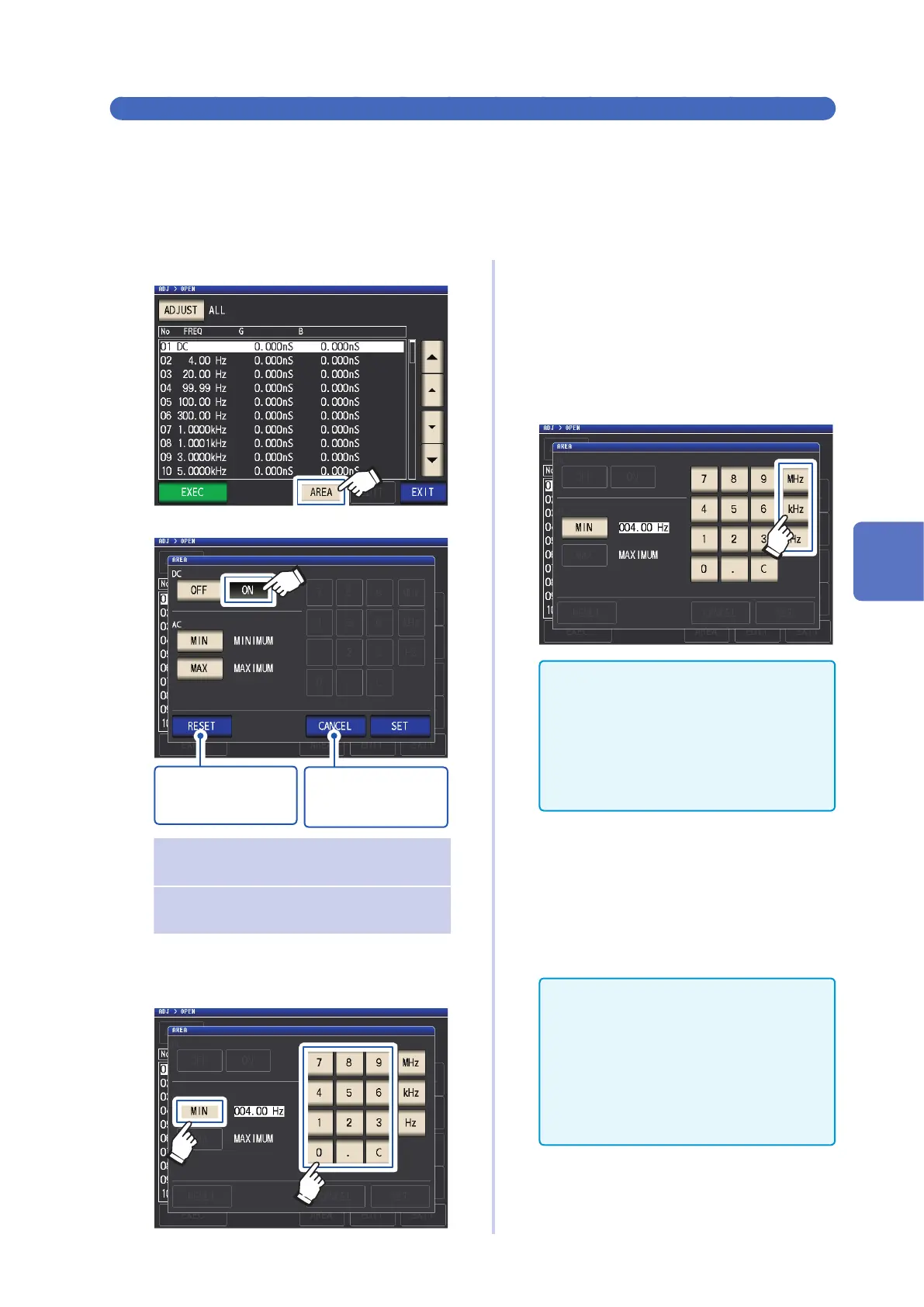
Touch the AREA key.
2
Select DC correction.
Touch when you wish
to cancel the congu-
ration process.
Touch when you wish
to revert the settings
to their default values.
ON Performs correction for AC measure-
ment and DC measurement.
OFF Performs correction for AC measure-
ment only.
3
Touch the MIN key and enter the correc-
tion minimum frequency with the nu-
meric keypad.
1
2
Settable range: 4 Hz to 8 MHz
(default setting: 4 Hz)
If you make a mistake, touch the C key to
reenter the value.
Touch the MIN key to return to the previous
screen without changing the settings.
4
Press a unit key to conrm the setting.
• The frequency is not conrmed until a unit
key is pressed.
• If you attempt to set a measurement fre-
quency greater than 8 MHz, it will automati-
cally be reduced to 8 MHz.
• If you attempt to set a measurement fre-
quency lower than 4 Hz, it will automatically
be increased to 4 Hz.
The display will return to the screen shown
in step 2.
5
Touch the MAX key and enter the cor-
rection maximum frequency with the
numeric keypad.
Settable range: 4 Hz to 8 MHz
(default setting: 8 MHz
)
x
Correction cannot be performed if limits are
applied using a range that exceeds the maxi-
mum valid frequency setting (see p. 215) for
each cable length. Correction will be per-
formed up to the maximum valid frequency
setting for the set cable length if limits are
applied using a range that exceeds the maxi-
mum valid frequency setting (see p. 215) for
each cable length.
5
Error Correction



 To Next Page