L-INX User Manual 192 LOYTEC
Version 4.0 LOYTEC electronics GmbH
channel members must be configured with the same multi-cast address and use the same
client port (1628 is recommended). Also note, that multi-cast addresses cannot be routed on
the Internet. They can only be used in a LAN or VPN environment.
If you configure multi-cast, there may be some devices, which do not support this feature. In
this case, the device uses a hybrid scheme and sends unicast to those devices, which are not
configured for multi-cast. Note, that the device determines automatically, when to switch to
the multi-cast mode depending on what types of devices are in the channel and on the traffic
burden for those devices. As a rule of thumb, multi-cast is used when there are only
switches/repeaters in the channel and it is not used when there are only configured routers.
To detect if the device utilizes the multi-cast feature, contact the Extended CEA-852 device
statistics in the statistics menu (Section 4.2.15). The entry ―Channel Routing Mode‖ reads
SL (send list) if packets are routed to the multi-cast group. It reads CR (channel routing) if
the normal unicast method is employed. Also the entry ―Multi-cast packets sent‖ in the
CEA-852 device statistics menu (Section 4.2.15) counts the number of multicast packets
transmitted to the group. If this item remains zero, no multi-cast is used by the device.
7.5 Remote LPA Operation
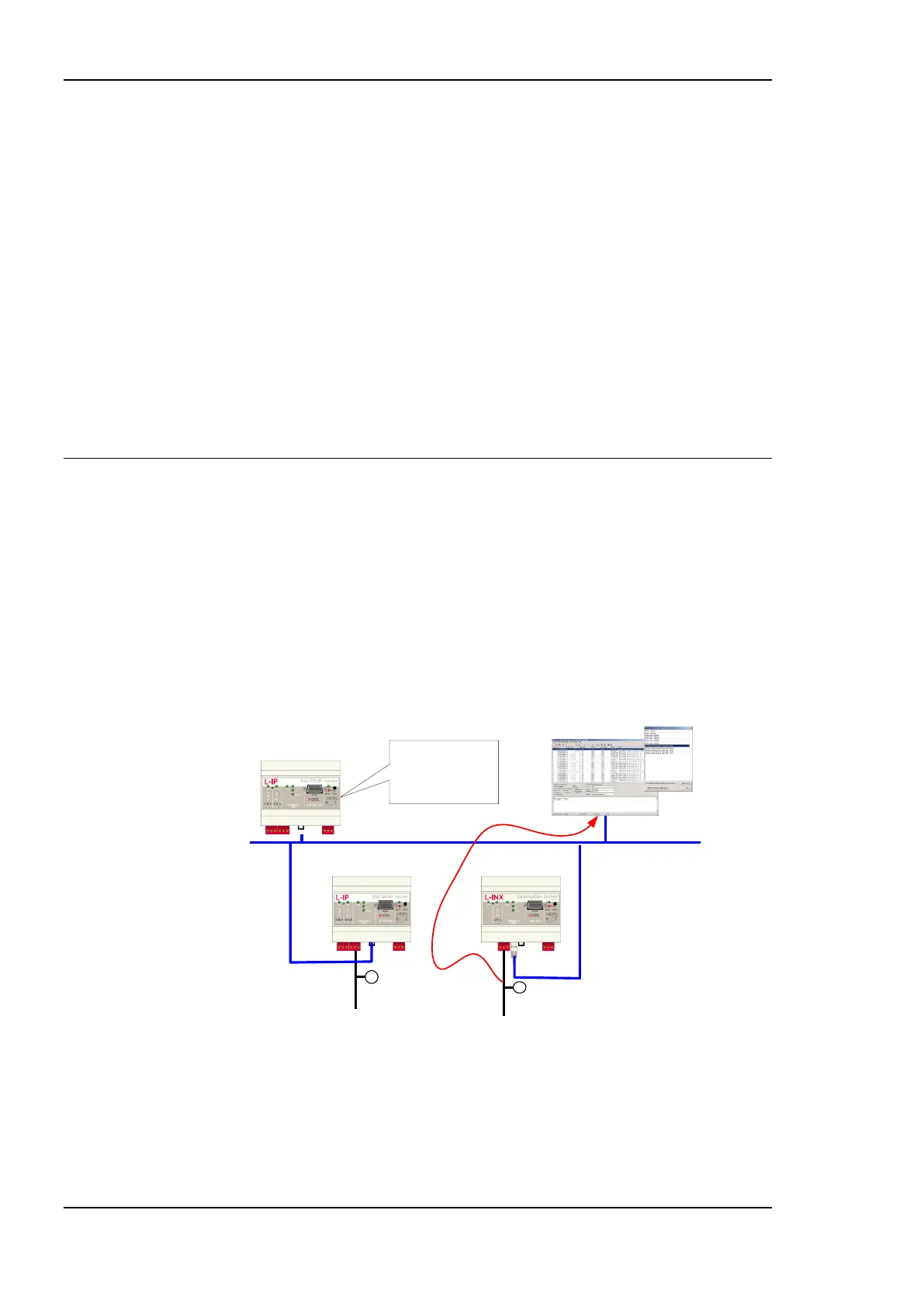
The L-INX supports remote LPA access. This means that a CEA-709 protocol analyzer
connected to the Ethernet network can connect to the L-INX and record all packets on the
CEA-709 channel (FT-10). Our LPA-IP supports this sophisticated feature. The
functionality is shown in Figure 156.
The LPA-IP runs on a Windows PC that is connected to the Ethernet network. In a
LINX-101 device selection window, one can e.g. select the L-INX with IP address
192.168.1.210 and display all packets on the FT-10 channel connected to the L-INX with IP
address 192.168.1.210. For this operation, the LPA-IP does not need to be a member of the
IP-852 channel. Note that this functionality is only available with L-INX Internet routers.
IP: 192.168.1.208
IP: 192.168.1.10
Configuration
Server for
IP-852 Channel
IP: 192.168.1.209
IP: 192.168.1.210
Ethernet
LPA-IP
Figure 156: Remote LPA principle.
7.5.1 Internet Timing Aspects
If the CEA-709 router is used over the Internet or in a large Intranet with unpredictable
network delays, the user should become familiar with the following advanced timing
aspects. Channel Timeout is set in the configuration server whereas escrowing and
aggregation are set in the CEA-852 client device. The Channel Delay is a channel property
of LNS and can be set in NL-220, LonMaker or other network management tools.



 To Next Page