L-INX User Manual 212 LOYTEC
Version 4.0 LOYTEC electronics GmbH
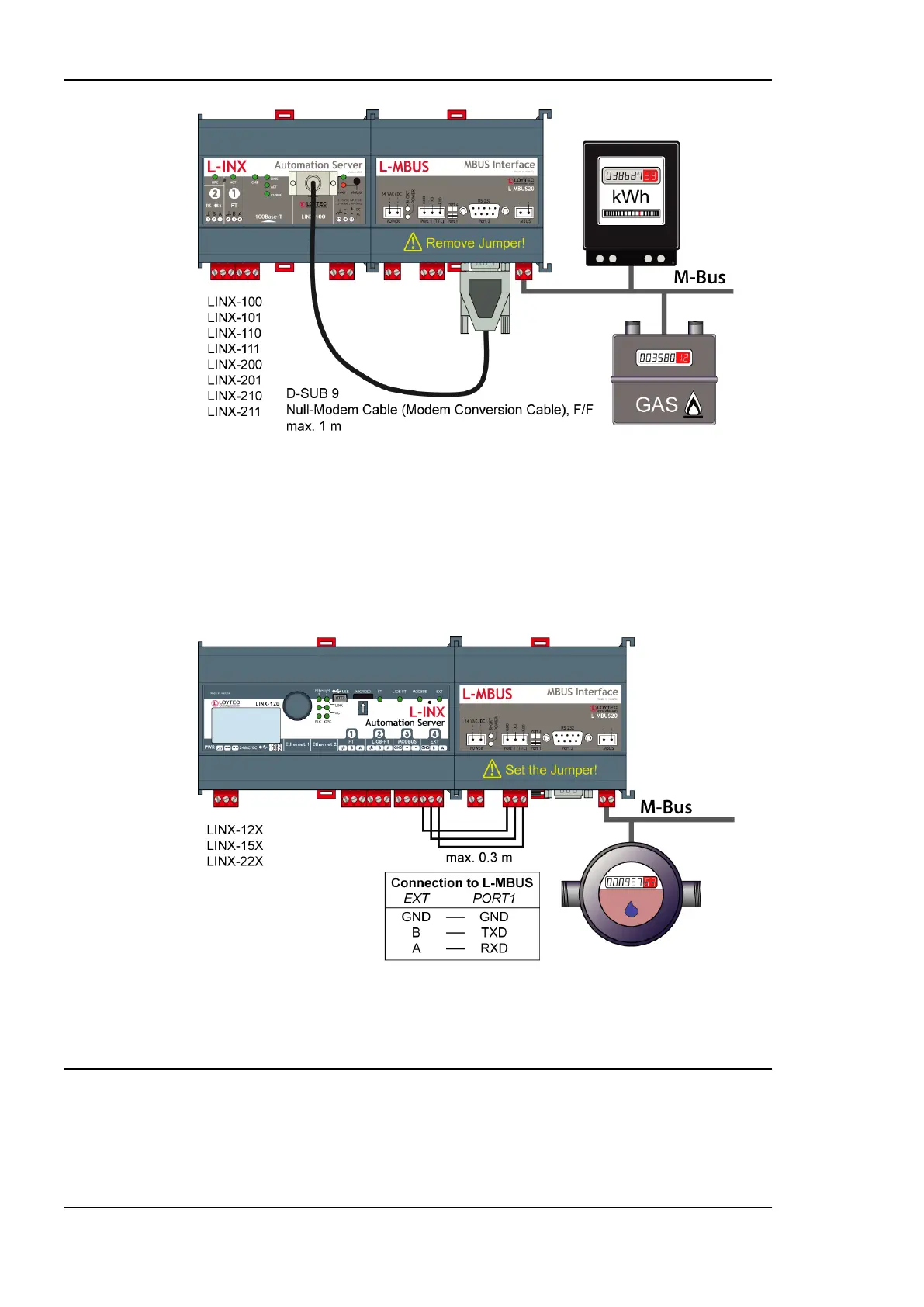
Figure 164: Connecting L-MBUS over console connector.
10.2.2 Extension Port
Devices that do not have a serial console connector provide an extension port marked EXT
on the device as shown in Figure 165. Those devices need to use the L-MBUS converter.
On the L-MBUS set the jumper as indicated on the front label. Follow the cabling
instructions of Figure 165 between the EXT port of the L-INX and the PORT1 on the
L-MBUS.
Figure 165: Connecting L-MBUS over the extension port.
10.3 M-Bus Network
The M-Bus network utilizes a two-wire connection. Several M-Bus slave devices are
connected in parallel to the transmission medium. Each M-bus device has a primary address
in the range from 0 to 250. This primary address must be unique for each device. Also a
secondary address can be used for the slave devices. The secondary addressing mode is



 To Next Page