L-INX User Manual 60 LOYTEC
Version 4.0 LOYTEC electronics GmbH
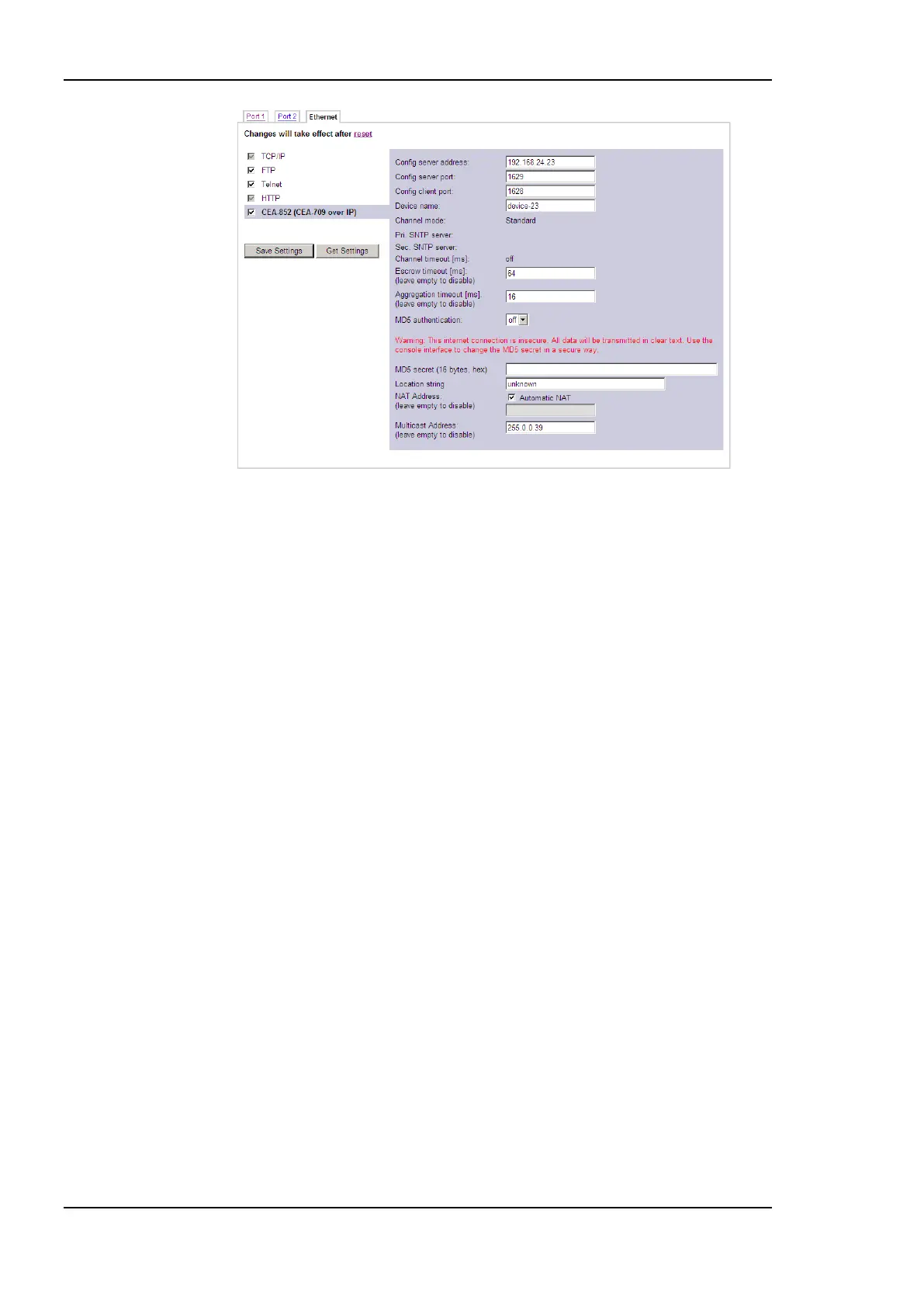
Figure 46: CEA-852 Device Configuration Page.
The field Config server address and Config server port display the IP address and port of
the configuration server, which manages the L-INX and the IP channel. The field Config
client port represents the IP port of the LINX‘s CEA-852 device. This setting should be left
at its default (1628) unless there are more than one CEA-852 devices operating behind a
single NAT router. Please refer to the L-IP User Manual [1] to learn more about NAT
configuration.
In the field Device name the user can enter a descriptive name for the LINX, which will
appear in the IP channel to identify this device. You can enter a device name with up to 15
characters. It is recommended to use unique device names throughout the IP channel.
The Channel mode field reflects the current channel mode of the CEA-852 device. It is
configured by the configuration server. If there are any two devices in the channel which
use the same IP address but different ports (e.g., multiple devices behind one NAT router)
the channel switches to Extended NAT mode. Please refer to the L-IP User Manual [1] to
learn more about configuring the Extended NAT mode in the configuration server.
The configuration server sets the SNTP server addresses and the Channel timeout.
The filed Escrow timeout defines how long the CEA-852 device on the L-INX waits for
out-of-sequence CEA-852 data packets before they are discarded. Please enter the time in
ms or ‗0‘ to disable escrowing. The maximum time is 255 ms.
The field Aggregation timeout defines the time interval in which multiple CEA-709
packets are combined into a single CEA-852 data packet. Please enter the time in ms or ‗0‘
to disable aggregation. The maximum time is 255 ms. Note that disabling aggregation will
negatively affect the performance of the CEA-852 device of the LINX.
The field MD5 authentication enables or disables MD5 authentication. Note that MD5
authentication cannot be used together with the Echelon‘s i.LON 1000 since the
i.LON 1000 is not fully compliant with the CEA-852 authentication method. MD5 can be
used with the i.LON 600. In the following field MD5 secret enter the 16-byte MD5 secret.
Note that for security purposes the active MD5 secret is not displayed. You may enter the
16 bytes as one string or with spaces between each byte, e.g., 00 11 22 33 44 55 66 77 88
99 AA BB CC DD EE FF.



 To Next Page