7 - 10 (00292)H
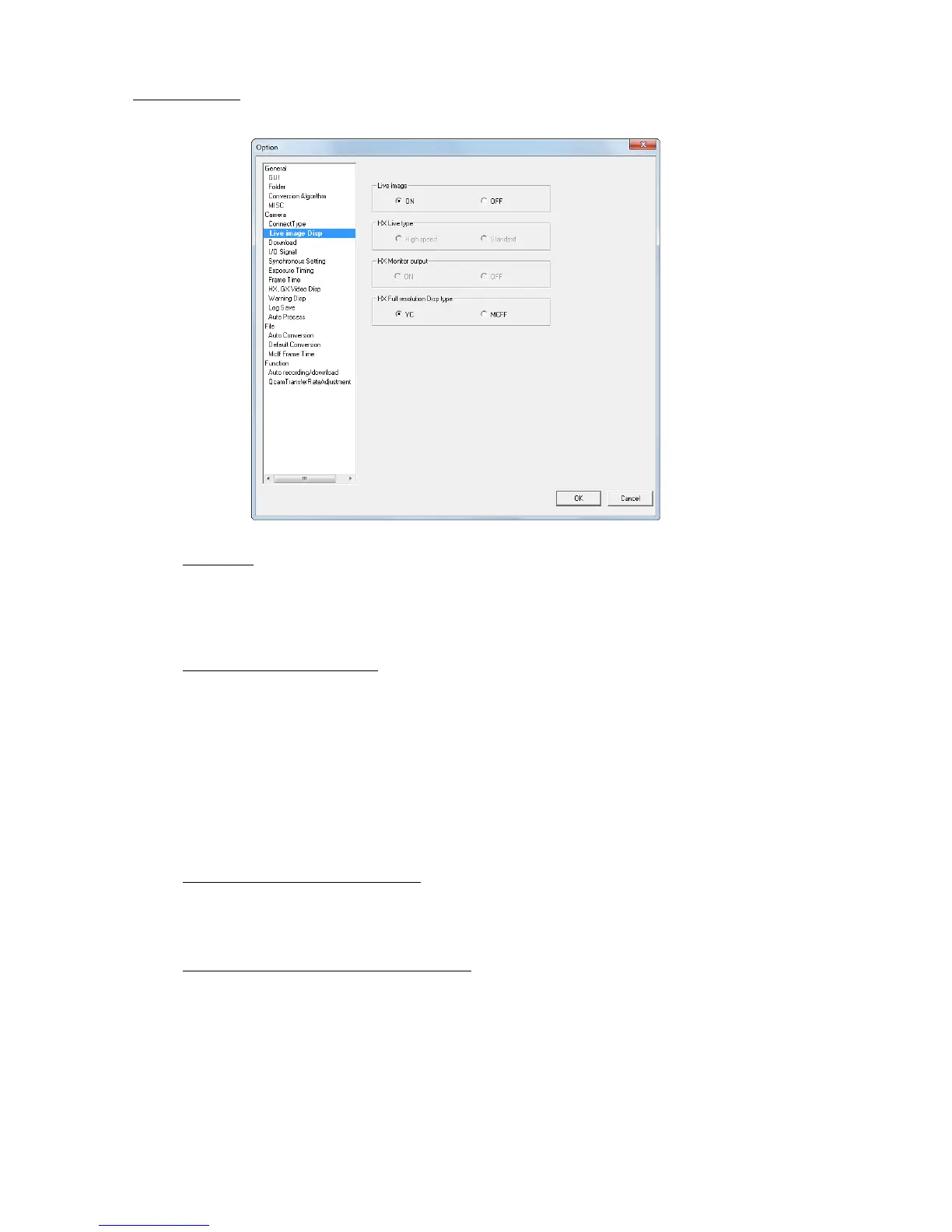
■Live image Disp
Sets the live image display for the camera.
Live Image
Sets the PC and camera live image communication ON/OFF.
ON Displays the live image loaded from the camera.
OFF Does not load the live image from the camera.
Reduces the amount of data transmitted with the camera.
Live Method(Only HX camera)
Sets the live recording creation method to the PC from HX cameras.
High Speed Outputs the same image as the camera monitor output to the PC as a
live image.
Zoom image: Select from FIT1, FIT2, 1/2, 1, x2, x4.
Faster than standard update rate of the camera monitor output and
PC live image.
Standard Outputs all of the image angles recorded independently from the
camera monitor output to the PC as a live image. The same method
as that for fx cameras.
Zoom image: Select from 1/1, 1/2, 1/4.
HX Monitor Output(Only HX camera)
Sets the live image output to the monitor connected to the HX camera ON/OFF.
ON Outputs the image to the connected monitor.
OFF No output of the image to the connected monitor.
HX Full Resolution Display(Only HX camera)
Sets the data format for the HX camera full resolution display.
YC Shows the image format for the monitor output. Faster update rate
than the MCFF.
MCFF HXLink transfers data from the camera to the PC without
conversion.



 To Next Page