(00292)H 14 - 7
■ Video and PC live image display not updated during ARM and recording is not possible
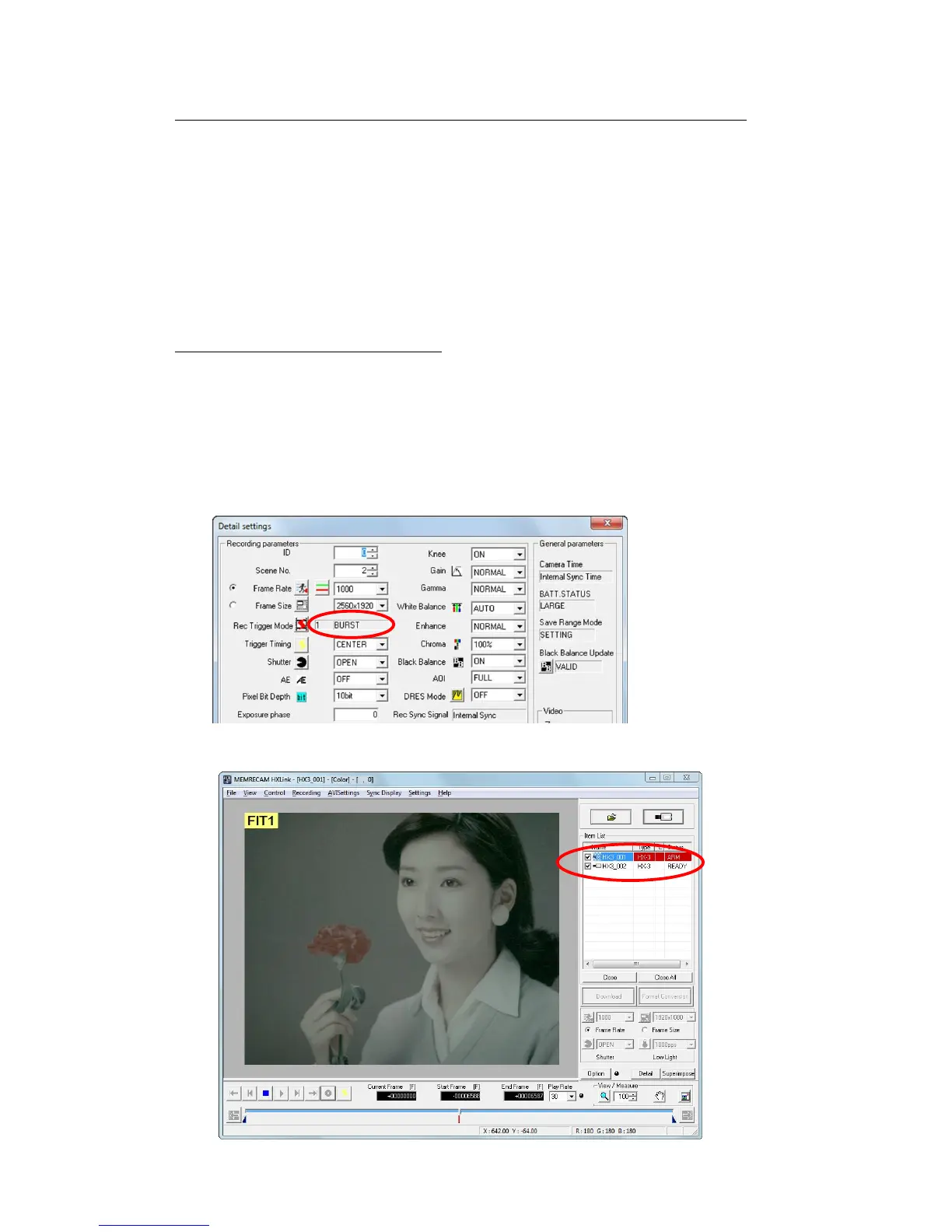
If the recording trigger mode is “BURST”, image recording does not occur unless burst signals
are input during ARM. If burst recording with GX cameras, the image is updated only when burst
signals are input during ARM.
If not conducting burst recording, set the “Trigger Recording Mode” to “NORMAL” in the
“Detailed Settings” dialogue.
If conducting burst recording, check to make sure the burst signals are correctly input to the
connector selected in “Select Trigger Input” under the “Input/Output Signals” in the “Options”
dialogue or the “Camera Connection Settings” dialogue.
■ The trigger button doesn’t work in ARM
When the camera status is in ARM, the trigger button is grayed out and can’t be clicked.
In this case, check that you are not in any of the following situations.
1) The recording trigger mode is BURST.
In BURST recording, input the burst recording signals from the trigger connector.
Recording with the trigger button is possible when the recording trigger mode is
NORMAL,EVENT, MULTI.
2) “ARM All Cameras” connected to HXLink is not selected.
Set ARM again after temporarily stopping ARM with the STOP button.



 To Next Page