(00292)H 7 - 11
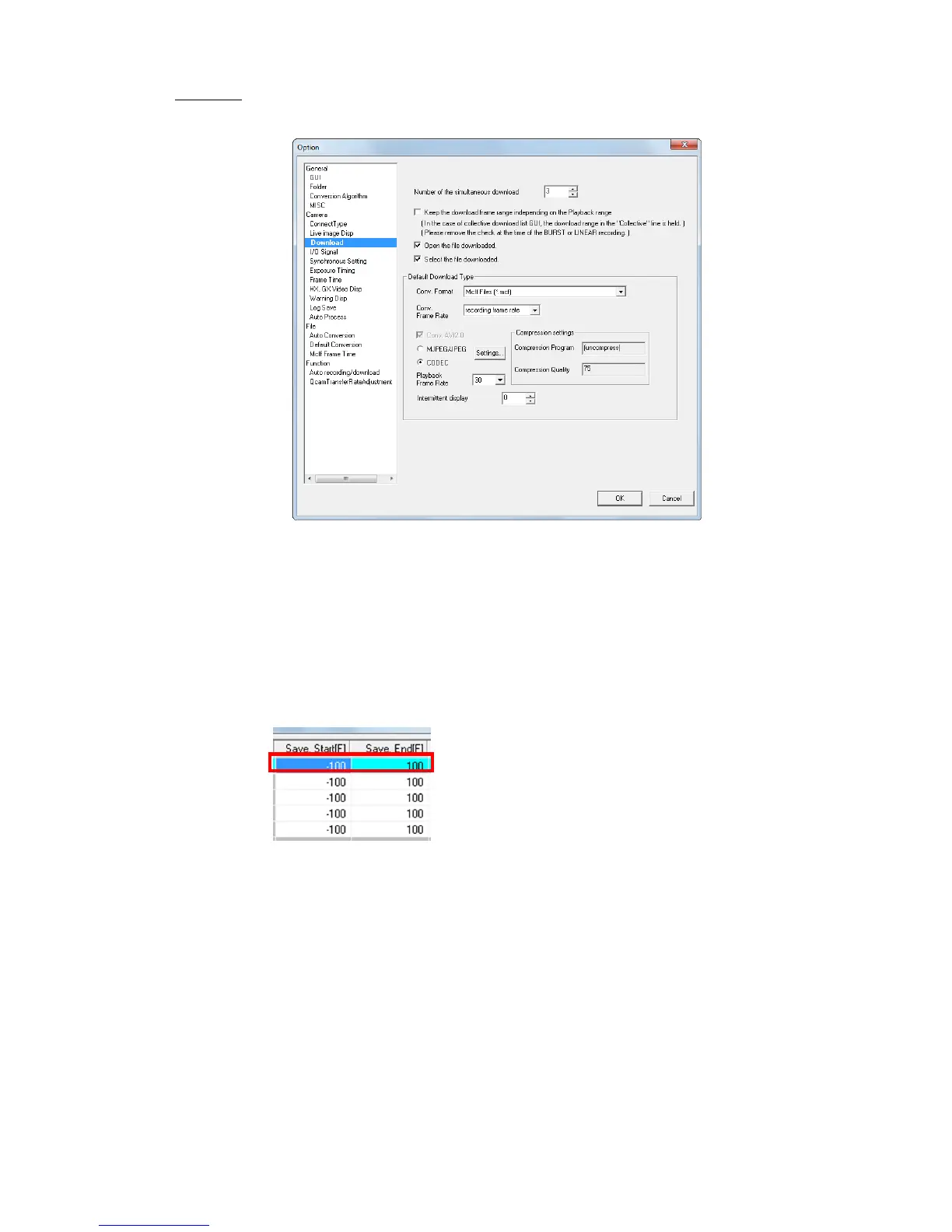
■Download
Settings relating to camera download.
Number of Cameras Simultaneously Downloading
If multiple HX, GX and Q cameras are connected, image data can be simultaneously
downloaded. If adjusting the number of cameras simultaneously downloading, the download
time can be shortened.
Refer to page 4-87 for simultaneous downloading details.
Save Download
Check to save the download range of the MCFF specified when downloading to enable
downloading of the same range for subsequent downloads. If the download GUI settings are
for a batch save, the download range specified for the batch is saved.
Saves the range set in the top row of the “Download”
dialogue (list).
If not checked, the playback range is set as the download range.
Open File after Downloading
Check to automatically add the downloaded MCFF to the item list and show the image.
Previous Download Format
Sets the default download format.
Conversion Format Specifies the type of downloaded file (AVI, TIFF, JPEG, BMP,
MCFF) .



 To Next Page