4 - 8 (00292)H
□"MANUAL" Procedures in the Camera Configuration Mode
The camera configuration mode must be set to "Manual" for manual camera configuration settings.
● Procedures for Camera Configuration Settings
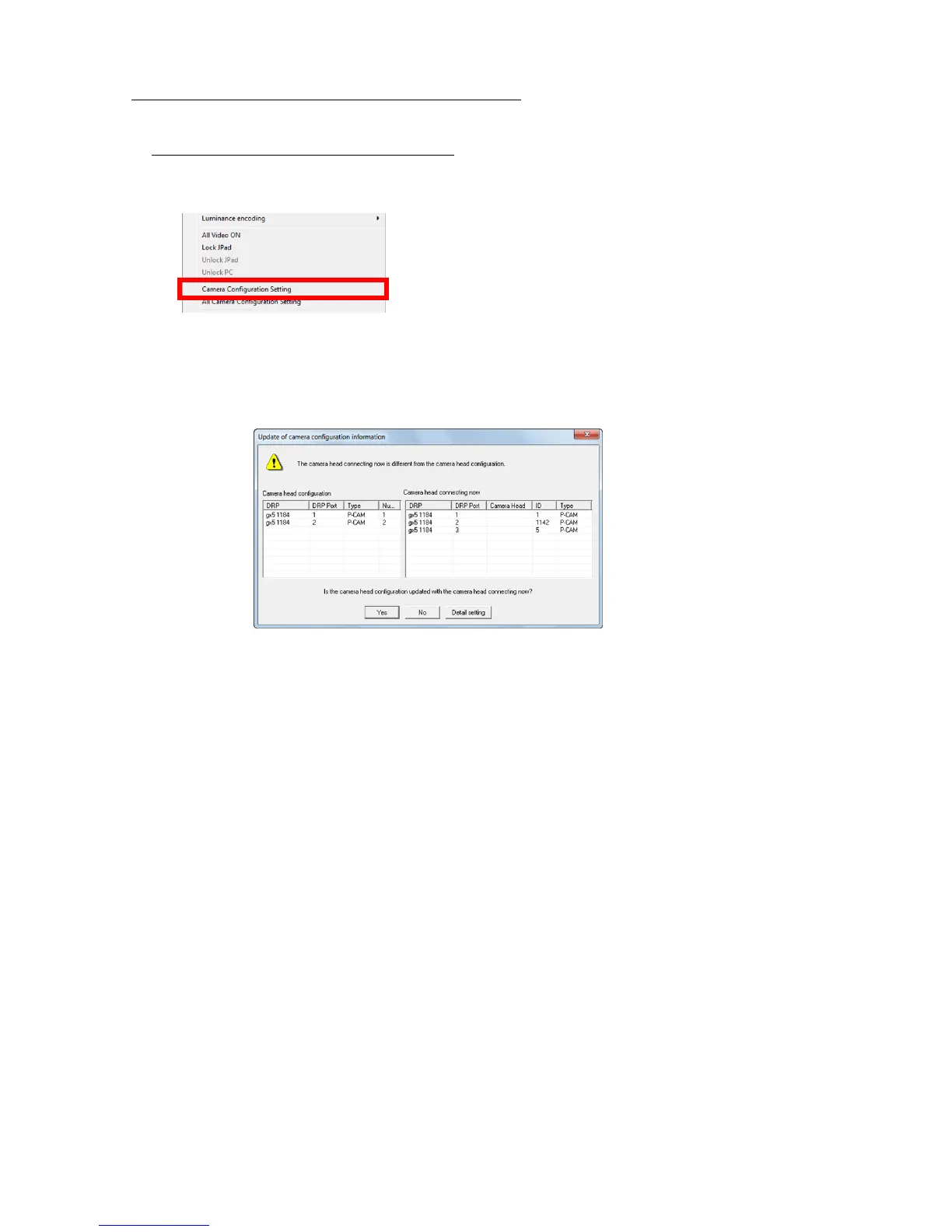
1) Connect to the MEMRECAM GX-5/GX-5F, and while in the READY mode, click on
"Camera Configuration Settings" on the Control menu. (Since the "Camera Configuration
Settings" is a function of the GX-5/GX-5F, it does not work with other DRP.)
The following dialogue is displayed.
This dialogue is displayed even when the camera configuration and camera head connection
status do not match when camera connections are finished or when VIEW has started.
The camera configuration currently set to the DRP is shown on the "Camera Head
Composition" list.
The camera head currently connected to the DRP is shown on the "Camera Head Currently
Connecting".
The following items are displayed on the "Camera Head Composition" list.
DRP DRP nickname
DRP Port Port number on the DRP side where the camera head is connected
Type Camera head type
Number Camera head number (the most recent number of the port numbers
for the "DRP Port")
The following items are displayed on the "Camera Head Currently Connected".
DRP DRP nickname
DRP Port Port number on the DRP side where the camera head is connected
Camera Head Camera head nickname
If the camera head nickname is registered, the registered nickname
is displayed.
ID Camera head ID. The camera head is needed to register the camera.
Type Camera head type



 To Next Page