8 - 14 (00292)H
8.9 Multi Trigger Recording
■ Download Multi Trigger Recordings
Specifying the range of multi trigger recording downloads varies according to the downloaded
GUI.
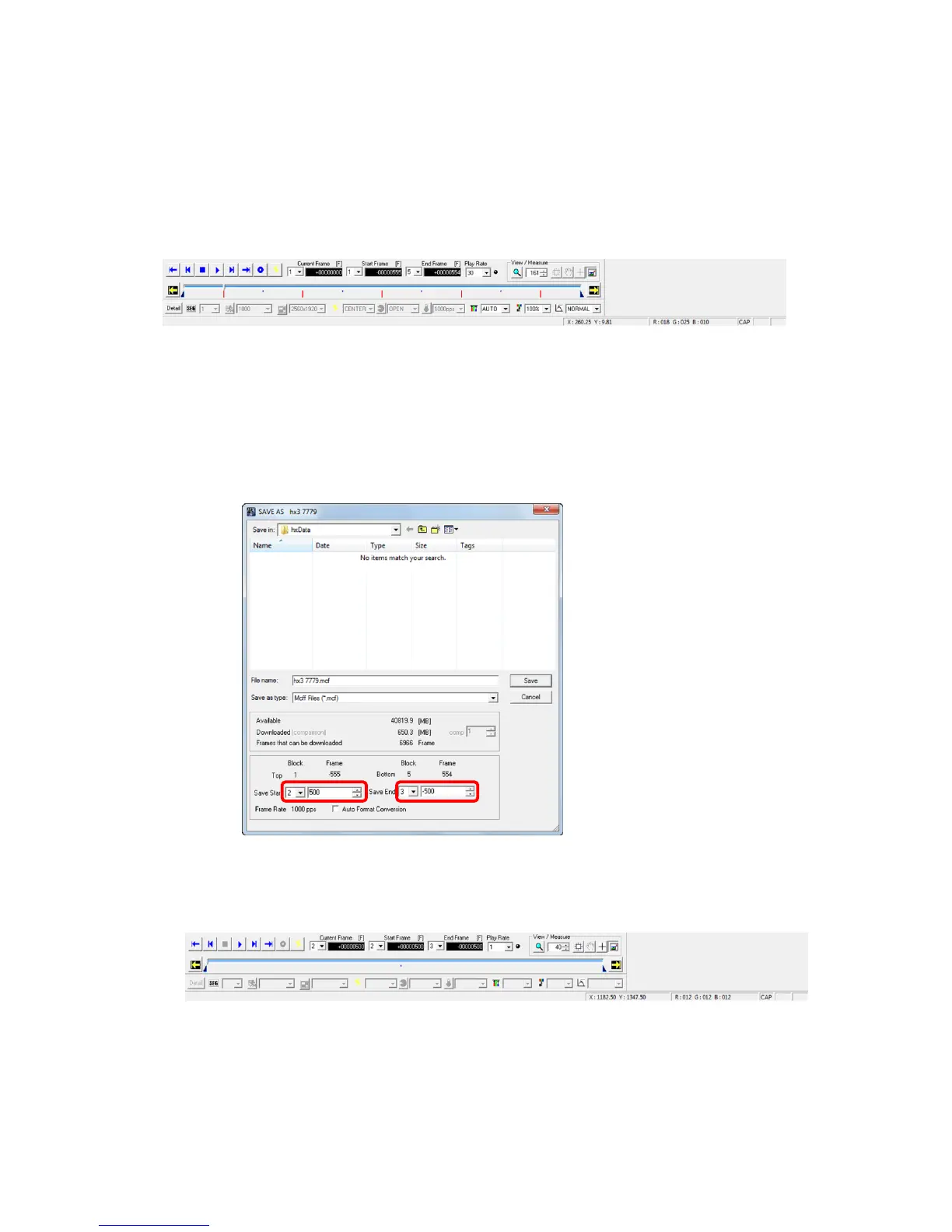
With individual downloads, the data for all recorded blocks is shown on the slider bar so the
portion of the recorded range is downloaded.
The camera recorded block and the recorded range immediately after multi trigger recording
is shown in the following example.
・Block 1 (Recorded range: -555 ~ +554)
・Block 2 (Recorded range: -555 ~ +554)
・Block 3 (Recorded range: -555 ~ +554)
・Block 4 (Recorded range: -555 ~ +554)
・Block 5 (Recorded range: -555 ~ +554)
Open the “Save As” dialogue, and set the following save range to download.
・Start Save: Block 2, Frame +500
・End Save: Block 3, Frame -500
The playback block for the created MCFF and the playback range are shown as follows.
・Block 2 (Playback Range: +100 ~ +554)
・Block 3 (Playback Range: -555 ~ -500)



 To Next Page