Running Mail
42
3
Checking the Sealing Mode
The feeder includes a sealer that can automatically seal envelopes of mixed sizes
while processing mail.
If activated, the sealer can work in two modes:
• Sealing nested (open) flaps only. It will not seal flaps that are closed flat. In this
mode you can mix sealed envelopes along with nested envelopes that require
sealing.
• Sealing mixed flaps where the envelope flaps are nested and closed. All the en-
velopes will be sealed in this mode. You can mix nested flaps with closed flats, but
you cannot process sealed mail in this mode.
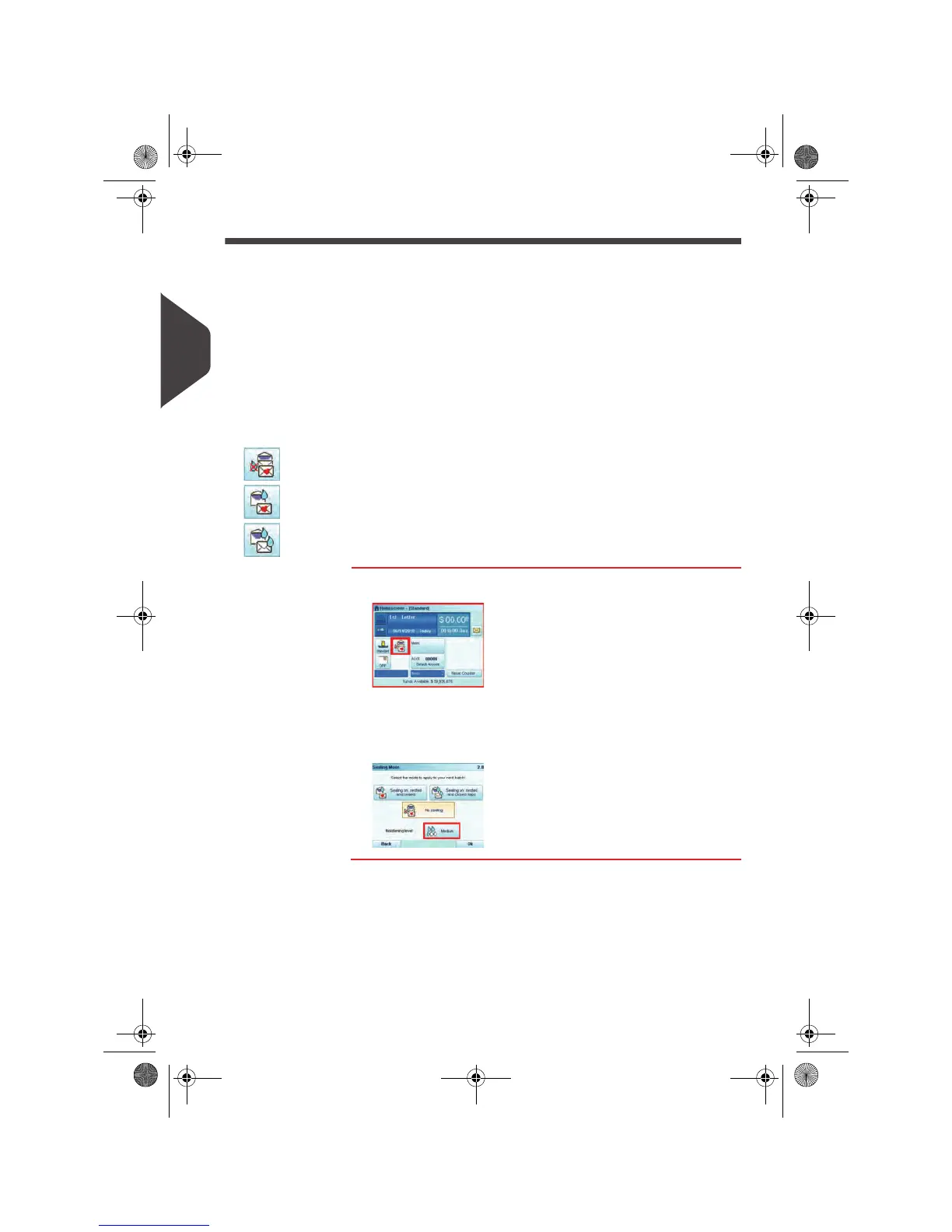
An icon on the Sealing Mode button in the user selections area of the home screen
indicates the current sealer mode:
• : sealer is OFF
• : sealer is ON. Nested envelopes and sealed envelopes.
• : sealer is ON. Nested envelopes and closed envelopes.
How to Select the Sealing Mode
How to Select
the Sealing
Mode
1 Press the Sealing Mode Button to select the mode.
2 Select a sealing mode.
3 Press the Moistening level button to select the amount of
moisture to be sprayed on the envelope flap.
See also
• As supervisor, you can set the default sealing mode and moisture level: see
Sealer
Default Settings
p.206.
OMEGA1_US.book Page 42 Vendredi, 1. octobre 2010 10:46 10


 To Next Page
 Loading...