R&S
®
ZVA / R&S
®
ZVB / R&S
®
ZVT GUI Reference
Channel Menu
Operating Manual 1145.1084.12 – 30 388
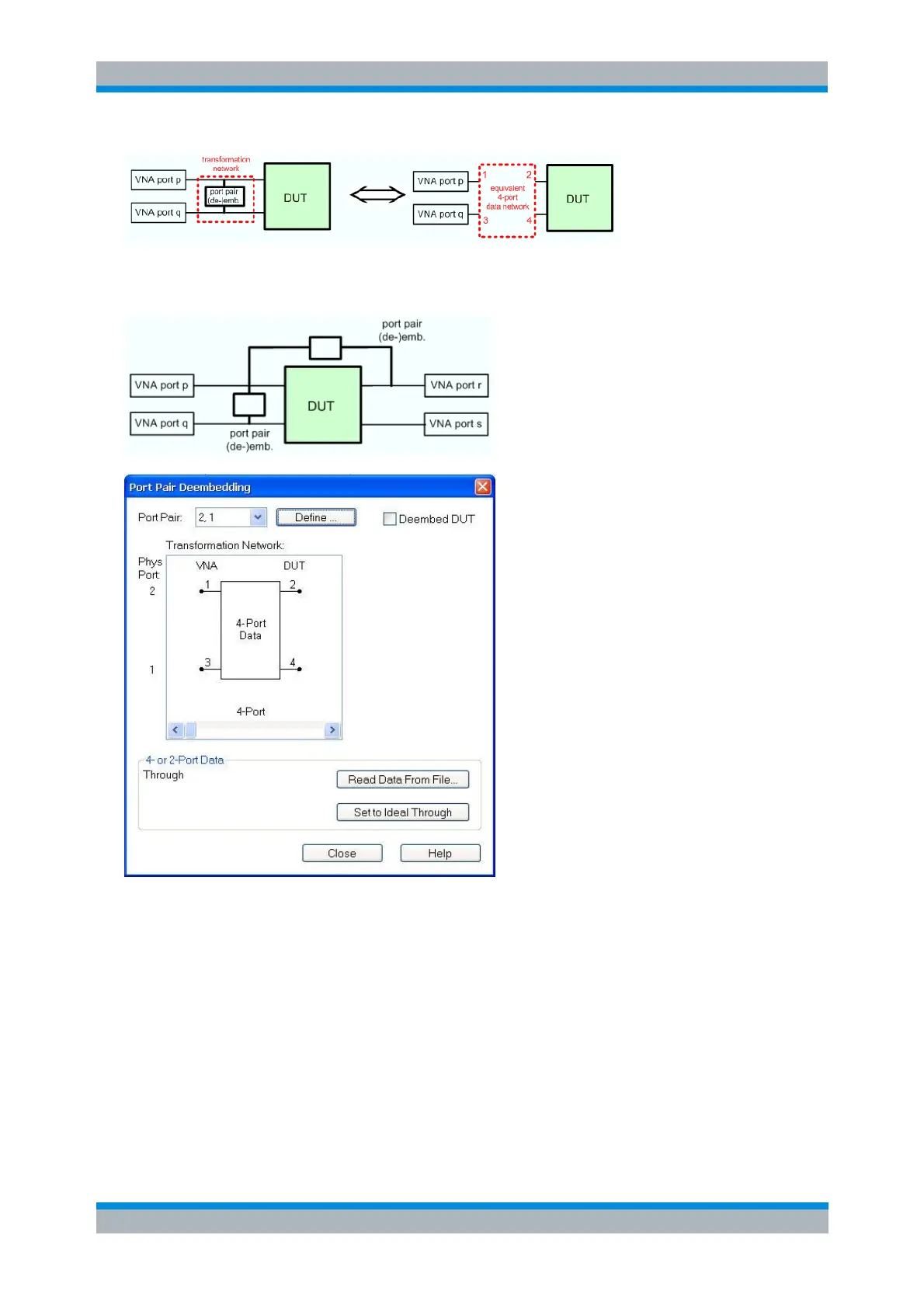
The two 2-port (de-)embedding networks in the figure below require two port pairs 1,2 and 1,3, each
combined with an appropriate set of equivalent 4-port S-parameters.
The Port Pair (De-)Embedding dialogs contain the following control elements:
Port Pair shows the configured pair of single ended ports. Define opens a dialog to define an
ordered list of port pairs.
(De-)embed DUT enables or disables the (de-)embedding function.
Transformation Network contains all available 4-port networks for port pairs (see below). Networks
are defined either by means of imported S-parameter data or by lumped elements. The active
network appears in inverse colors. The element parameters (C, R, L) for the selected network are
displayed on the right side.
Read Data From File... is enabled as long as one of the networks involving two-port or four-port S-
parameter data is active. The S-parameters are read from two-port (*.s2p) or four-port (*.s4p)
Touchstone files. In case the port number conventions of the loaded two-port Touchstone file
differ from NWA conventions (see description of Physical Port above), it is possible to Interchange



 To Next Page