R&S
®
ZVA / R&S
®
ZVB / R&S
®
ZVT Remote Control
Basic Remote Control Concepts
Operating Manual 1145.1084.12 – 30 589
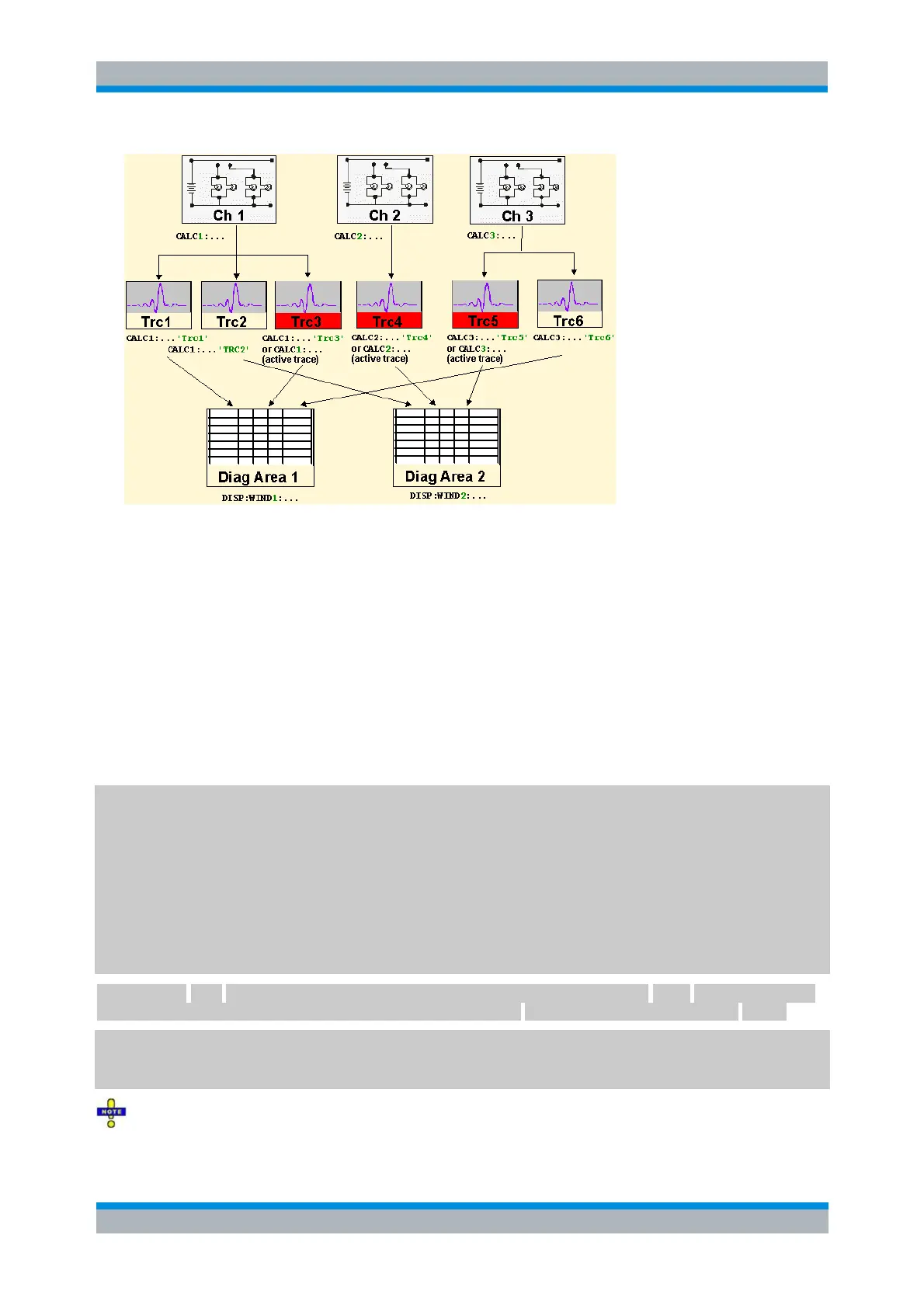
The active traces are handled as follows:
After a preset (*RST), the analyzer displays a single diagram area with the default trace no. 1
named TRC1. The trace is active in manual and in remote control.
In manual control, a new, added trace automatically becomes the active trace. To select another
trace as the active trace, click inside the trace list.
In remote control, a new trace added via CALCulate<Ch>:PARameter:SDEFine
'<trace_name>', '<parameter>' also becomes the active trace. To select another trace as
the active trace, use (CALCulate<Ch>:PARameter:SELect '<trace_name>').
The active traces for manual and remote control may be different.
The following program example illustrates how to create, select and reference traces. It is instructive to
observe the analyzer screen in order to check the effect of each step.
*RST
Reset the analyzer, creating channel no. 1 with the default trace Trc1. The trace is displayed in diagram
area no. 1.
CALC1:PAR:SDEF 'Trc2', 'S11'; DISP:WIND:TRAC2:FEED 'Trc2'
Create a new trace named Trc2, assigned to channel no. 1 (the suffix 1 after CALC, may be omitted), and
display the trace. The new trace automatically becomes the active trace for manual and for remote control.
To check this, click Trace – Marker – Marker 1 to create a marker. The marker is assigned to Trc2. Delete
all markers (Trace – Marker – All Markers Off).
CALC1:MARK ON
To verify that Trc2 is also active for remote control, use the channel suffix 1 after CALC (may be omitted)
to reference the active trace in channel 1 and create a marker M 1. The marker is assigned to Trc2.
CALC:PAR:SEL 'Trc1'; CALC1:MARK ON
Select the old default trace Trc1 as the active trace for remote control. Create a new marker to verify that
Trc1 is now the active trace in channel 1.
In the SCPI command description, the numeric suffix <Ch> is used for channel settings (it denotes the
configured channel), whereas <Chn> is used for trace settings (it denotes the active trace in the channel).



 To Next Page