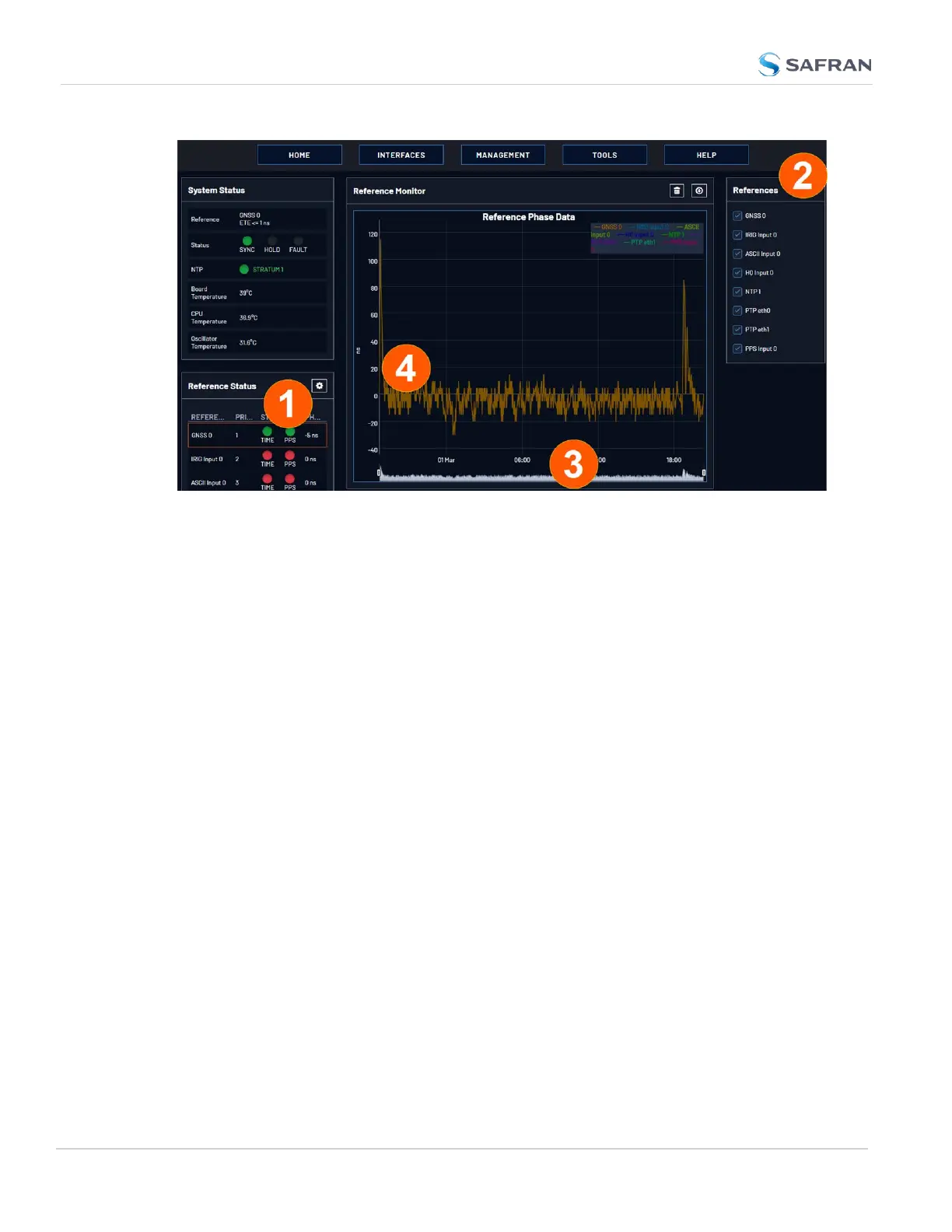
On the left side of the screen, Status information is displayed for the System and
the References. Note that the Reference Status panel also displays the latest
PHASE OFFSET reading (1) for active references against the System Ontime
Point. The reading is updated every 30 seconds.
This Reference Phase Offset Data is plotted over time (abscissa) in the Reference
Monitor panel in the center of the screen. Use the check boxes in the References
panel (2) to select the reference(s) for which you want to plot the phase offset
data. Use the handles (3) to zoom in on a time window.
The scale of the axis of ordinate (4) is determined by the largest amplitude of any
of the references displayed in the current time window. Use the checkboxes in
the References panel on the right to remove references from the graph, or add
them to it.
Smart Reference Monitoring
The Smart Reference Monitoring uses phase error validation in combination with
automatic failover:
The phase error validation calculates long- term averages and standard devi-
ations of the phase offset between the monitored external reference and the
internal system reference. The standard deviation is used to calculate two validity
thresholds, a higher and a lower one (the latter acts as a hysteresis buffer, pre-
venting the status flip/flopping if the actual phase error validation value varies
closely around the outer threshold). The thresholds are not user-configurable.
If the higher threshold value is exceeded, the automatic failover will cause Ver-
saSync to fall back to its next lower reference (if available).
184
CHAPTER 3 • VersaSync User Manual Rev. 12
3.3 Managing References



 To Next Page