1. In the Web UI, navigate to MANAGEMENT > OTHER: Authentication.
2. In the Actions panel on the left, click TACACS+. The TACACS+ Setup win-
dow will be displayed.
3. Configure the Default User Group to select your preferred default user per-
missions level (Admin or User)
4. Under Enable TACACS+, click the toggle to ON to enable TACACS+, and
click the toggle to OFF to disable this feature.
5. Click Submit.
4.4.6.2 Adding/Removing a TACACS+ Server
To add a TACACS+ authentication server, or remove a server from the list:
1. Navigate to MANAGEMENT > OTHER: Authentication.
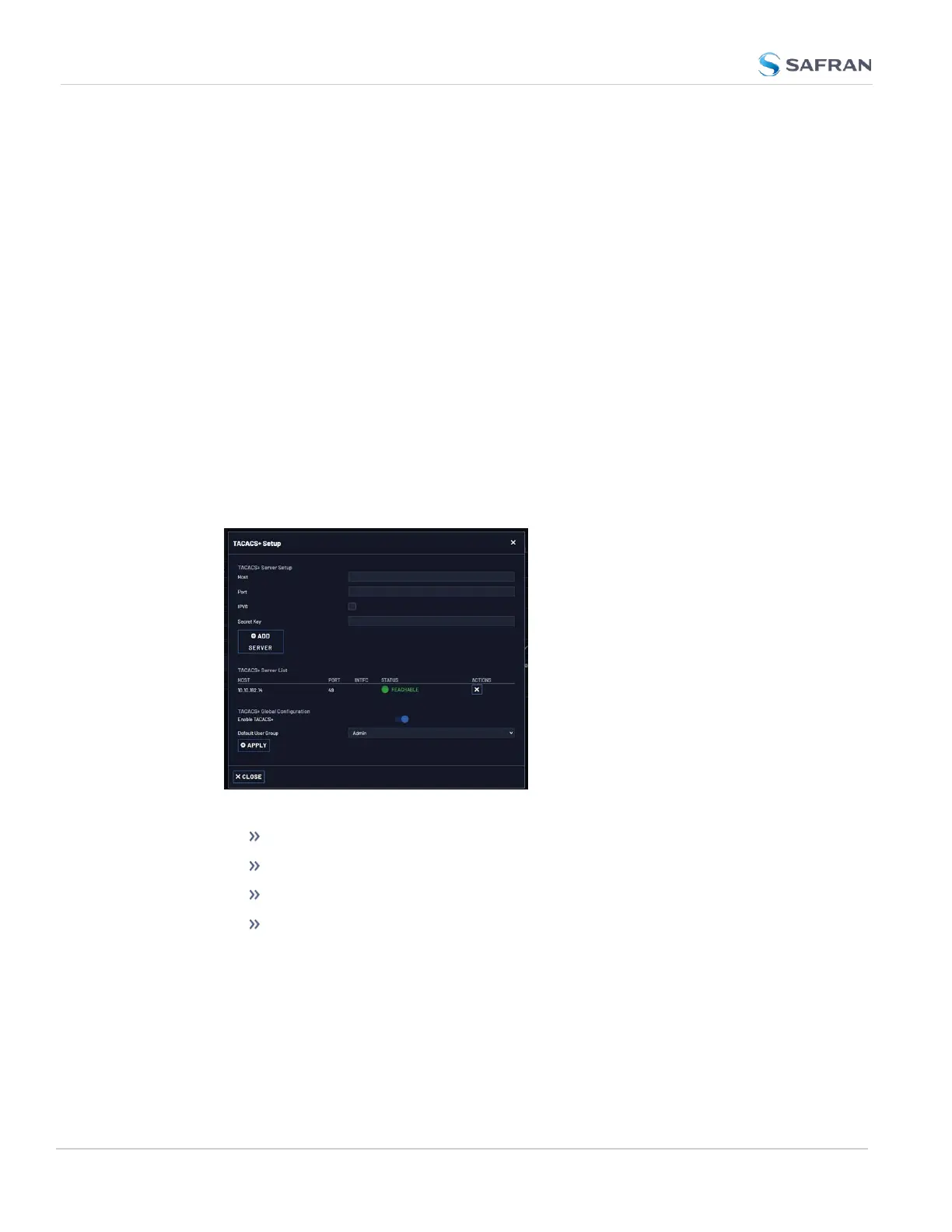
2. In the Actions panel on the left, click TACACS+ Setup. The TACACS+ Setup
window will be displayed:
3. Fill out the fields:
Host: The hostname or IP address of the TACACS+ server
Port: Defines the TACACS+ Port to use.
IPv6: Enables IPv6 and reveals a field to select a Parent Interface.
Secret Key: The same encryption key as used on the TACACS+
server.
4. Click the Add Server button. A confirmation message The item has been
added will be displayed if the server could be added, and the server will be
added to the list. The server status can be:
262
CHAPTER 4 • VersaSync User Manual Rev. 12
4.4 Managing Users and Security



 To Next Page