2.7.4.3 Configuring an ASCII Input
To configure an ASCII Input (ATC = ASCII Time Code):
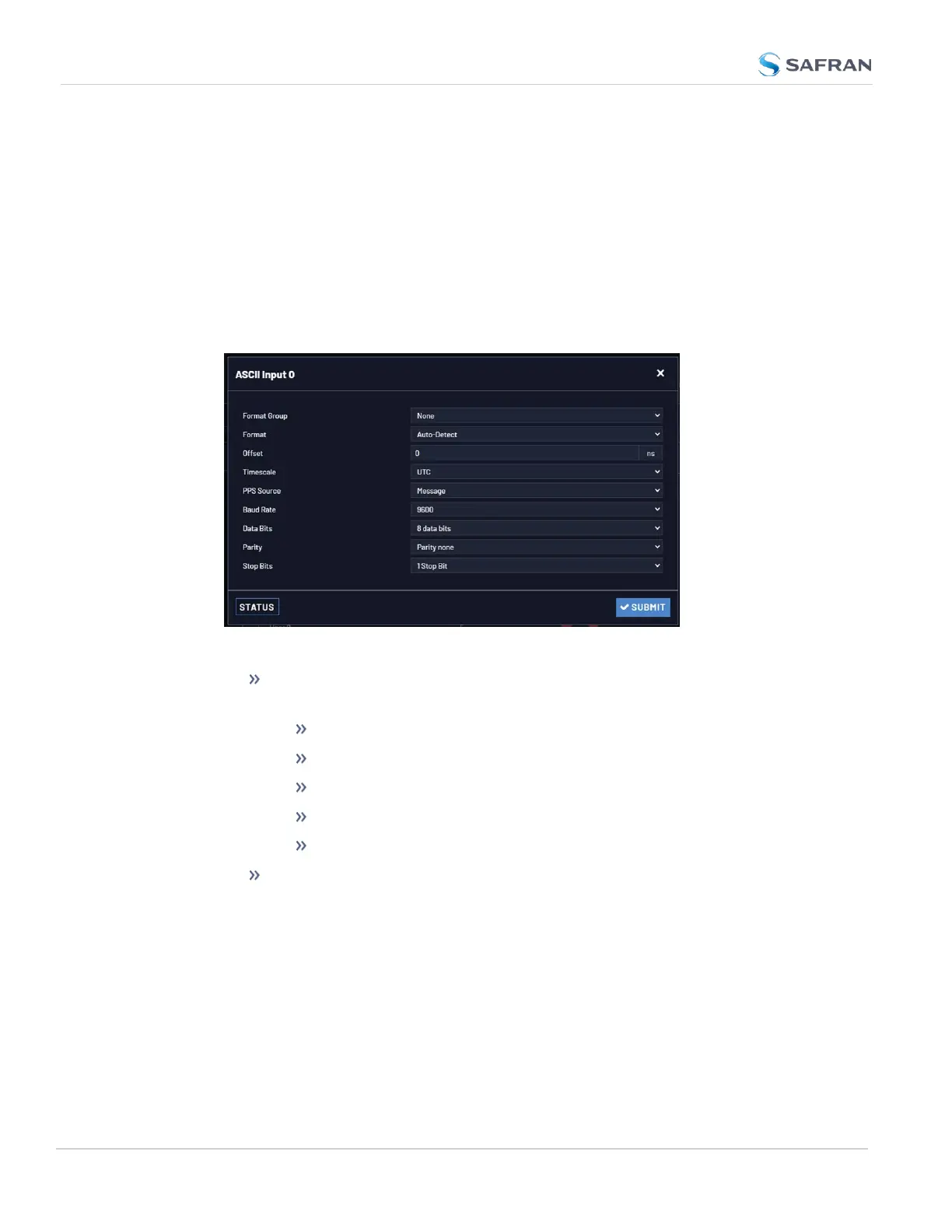
1. Navigate to INTERFACES > REFERENCES: ASCII Input 0 (or: INTERFACES
> OPTIONCARDS: ASCII Input 0). The status window will open, providing
information on the current Reference ID, input Validity, ASCII Format, and if
a pending Leap Second will be added to the UTC timescale at the end of
the month. (See also "Local Clock(s), DST" on page168.)
2. Click Edit to open the configuration window:
The following settings are editable:
Format Group: Determines the time code message format category
(see also "Time Code Data Formats" on page319.) Choices are:
Auto
Spectracom
NMEA
ICD-153
EndRun
Format: Once a Format Group has been selected, one or more
Format fields may appear, allowing you to select one or more time
code Formats. For detailed specifications and limitations on the sup-
ported time code formats, see "Time Code Data Formats" on
page319.
54
CHAPTER 2 • VersaSync User Manual Rev. 12
2.7 Configuring Inputs/Outputs



 To Next Page