2.8.12.3 Enable/Disable PTP
To enable or disable PTP:
1. Navigate to MANAGEMENT > NETWORK: PTP Setup.
2. In the PTP Masters Overview or the PTP Slaves Overview panel, slide the
toggle switch to ON or OFF for the desired Ethernet port.
Note: You will not be able to see or Enable PTP ports if you do
not have one configured. Select the plus icon in one of the
PTPOverview panels to add a PTPinterface.
3. Configure your settings using the Edit Settings Panel.
2.8.12.4 PTP Monitoring
To confirm that your PTP is functioning correctly, we provide a number of
PTPMonitoring methods.
PTP Monitoring via the Web UI
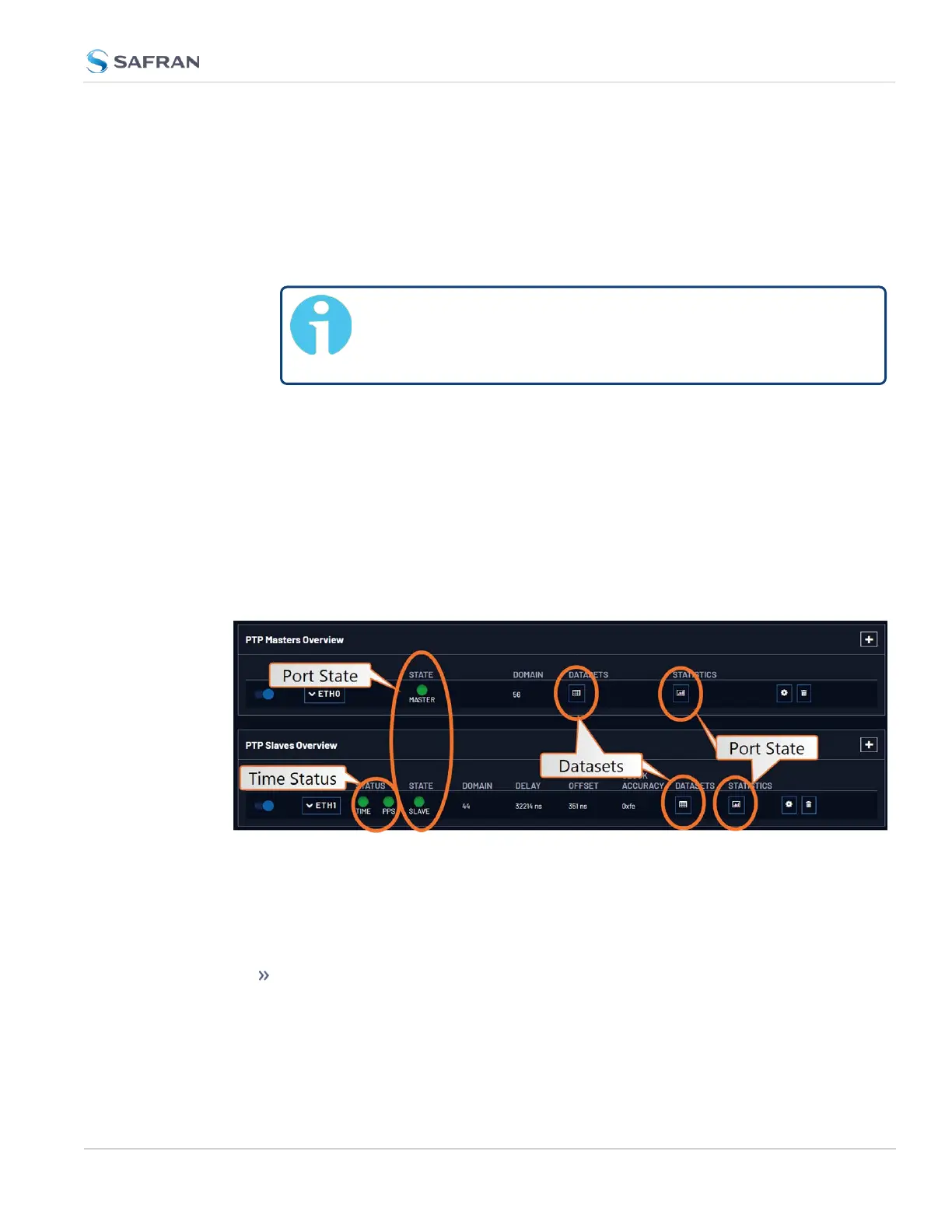
After configuring and enabling your PTP port(s), the main clue to the current con-
dition of PTP functionality is the State for either Master or Slave (found in the PTP
Master and Slave Overview panels).
Another good indication of the heath and operation of your PTPsetup are the
PTPgraphs:
The Port Monitor graph allows you to select an Ethernet port to view the
rates different types of traffic:
2.8 Configuring Network Settings
CHAPTER 2 • VersaSync User Manual Rev. 12
151



 To Next Page