Sanitization
The Delete Position command is automatically applied when sanitizing a Ver-
saSync unit (ensuring that no trace of position data remains on the unit). See
"Sanitizing the Unit" on page300.
Deleting the GNSS position
To delete the GNSS position:
1. Disconnect the GNSS antenna from the VersaSync unit (this is required
only when sanitizing the unit).
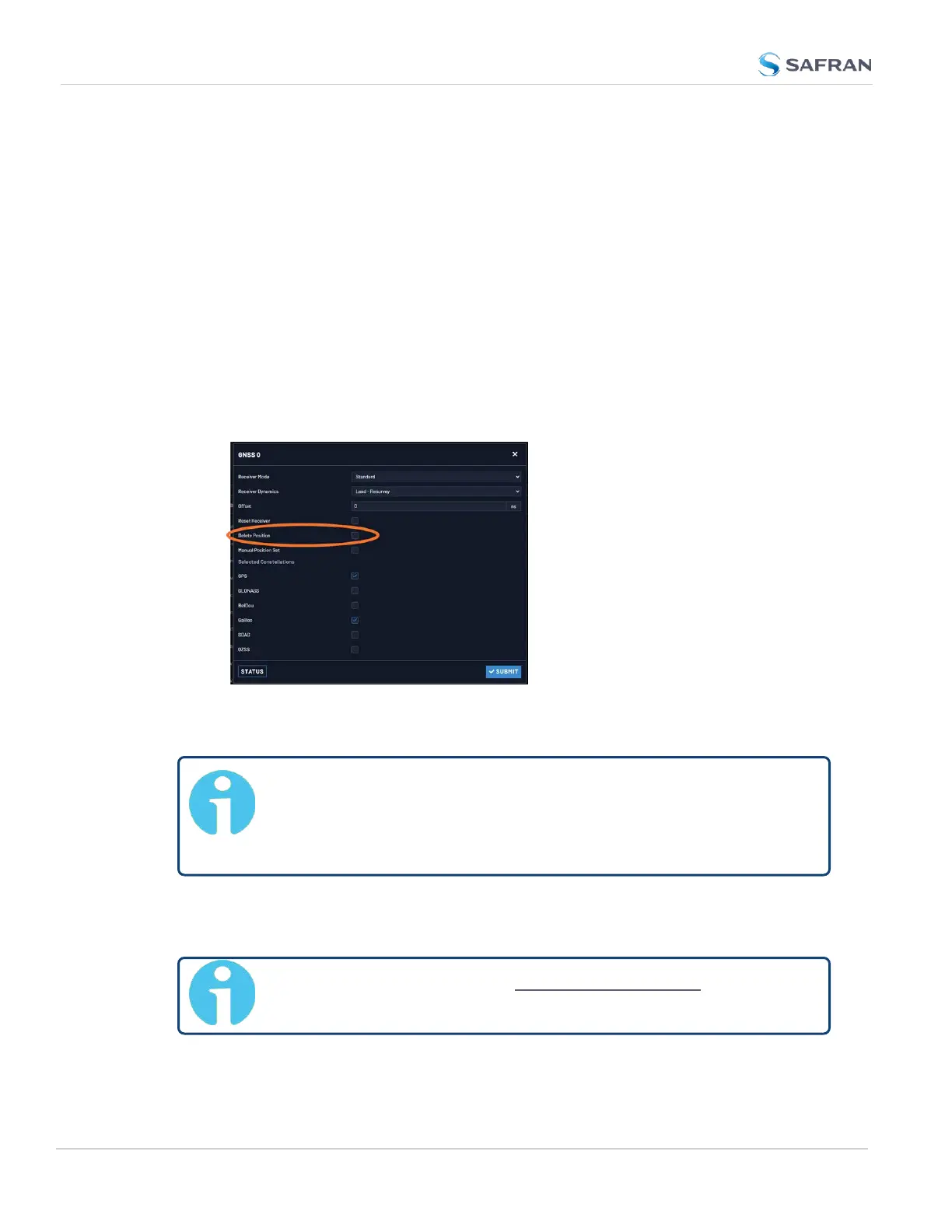
2. Navigate to Interfaces > References: GNSS Reference.
3. Click on the GEAR button next to the GNSS Reference (typically, there is
only one reference, numbered "0"). The GNSS0 window will open:
Locate the Delete Position box, check it, and click Submit.
4. VersaSync will initiate a GNSS self survey.
Note: In Mobile Receiver Mode it is NOT possible to delete the pos-
ition and start the GNSS survey. This feature is only available in
Standard Mode and in Single Satellite Mode. In Single Satellite Mode
a GNSS survey may take up to 24 hours.
3.3.3.9 Manually Setting the GNSS Position
Note: This topic applies only to stationary applications, i.e. to Stand-
ard mode, or Single Satellite mode.
210
CHAPTER 3 • VersaSync User Manual Rev. 12
3.3 Managing References



 To Next Page