provided at the same time as the first message are discarded. This unique cap-
ability allows VersaSync to be able to simultaneously provide multiple pieces of
data from different selected format messages.
An example of selecting multiple formats is selecting “NMEA GGA” as the first
format, “NMEA RMC” as the second format and “NMEA ZDA” as the third format.
Depending on the setting of the “Mode” field (which determines if the data
streams are available every second or upon a request character being received),
at the next second or the receipt of the next request character, the output port
will provide the GGA message followed immediately by the corresponding RMC
message for that same second, followed immediately by the corresponding ZDA
message for that same second. The first GGA message will provide the on-time
point for the entire output data stream.
To configure an ASCII Output:
1. Navigate to INTERFACES > OUTPUTS: ASCII Output 0, or to INTERFACES
> OPTIONCARDS: ASCIIOutput 0. The status window will display, provid-
ing information on Signature Control and the message format (s).
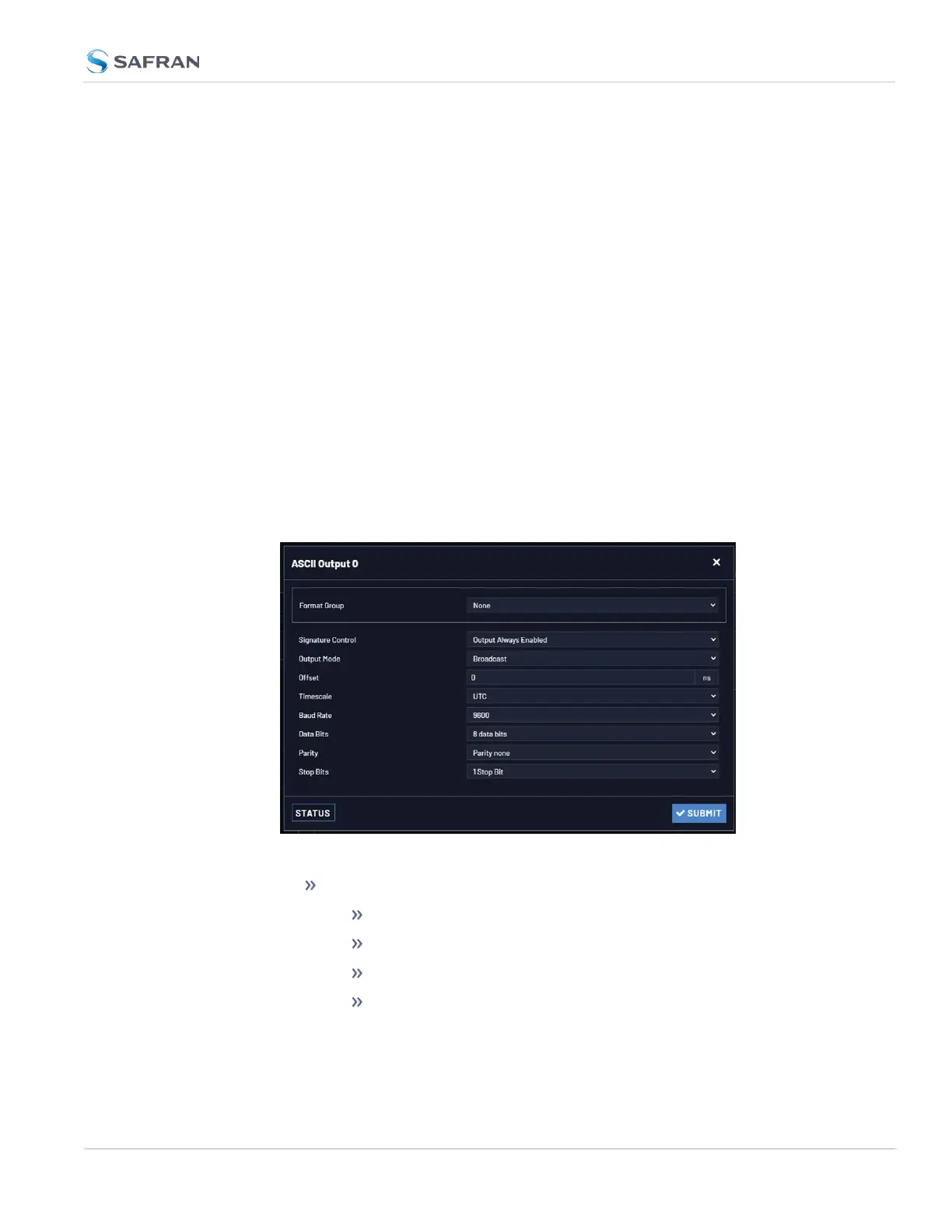
2. Click the Edit button to open the configuration window:
The Edit window allows the configuration of the following settings:
Format Group: configures the message format type. Choices are:
None (no message will be output)
Spectracom
NMEA
BBC
2.7 Configuring Inputs/Outputs
CHAPTER 2 • VersaSync User Manual Rev. 12
57



 To Next Page