5 — Operating Instructions
68
920515770_J
Vision® 1300 Series
Operator Manual
The list of warning messages is also printed at the end of cycle.
5.24 Responding to an Alarm
Conditions that trigger an ALARM immediately stop the cycle in process and prevent new cycles from being started
until problem is resolved.
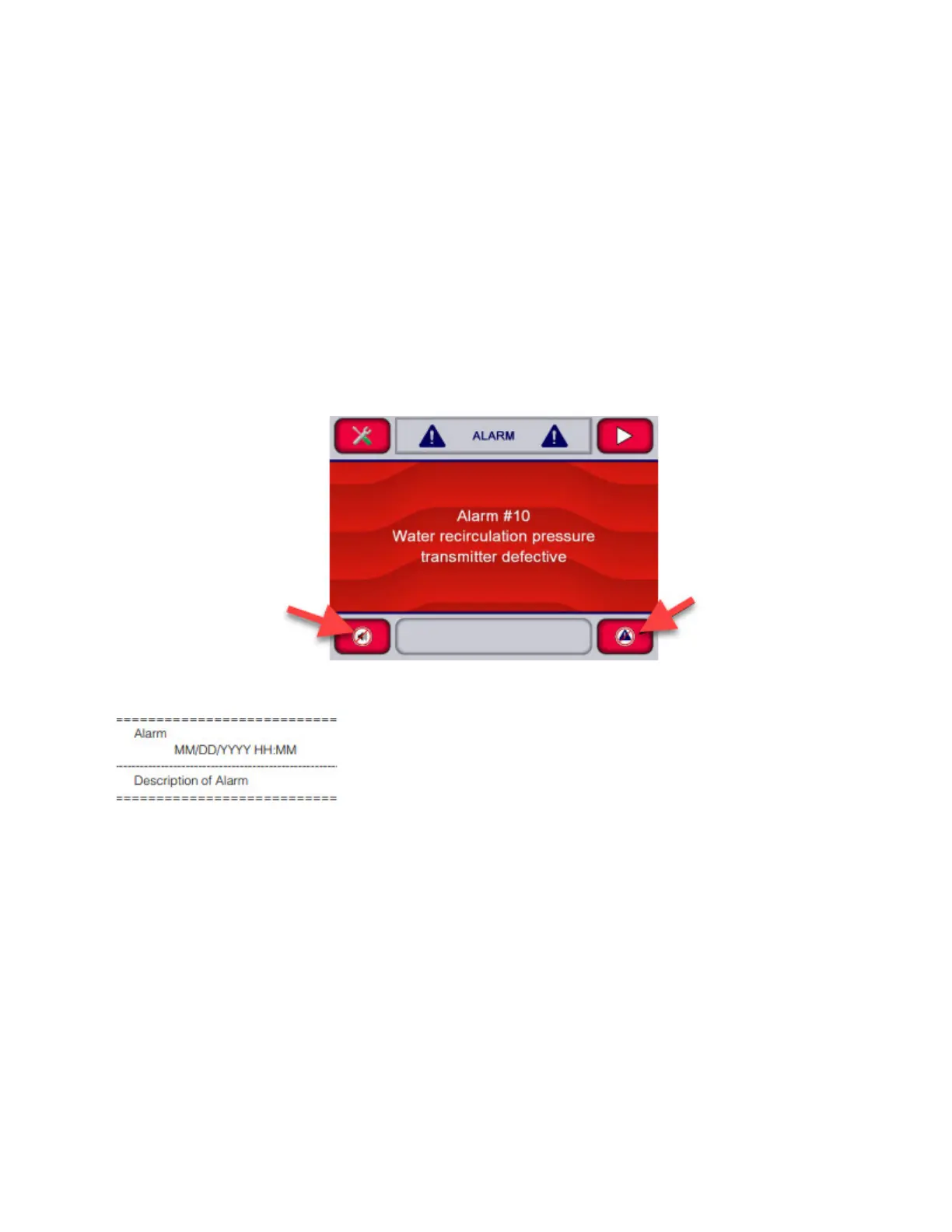
When such a condition is detected by the control, the display turns red, an audible signal sounds and an alarm message
identifies the abnormal condition. Alarm conditions can be caused by failure of utility supplies or of washer/disinfector
components.
NOTE: Any alarm that is not related to a cycle in progress can be generated while the control system is in the Ready
mode.
Refer to Troubleshooting Section for a detailed listing of alarms.
NOTE: Some alarm conditions can be solved by the operator, other require the intervention of a STERIS-trained
technician.
1. When a malfunction or an alarm occurs before cycle is successfully completed, an alarm sounds and display
shows, for example:
NOTE: If multiple alarms are generated at the same time: Press arrow on upper right corner of touch screen to
navigate between alarms. All alarms need to be acknowledged and resolved so cycle can be aborted.
2. Press Silence buzzer on touch screen to silence buzzer (operator can assess alarm condition without hearing
buzzer sound).
– or –
Press Alarm reply on touch screen to acknowledge alarm and silence buzzer. This records time at which operator
acknowledged the alarm. Display shows:












 To Next Page