28
Smart Sipper
414 Evolution 200 Series User Guide Thermo Scientific
Do not stretch, slacken or twist the tubing during installation.
Y To install a flow cell
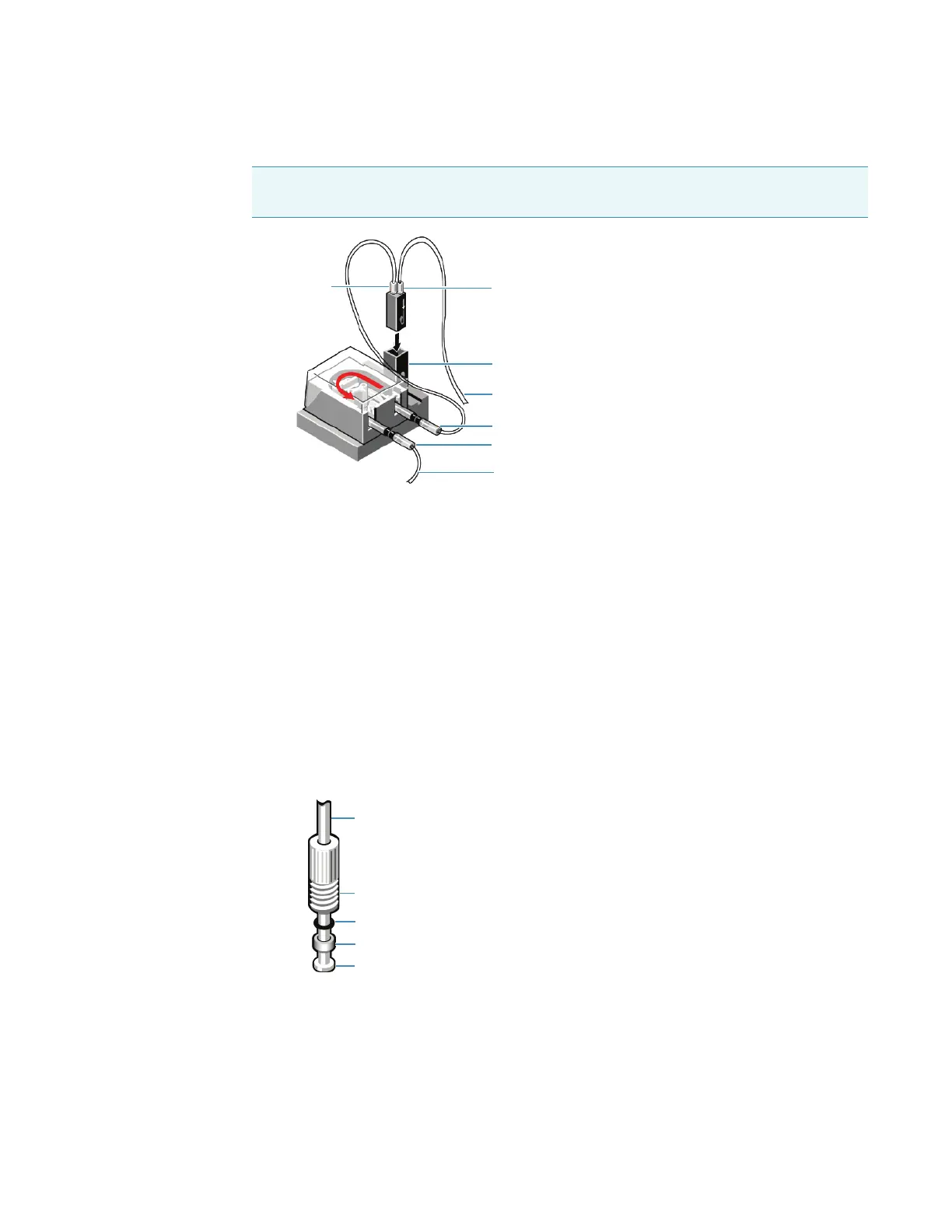
1. Connect a length of appropriate tubing between the Flow Cell Out connector and the
pump In connector on the Smart Sipper.
Use pump tubing if it fits the cell port. If the flow cell ports are not marked, check the
documentation that came with the cell.
For flow cells with glass connectors, slide one end of the tubing over the Flow Cell Out
connector and the other end over the connector on the Pump In tubing.
For flow cells with screw-caps, install screw connectors, O-rings and washers that fit the
cell ports, and tubing that has a flanged end (samples are provided).
a. In this order, slide the plastic O-ring, rubber washer and screw connector over the
open end of the tubing until they contact the flange.
b. Screw the cap into the Out port on the flow cell.
c. Attach the open end of the tubing to the Pump In connector.
Tip To prevent leaks, push tubing onto connectors as far as possible (wet the tubing first if
necessary).
Flow Cell In
Cell holder
Pump In
Pump Out
Flow Cell Out
From Sipper front panel
To waste container
Flanged tube
Screw connector
Rubber washer
Plastic O-ring
Flange









 To Next Page