09/2007
8-19
Phaser 8860/8860MFP Service Manual
Image Output Terminal
Theory of Operation
Initial Issue
CAUTION
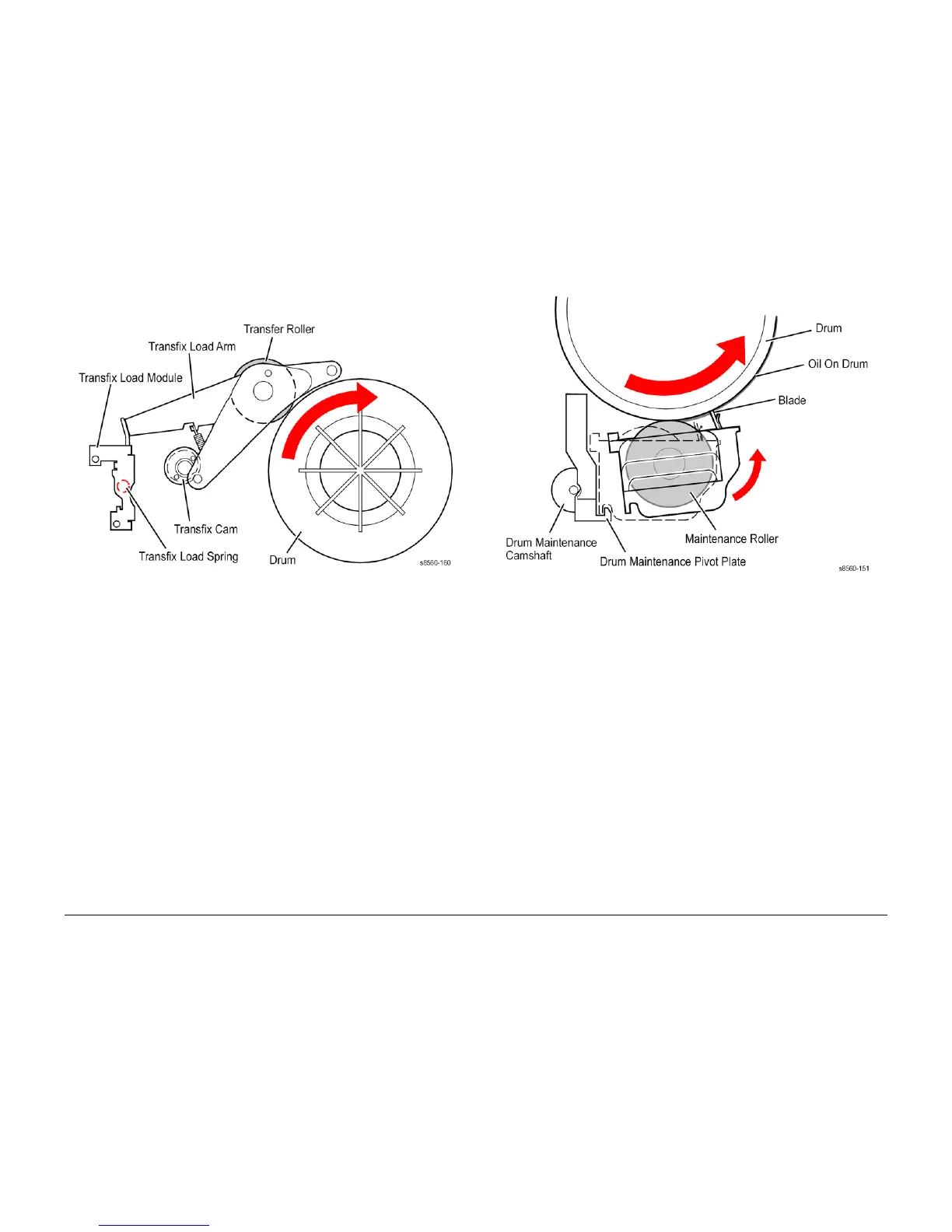
Never attempt to adjust or increase the transfix pressure of the springs.
Figure 18 Transfix System
Drum Maintenance System
The drum maintenance system creates a thin layer of silicone oil on the surface of the Drum
prior to printing. The oil keeps the ink from sticking to the Drum’s surface and facilitates image
transfer to the media. The oil is contained in a porous foam roller in the Drum Maintenance Kit.
Prior to each print, the Process Drive rotaes the Drum Maintenance Camshaft to move the
Drum Maintenance Pivot Plate forcing the oil roller and wiper blade against the Drum. The
wiper blade produces a smooth and even oil film across the Drum’s surface. The excess oil
drains back into the Drum Maintenance Kit through a felt filter for reuse. As the Drum com-
pletes one rotation, the Process Drive rotates the cam lowering the oil roller and wiper blade
away from the Drum.
The Drum has a floating deadband area. The deadband is a narrow section of the Drum’s sur-
face containing excess oil and other debris cleared by the drum maintenance wiper blade. An
oil bar is left on the Drum surface in this deadband area as the blade is lowered from the drum.
The deadband area’s location is controlled to keep it outside of the Drum’s image area.
An EEPROM, built-in to the Drum Maintenance Kit, stores the number of oiling cycles per-
formed by the drum maintenance system to track consumable life. At startup, four oiling cycles
are performed to condition the Drum.
Figure 19 Drum Maintenance
Purge System
Proper Printhead operation is dependant on the purge system shown in Figure 20. The purge
system uses air pressure to purge any debris or air bubbles that may be obstructing the Print-
head jets. Waste ink expelled during a purge cycle is removed from the Printhead by the Wiper
Blade and collected in the Waste Tray. Following the purge, a cleaning page is printed.













 To Next Page