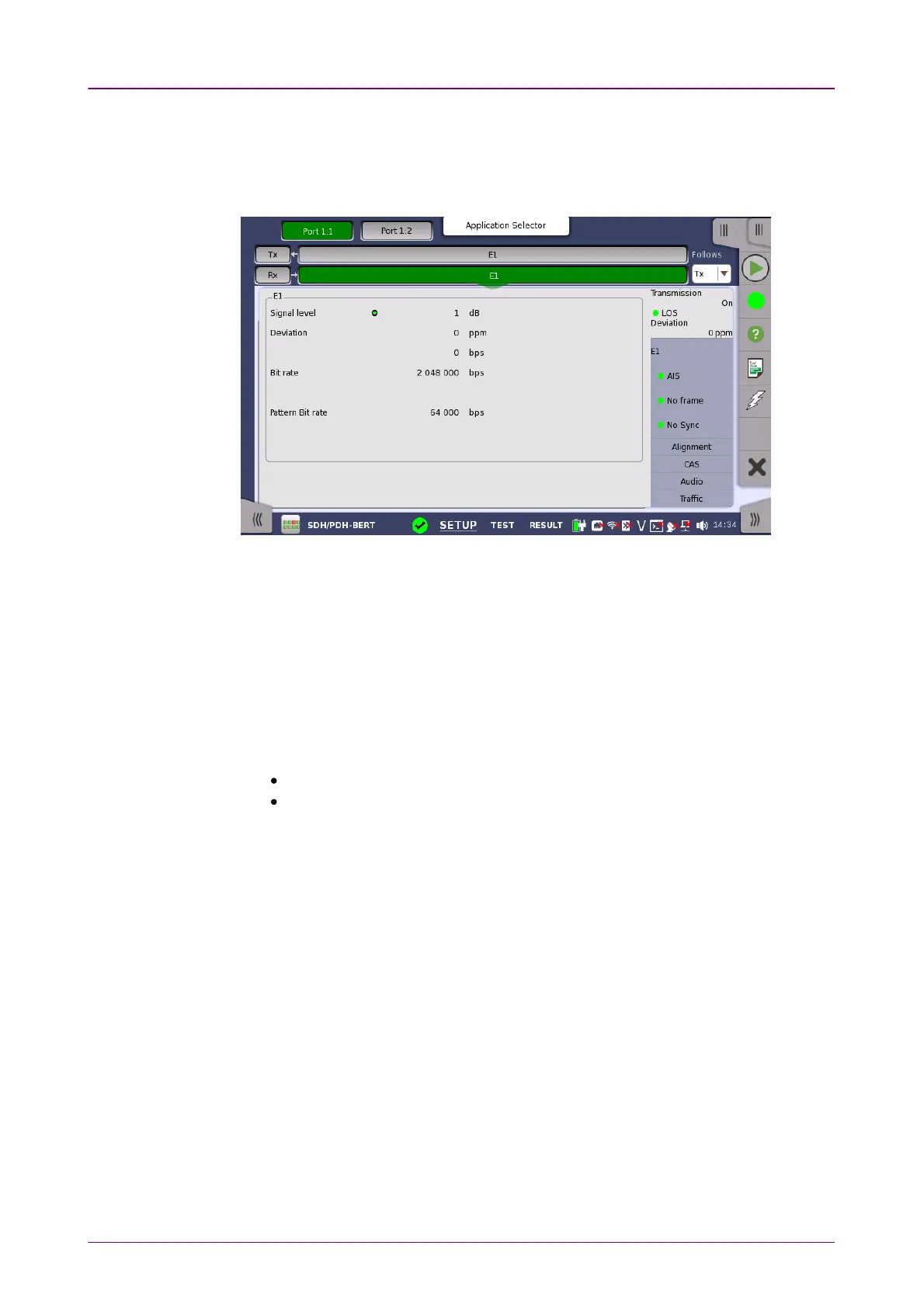
55..33..33..22 Physical DetailsPhysical Details
Touching the topmost summary box in the status area of the Ports SetupPorts Setup screen
displays the status shown below.
This screen presents detailed information about the current physical status of
the received signal at the 2 Mbps E1 layer.
The physical status information consists of the following parameters.
Signal levelSignal level
The Signal Level indicators show the attenuations (in dB) of the currently
received signals compared to a nominal signal.
The nature of the levels depend on the Input Level setup for each receiver
(Terminate or Monitor):
In Terminate mode, the attenuation is assumed to be caused by a cable.
In Monitor mode, linear attenuation is assumed.
DeviationDeviation
The deviation from the nominal bit rate is shown for each receiver in both ppm
and bps. The nominal bit rate is 2 048 000 bps.
Bit rateBit rate
The actual bit rate of each receiver is shown (in bps).
Pattern Bit ratePattern Bit rate
This field shows the effective bit rate of the patterns received (that is, the
number of pattern bits received per second).
55..33..33..33 Alarms and ErrorsAlarms and Errors
Touching the middle summary box in the status area of the Ports SetupPorts Setup screen
displays the status shown below.














 To Next Page