Test setup controlsTest setup controls
Test monitoringTest monitoring
informationinformation
66..33..11 Test SetupTest Setup
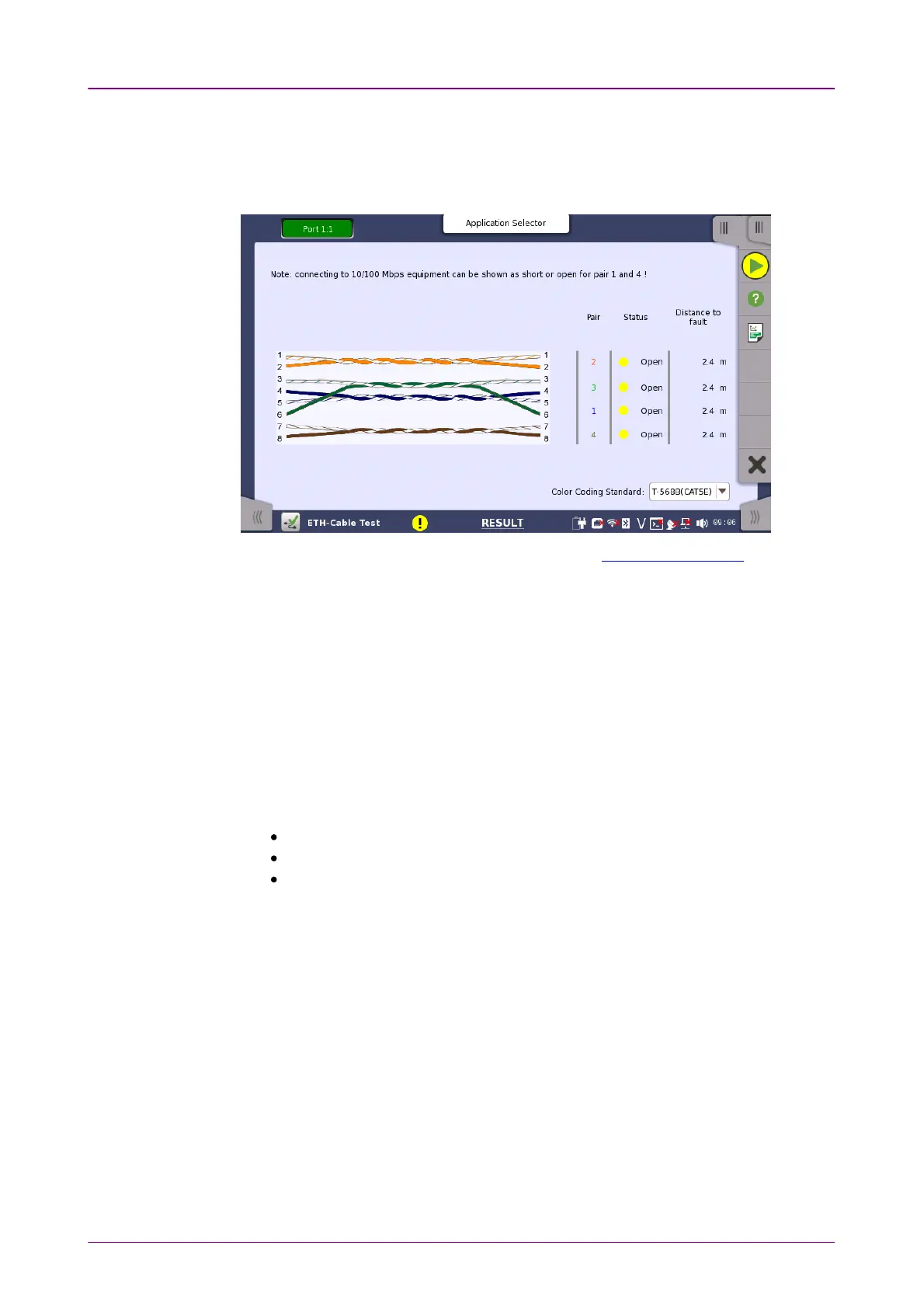
When you go to the test setup of the Ethernet Cable Test, the following screen
is displayed.
This screen allows you to control and monitor an Ethernet Cable Test.
Color Coding StandardColor Coding Standard
Allows you to select the color coding used for the graphical representation of
the cables. In the drop-down menu, you can choose between T-568A (CAT5)T-568A (CAT5)
and T-568B (CAT5E)T-568B (CAT5E).
PairPair
Lists the individual cable pairs in relation to the pin number and color coding.
StatusStatus
Shows the status of the wires inside the cable. The Lamp indicator will be
green
if there is no problem and
red
if there is a problem.
OKOK indicates a fully functional cable.
ShortShort indicates a short circuited cable.
OpenOpen indicates an open circuited cable.
Distance to faultDistance to fault
In case of cable troubles (i.e. an open or a short circuit) the distance to the
problem will be indicated approximately in this field.
Detectable distance to the fault is up to 100 m.














 To Next Page