Measurement ModeMeasurement Mode button appears in the Navigation area only when starting the BERT
by Application selector.
Measurement ModeMeasurement Mode
Touch the field to select the application.
BERT
RTD
APS
Pointer movementPointer movement
Touch the field to select the Pointer movementPointer movement button display in Result screen.
Selecting OnOn displays the Pointer movementPointer movement button.
If selecting OffOff, Pointer movementPointer movement button on Test screen is hidden. However,
Estimate of test duration varies depending on the Interval lengthInterval length setting.
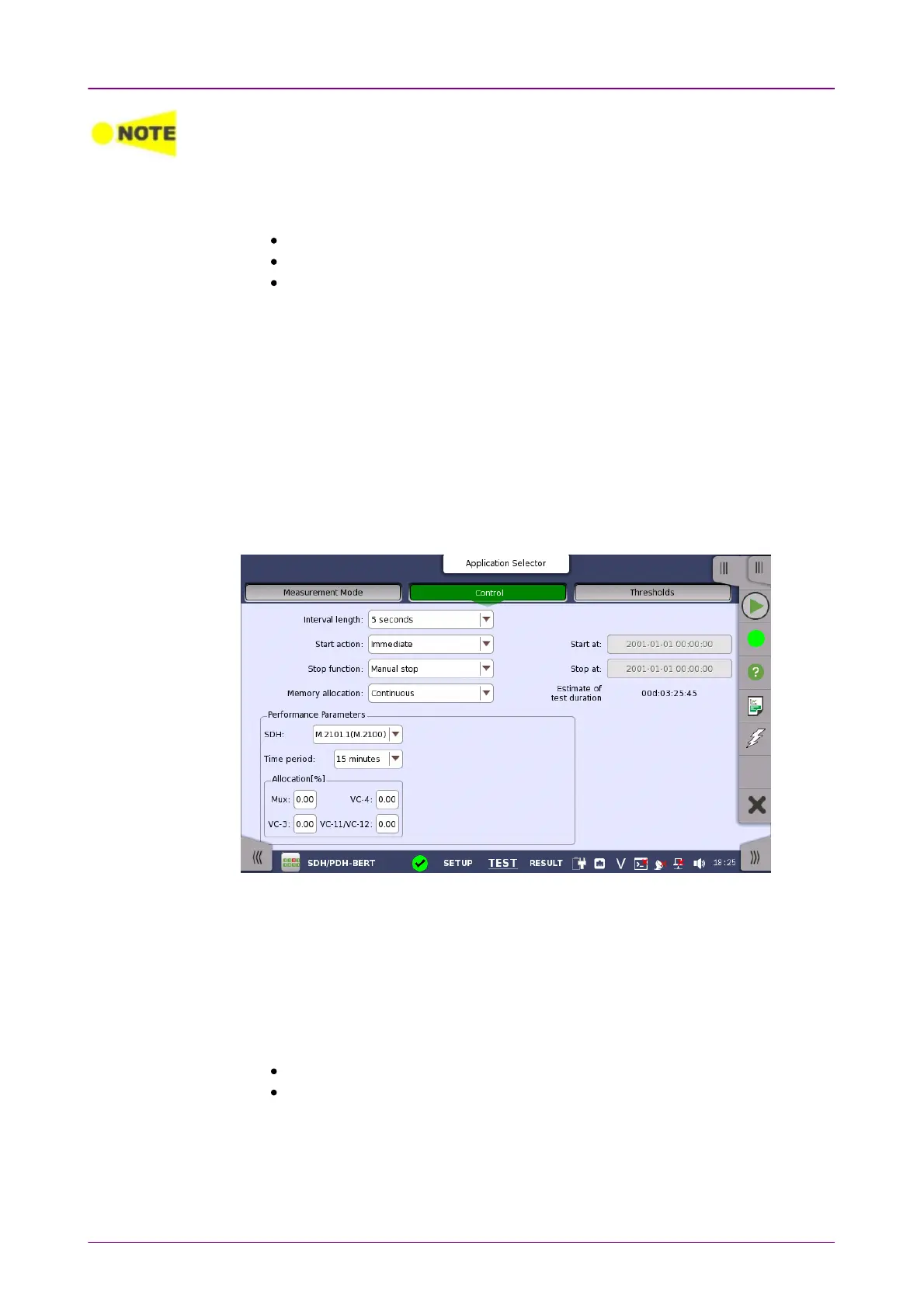
55..99..22..22 ControlControl
Touching the ControlControl button in the navigation area displays the following
screen.
This screen contains the parameters that are generally required in a BERT test
setup.
Interval lengthInterval length
Allows you to specify the length of the measurement intervals.
Start actionStart action
Allows you to specify when the measurement is started.
ImmediateImmediate: Starts the measurement when you touch the StartStart button.
Start atStart at: Starts the measurement at the time specified in the Start atStart at field on
the right.
Stop functionStop function
Allows you to specify when the measurement ends. Select the relevant option
from the drop-down menu:














 To Next Page