Sky ViewSky View
SatellitesSatellites
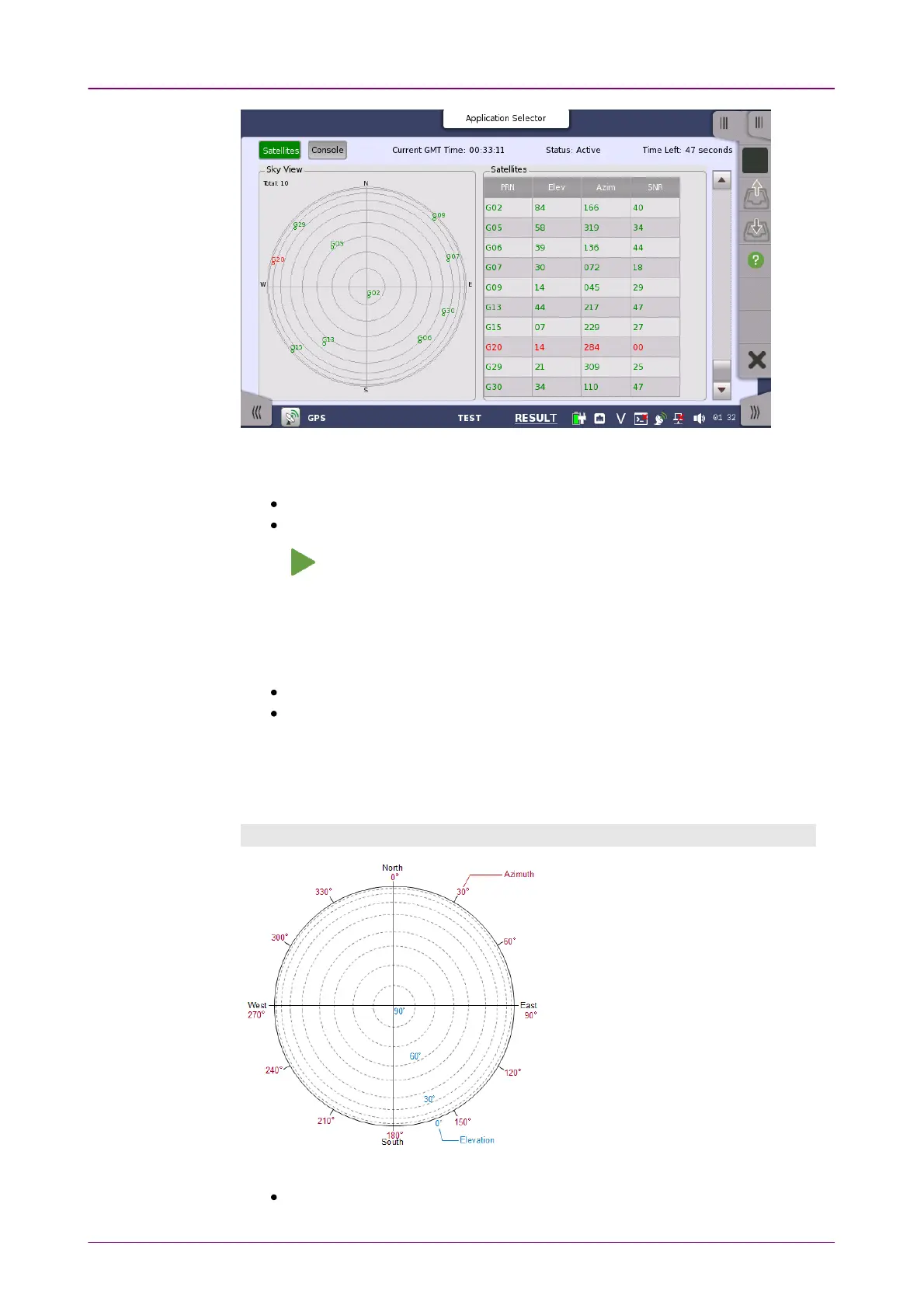
This screen displays positions of satellite and the logged data. Touch a left top
button to switch the result to display.
SatellitesSatellites: Displays the satellite positions by the chart and the table.
ConsoleConsole: Displays the logged data received from GPS receiver.
Touch to start a test.
Current TimeCurrent Time
The time received from GPS appears.
StatusStatus
Active: Data have been received from GPS receiver.
Stopped: Data reception from GPS receiver has stopped.
Time LeftTime Left
When TimedTimed is selected on the Test setup screen, the remaining test time is
displayed.
SatellitesSatellites
Radius of the circle
corresponds to the
elevation. The
position at circle edge
is where the elevation
is 0 degree.
Clockwise angle
corresponds to the
azimuth. Top of the
circle corresponds to
north.
Data of the received satellites are displayed.
PRN: Displays the satellite number. (Pseudo-Random Noise sequences)














 To Next Page