MP-202 Telephone Adapter 72 Document #: LTRT-50605
User's Manual
8.4 802.1p Mapping
The IEEE 802.1p priority marking method is a standard for prioritizing network traffic at the
data link/Mac sub-layer. 802.1p traffic is simply classified and sent to the destination, with
no bandwidth reservations established.
The 802.1p header includes a 3-bit prioritization field, which allows packets to be grouped
into eight levels of priority. The gateway maps these eight levels to three main priorities:
high, medium and low. By default, values six and seven are mapped to high priority, which
may be assigned to network-critical traffic. Values four and five are mapped to medium
priority, which may be applied to delay-sensitive applications, such as interactive video and
voice. Values three to zero are mapped to low priority, which may range from controlled-
load applications down to ‘loss eligible’ traffic. The zero value is normally used for best-
effort traffic. It is the default value for traffic with unassigned priority.
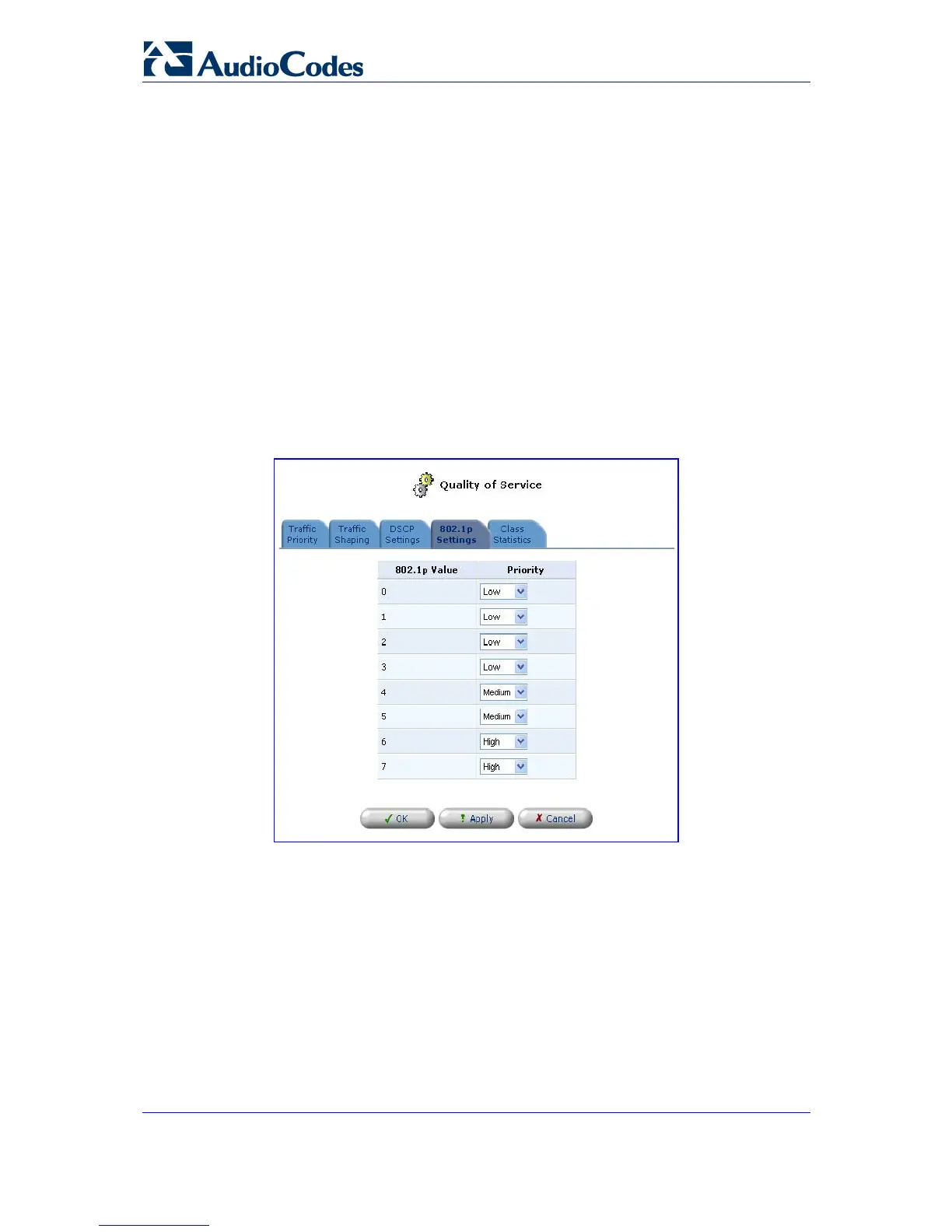
Click the QoS link on the sidebar and then click the tab '802.1p Settings'; the following
screen opens:
Figure 8-10: QoS - 802.1p Settings
The eight 802.1p values are pre-configured with the three priority levels: high, medium
and low. You can change these levels for each of the eight values in their respective
combo box.
Click ’OK’ to save the settings.


 To Next Page