● Y
ou can also congure the setting to receive faxes automatically after the machine rings for a certain
period of time.
[Switch to Auto RX](P. 445)
4
Press [Apply].
➠ The [Connect T
elephone Line] screen is displayed.
Step 4: Connecting to Telephone Line
Use the supplied telephone cor
d to connect the machine to the telephone line.
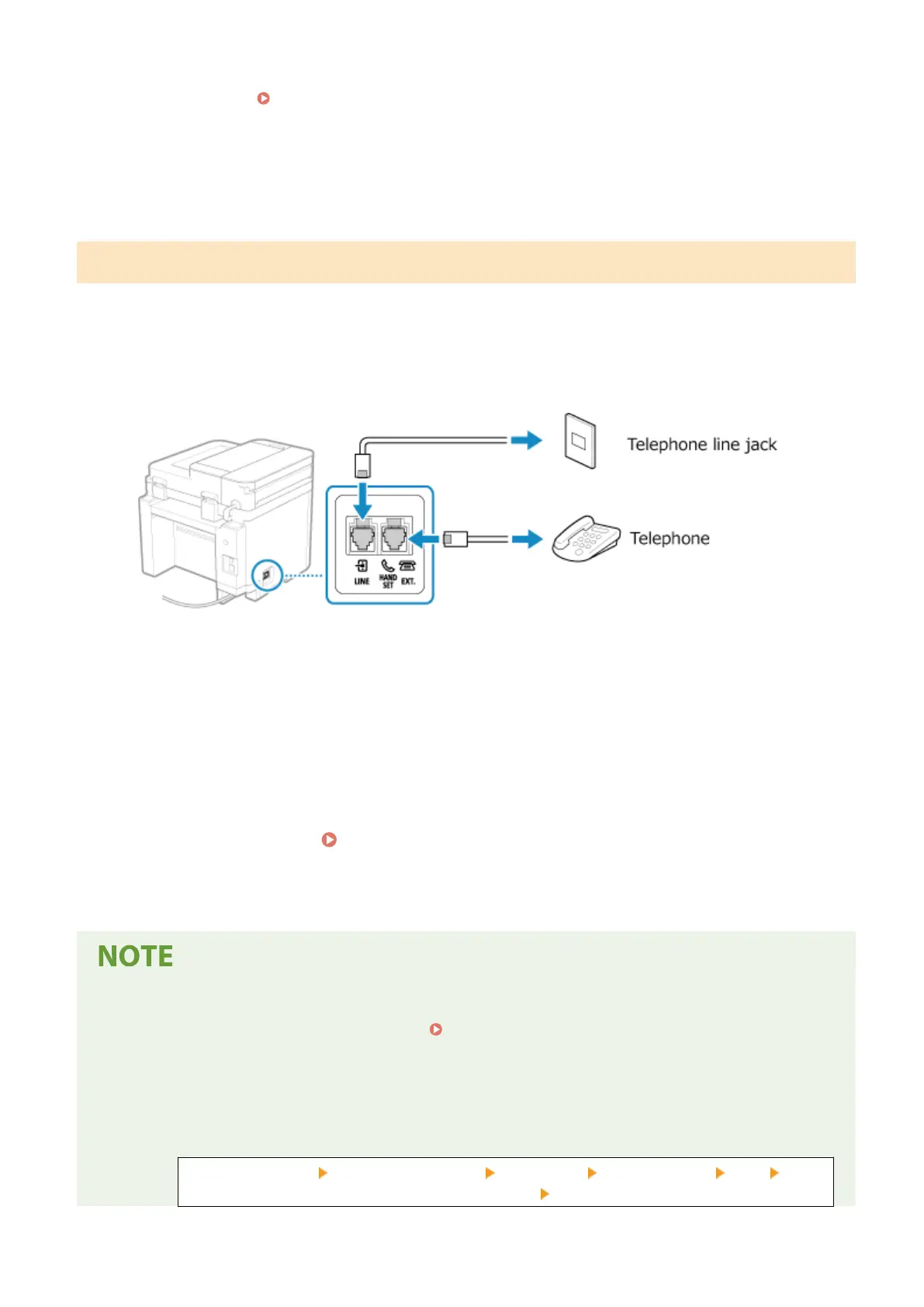
When using a telephone, connect it to the machine.
1
Connect the supplied telephone cord to the telephone line jack (LINE) on the
machine and the telephone line connector on the wall.
Connect the telephone to the external telephone jack (EXT.) on the machine.
● When
connecting a telephone with fax function, be sure to disable the fax auto receive setting on the
telephone.
● Depending on the type of telephone connected to it, the machine may not be able to send or receive faxes
properly.
2
On the screen conrming that you want to e
xit the Fax Setup Guide, press [Yes].
3
Restart the machine.
Restarting the Machine(P. 106)
➠ The settings congur
ed in the Fax Setup Guide are applied, and the type of telephone line is congured
automatically.
If the Type of Telephone Line Is Not Congur
ed Automatically
● Congure the type of telephone line manually.
[Select Line Type](P. 438)
* If you do not kno
w the type of your telephone line, contact your telephone company.
Making an Alert Sound When the Handset Is Not Properly Set on the Cradle
● You can select whether the machine makes an alert sound when the handset of a telephone connected to
the machine is not properly set on the cradle.
Log in to Remote UI [Settings/Registration] [TX Settings] [Fax TX Settings] [Edit] Select
the [Off-Hook Alarm] checkbo
x and adjust the volume
[OK]
Setting Up
97











 To Next Page