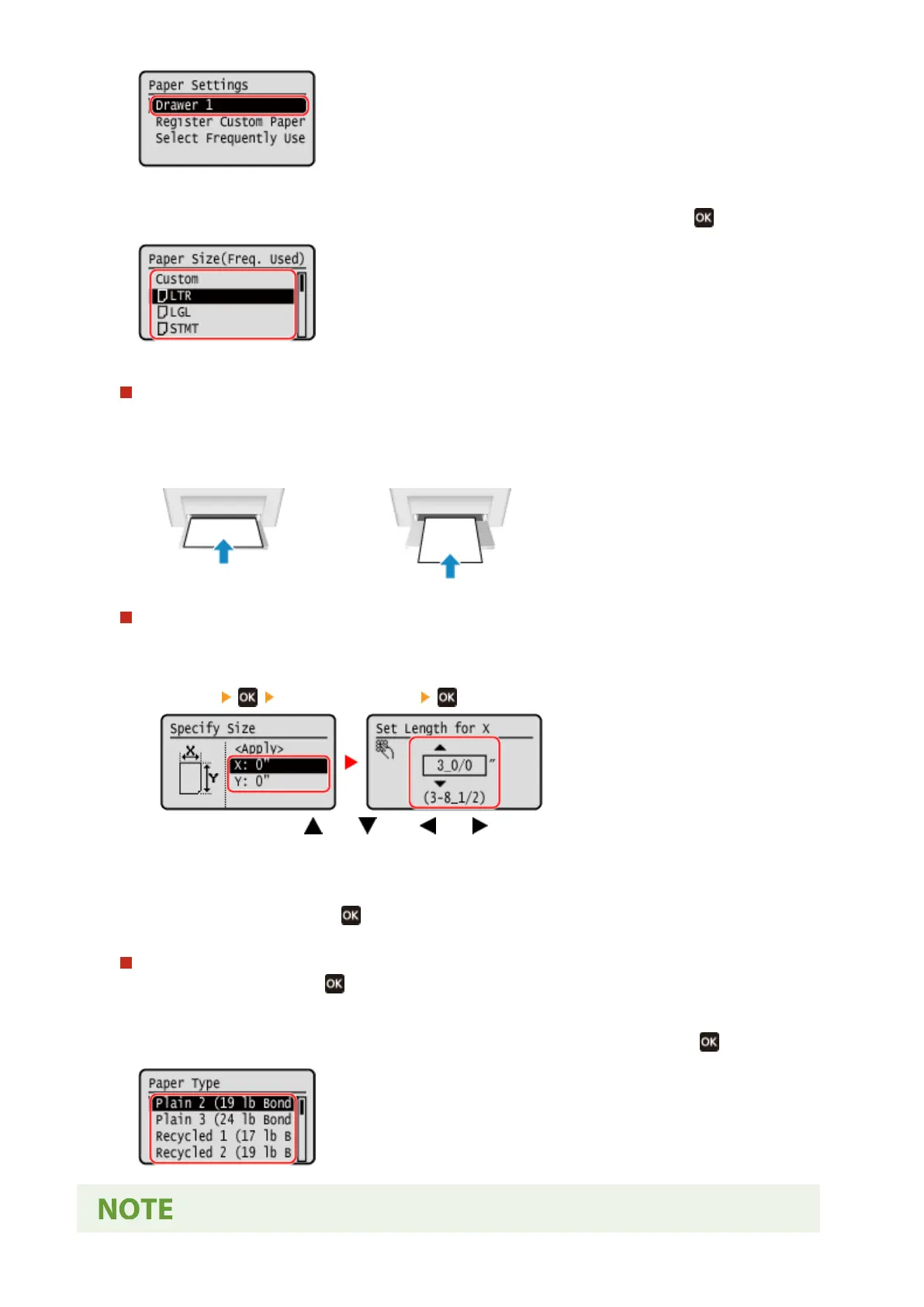
3
Select the size of the paper loaded in the paper drawer, and press
.
You can scroll the screen to view paper sizes (such as envelopes) not displayed on the screen.
When A5 Size Paper Is Loaded
When paper is loaded in the landscape orientation, select [A5]. When paper is loaded in the portr
ait
orientation, select [A5R].
Landscape orientation (A5)
Portrait orientation (A5R)
When Non-standard Size (Custom Size) Paper Is Loaded
1
Press [Custom].
2
Press [X]
enter the value in [X] .
Enter the value using and , with and to move the cursor between the digits for inputting
whole numbers and fr
actions.
3
Enter the value in [Y] in the same way as [X].
4
Select [<Apply>], and press
.
If a Set Paper Size Is Not Displayed
Pr
ess [<Other Sizes>], press
, and select the paper size from the displayed list.
4
Select the type of the paper loaded in the paper drawer, and press .
Basic Operations
143











 To Next Page