5
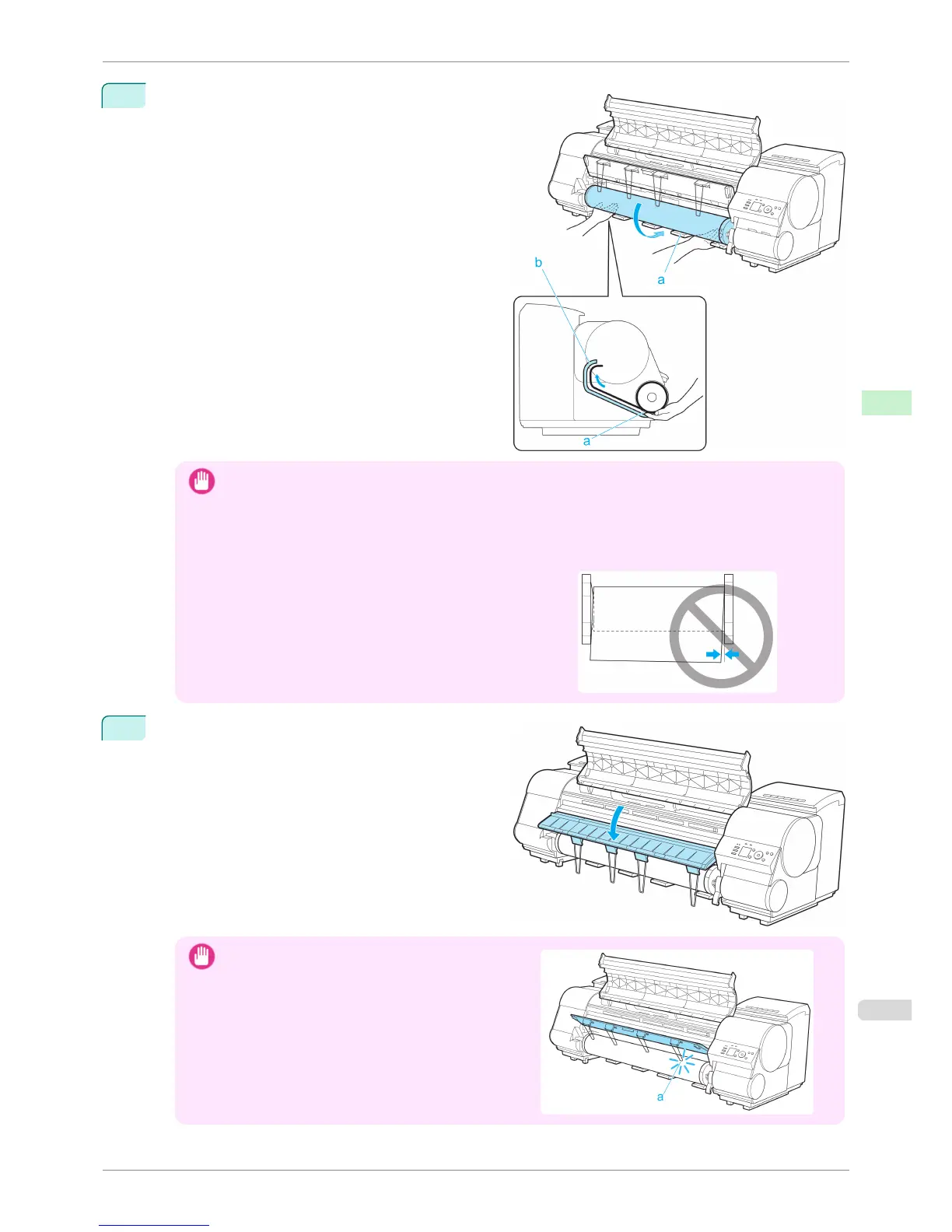
Pull out the roll evenly on both ends and insert it in
the Paper Feed Slot (a). Advance the roll until it
touches the Paper Retainer (b).
Once the roll reaches the Paper Retainer, it is auto-
matically advanced over the Platen.
Important
• When handling the roll, be careful not to soil the printing surface. Otherwise, it may affect printing quality. We
recommend wearing clean cloth gloves when handling rolls to protect the printing surface.
• If the paper is wrinkled or warped, straighten it out before loading it.
• For paper that tends to curl, lift the Release Lever and manually pull the roll paper over the Platen.
•
Load paper straight so it is not fed askew.
6
Lower the Ejection Guide.
Important
•
When lowering the Ejection Guide, lower it slowly. If
the Ejection guide is lowed forcefully, the Ejection
Supports (a) may hit the roll and scratch the printing
surface.
iPF8400S
Loading Rolls in the Printer
User's Guide
Handling and Use of Paper Handling rolls
473














 To Next Page