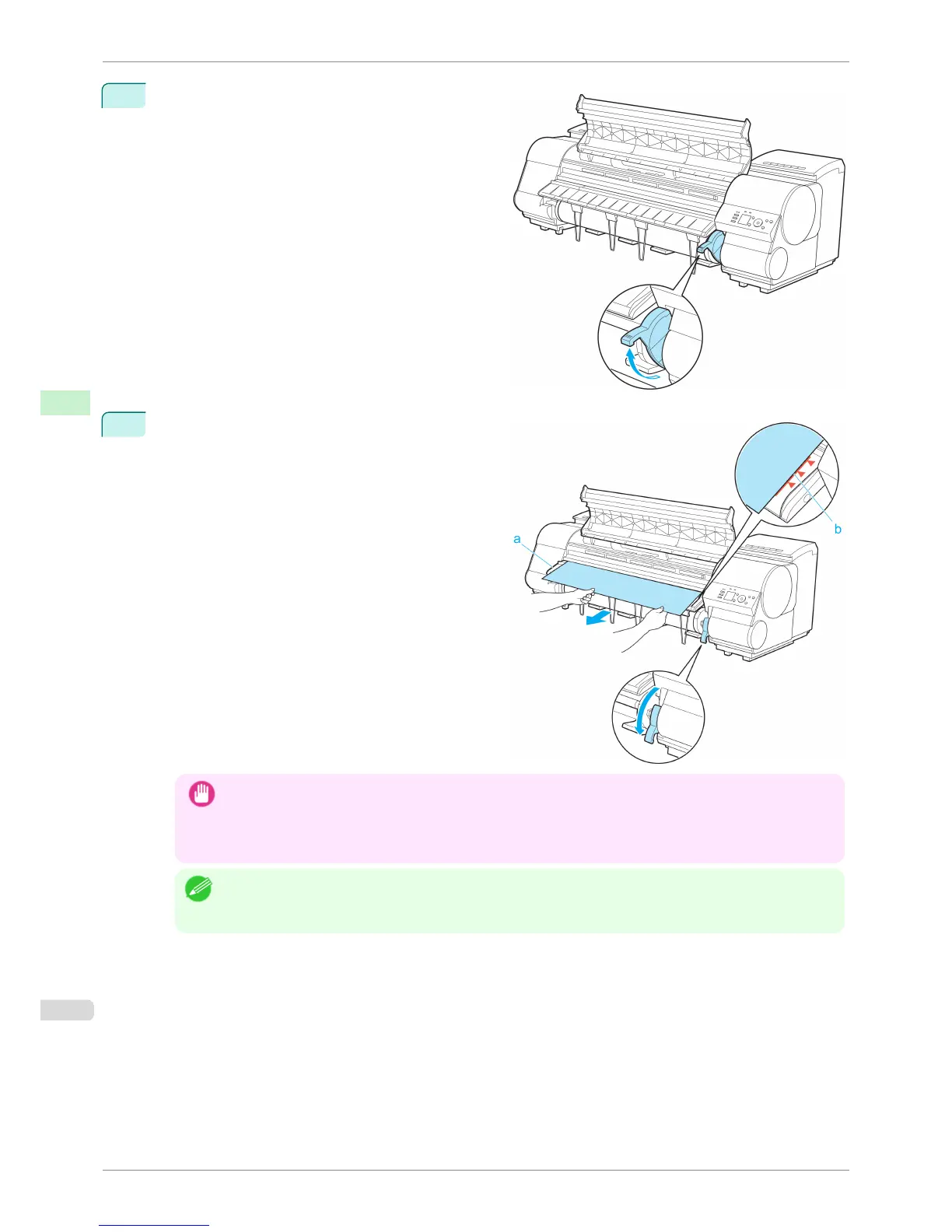
7
Holding the edge of the roll paper, lift the Release
Lever.
8
Hold the edge of the roll paper as you gently pull it
evenly with both hands to the position of the Ejection
Guide (a). Align the right side of the roll paper with
the Paper Alignment Line (b), keeping this side paral-
lel to the line, and then lower the Release Lever.
Important
• Do not omit steps 7 and 8. If paper cannot be advanced straight or if it wrinkles, it may jam or rub against the
Printhead.
• Do not force the roll paper into alignment with the paper alignment line (b). This may prevent the paper from
being advanced straight.
Note
• You can adjust the strength of suction holding paper against the Platen when the Release Lever is released. If it
is difficult to load paper, press the ▲ or ▼ button on the Control Panel to adjust the strength. Set suction stron-
ger by pressing the ▲ button or weaker with the ▼ button. Three settings are available.
Loading Rolls in the Printer
iPF8400S
User's Guide
Handling and Use of Paper Handling rolls
474














 To Next Page