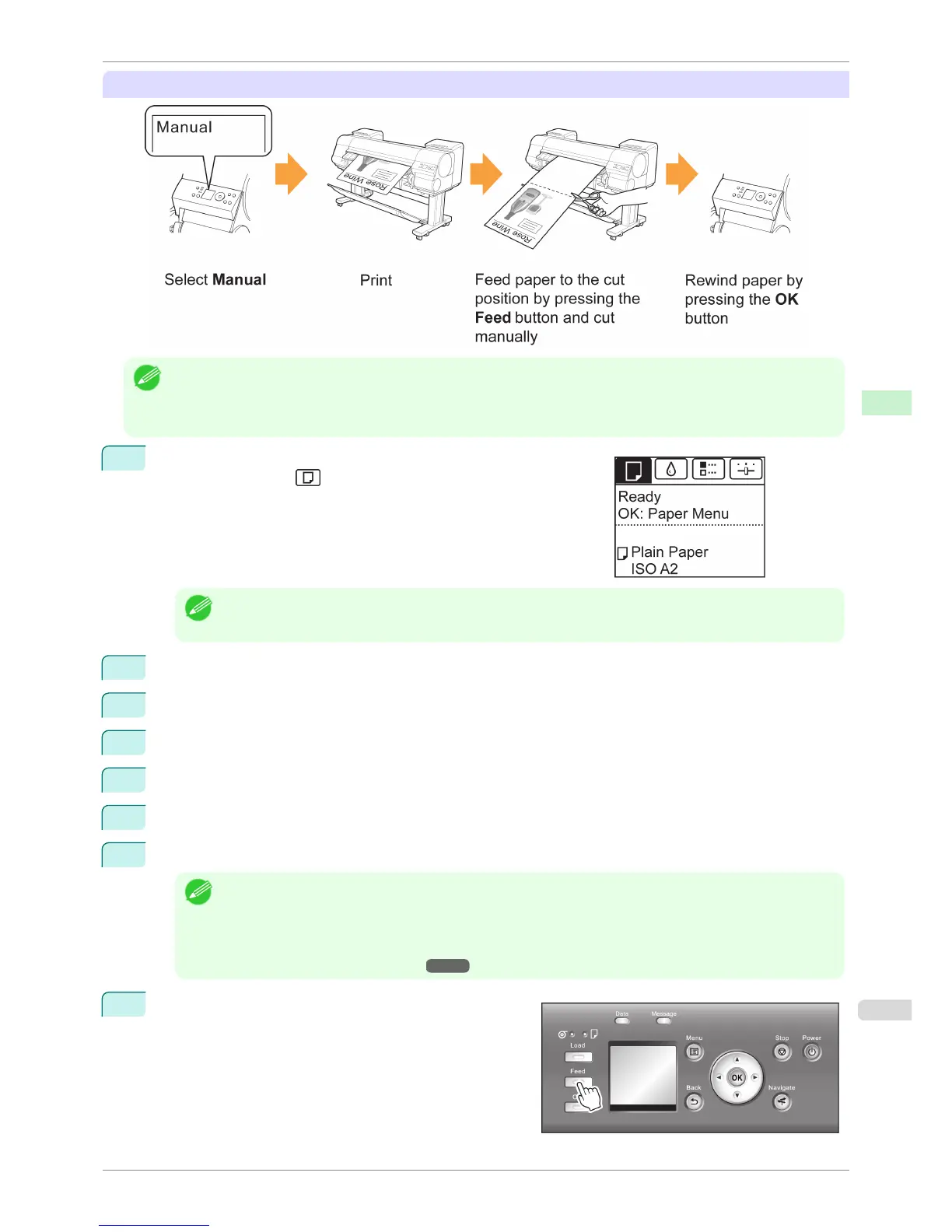
Manual (for paper of which the leading edge rubs the printhead)
Note
• Once the following step has been performed, the procedure can be started from step 10 the next time.
• Printing the second and subsequent times
• Printing after replacing with the same type of paper
1
On the Tab Selection screen of the Control Panel, press ◀ or ▶ to
select the Paper tab ( ).
Note
• If the Tab Selection screen is not displayed, press the Menu button.
2
Press the OK button. The Paper Menu is displayed.
3
Press ▲ or ▼ to select Paper Details, and then press the OK button.
4
Press ▲ or ▼ to select the type of paper, and then press the OK button.
5
Press ▲ or ▼ to select Cutting Mode, and then press the OK button.
6
Press ▲ or ▼ to select Manual, and then press the OK button.
7
When "Perform the detection of paper leading edge?" is displayed, select Do not perform.
Note
• If you set the detection of paper leading edge to Do not perform, a margin of about 10 cm is created at the
paper leading edge when printing starts.
• When the detection of paper leading edge is set to Do not perform, printing will start at the position at which
the roll was set for the first printing after replacing a roll. Thus, the margin of the paper leading edge will enlarge.
(See "Loading Rolls in the Printer.") ➔ P.471
8
Press the Feed button.
iPF8400S
Specifying the Cutting Method for Rolls
User's Guide
Handling and Use of Paper Handling rolls
487














 To Next Page