8
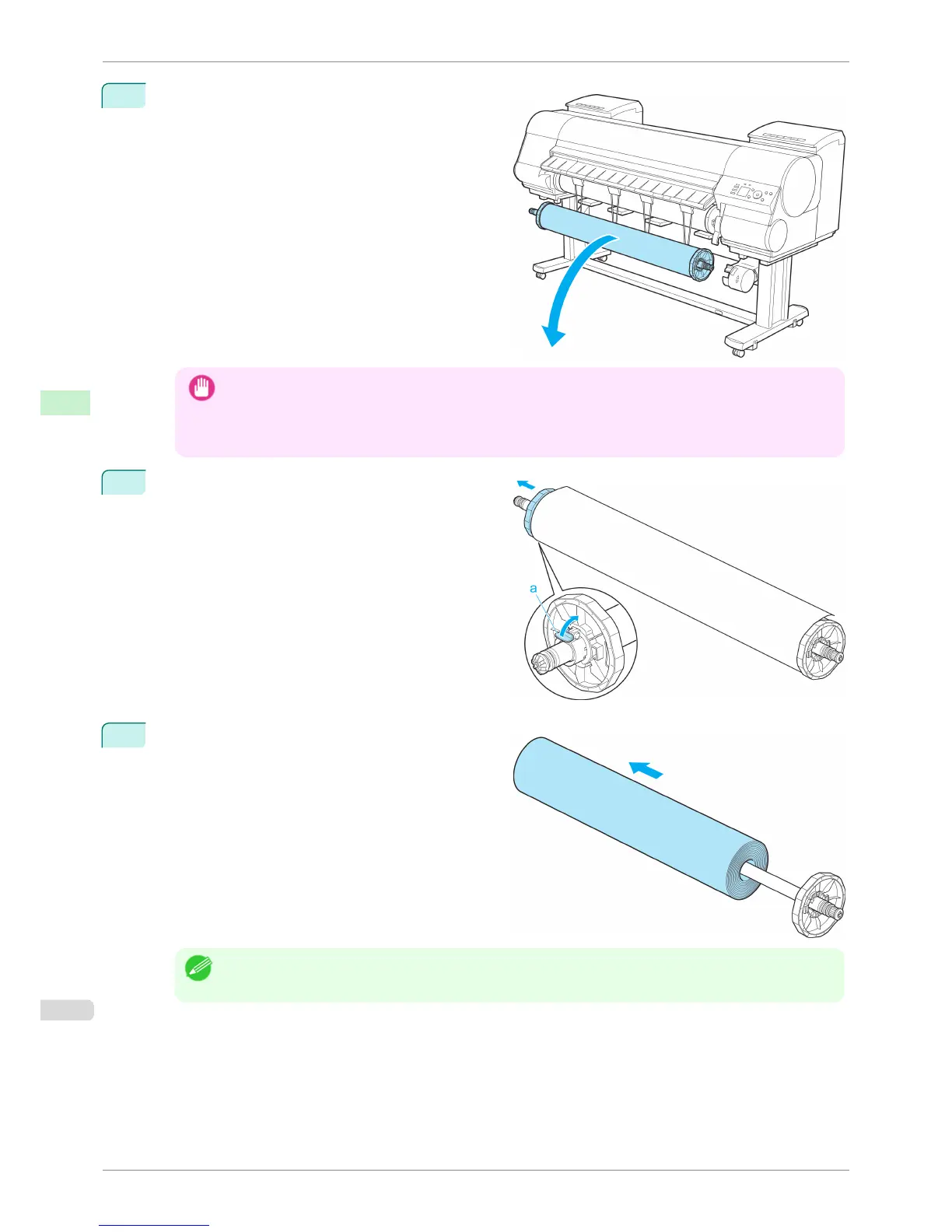
Remove the Rewind Spool from the Media Take-up
Unit.
Important
• Always turn off the Media Take-up Unit before removing the Rewind Spool. The Media Take-up Unit may be
damaged if you do not turn it off first.
• Remove the Rewind Spool, pulling off both ends from the Media Take-up Unit at once. If you do not pull off
both ends at once, the Media Take-up Unit may become damaged.
9
Unlock the flange on the left side of the Rewind Spool
by lifting the lever (a) from the shaft side. Remove the
flange.
10
Remove the entire paper core with the rewound prin-
ted documents from the Rewind Spool.
Note
• You can leave the Rewind Spool on the Media Take-up Unit even when it is not used for rewinding rolls.
Removing Printed Documents from the Media Take-up Unit (Optional)
iPF8400S
User's Guide
Handling and Use of Paper Media take-up unit
516














 To Next Page