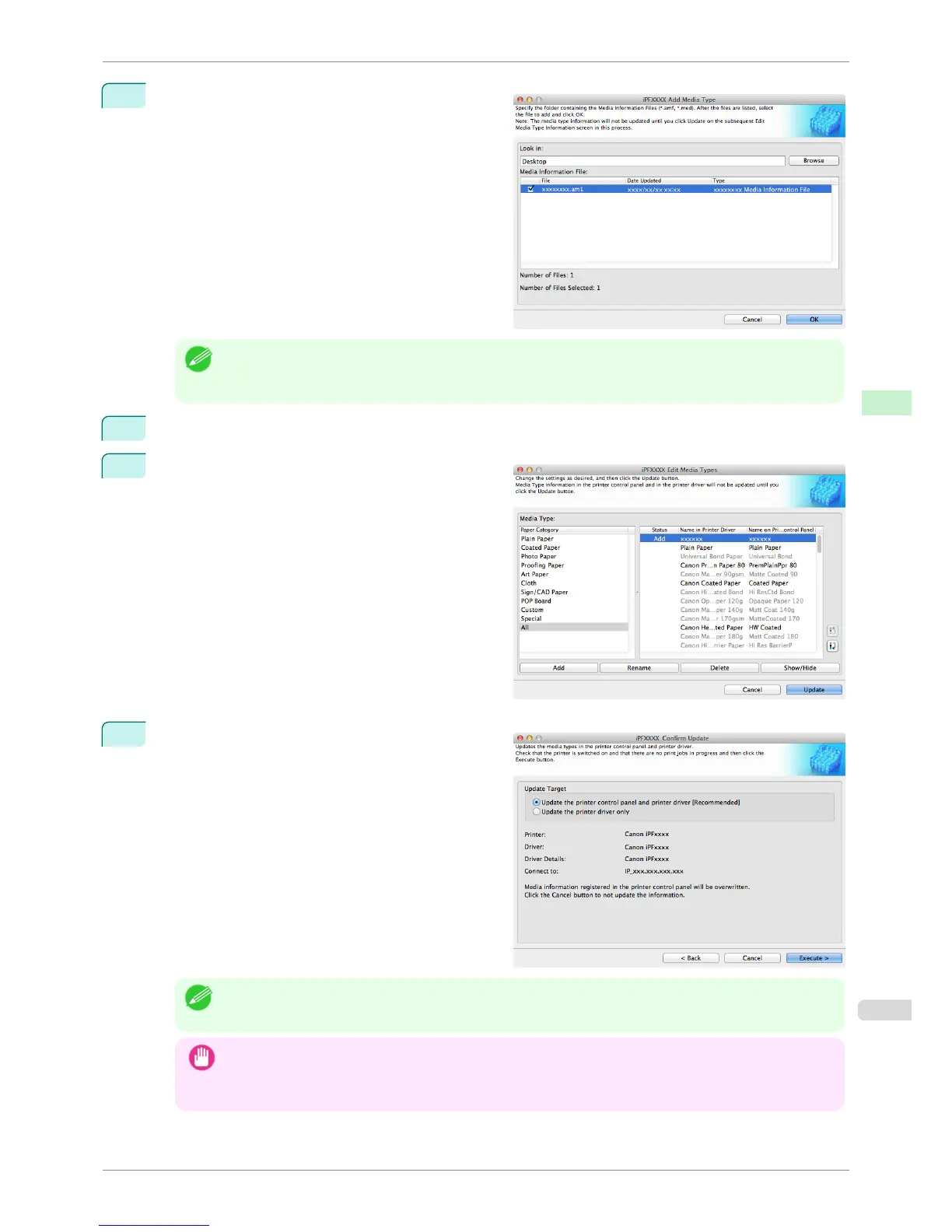
4
The names of the media information files contained in
the selected folder are displayed in Media Informa-
tion File in the Add Media Type dialog box. Select
the check box for the paper you want to add and click
the OK button.
Note
• If Master Media Information File is displayed as the Type of the Media Information File, the media type dis-
play order and media type display/non-display settings are initialized. Reconfigure these after added the master
media information file.
5
Click
OK when the confirmation message is displayed.
6
In the Edit Media Types dialog box, click the Update
button.
7
The Confirm Update dialog box is displayed.
Configure Update Target and click the Execute but-
ton.
Communication with the printer begins.
Note
• You should normally select Update the printer control panel and printer driver.
Important
• When setting a data to the printer that differs from the data to be updated, the selected media information file is
updated. When you would like to remain the data that is set to the printer, click the Cancel button.
• Do not attempt to print or turn the printer off while the program is communicating with the printer.
iPF8400S
Adding Media Types
User's Guide
Handling and Use of Paper Media Configuration Tool (Mac OS)
551














 To Next Page