*1: A rough estimate of the amount of ink consumed per print job is displayed. Actual ink consumption may be different. The average
margin of error for estimates calculated according to Canon measurement conditions for ink costs is ±15%. Canon does not guar-
antee the accuracy of these estimates. Estimates may vary depending on conditions of use. Calculation of these estimates does
not include ink consumed when cleaning printheads by forceful ejection of ink.
Set./Adj. Menu
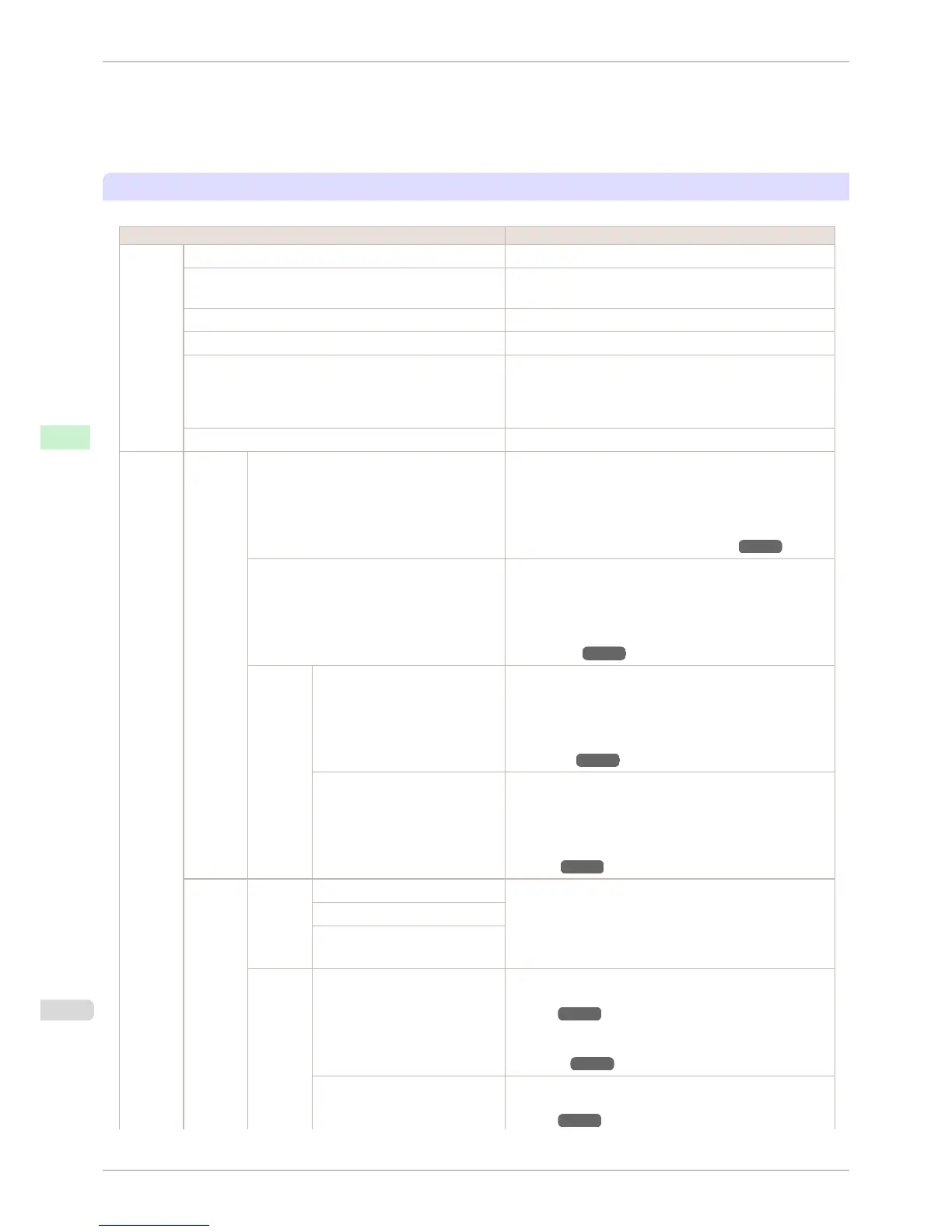
Limited items are displayed during printing. The displayed items are indicated by annotations.
Setting Item Description, Instructions
Test
Print
Nozzle Check Print a test pattern to check the nozzles.
Status Print Print information about the setting values and condition of the
printer.
Interface Print Print interface settings information.
Paper Details Print the paper settings as specified in Paper Details.
Print Job Log Print a record of print jobs, including the paper type and size,
amount of ink consumed, and so on. Ink consumption indi-
cates a rough estimate of the amount of ink consumed per
print job.(*1)
Menu Map Print the menu structure.
Adjust
Printer
Head
Posi.
Adj.
Standard An adjustment pattern is printed and the print position is au-
tomatically adjusted to fix misaligned printing. Select Stand-
ard if vertical lines in printed material are warped or colors
are out of alignment. Select Standard also if the printing re-
sults are not improved by executing Simple. (See "Automatic
Adjustment to Straighten Lines and Colors.") ➔ P.712
Simple An adjustment pattern is printed and the print position is au-
tomatically adjusted to fix misaligned printing. Simple exe-
cutes a simple adjustment in a short time. Select Simple
when frequently adjusting the printhead, such as during daily
maintenance. (See "Automatic Adjustment to Straighten Lines
and Colors.") ➔ P.712
Other Initial adjustmt Printhead position adjustment is executed during the initial
setup. If adjusting the printhead position has not been per-
formed such as due to an error during initial setup or the
state of the operating settings when replacing the printhead,
select Initial adjustmt. (See "Adjustment When Installing the
Printhead.") ➔ P.715
Manual Input the setting values from the adjustment pattern printing
results and adjust the printing position to fix misaligned print-
ing. Normally, select Standard. However, when printing on
special paper, or if printing is not improved after Standard,
try Manual. (See "Manual Adjustment to Straighten Lines and
Colors.") ➔ P.714
Feed
Priority
Adj. Pri-
ority
Automatic Specify exact paper feeding, if desired. Normally, select Au-
tomatic. Choose Print Quality for attractive printing. Choos-
ing Print Quality also makes banding less noticeable.
Choose Print Length if you prefer to feed the paper an exact
amount.
Print Quality
Print Length
Adj.
Quality
Auto(GenuinePpr) Specify this mode with paper identified in the Paper Refer-
ence Guide. (See "Displaying the Paper Reference
Guide.") ➔ P.462
The printer prints and reads a test pattern for automatic ad-
justment of the feed amount. (See "Automatic Banding Ad-
justment.") ➔ P.719
Auto(OtherPaper) Specify this mode with paper not in the Paper Reference
Guide. (See "Displaying the Paper Reference
Guide.") ➔ P.462
Menu Settings
iPF8400S
User's Guide
Control Panel Printer Menu
594














 To Next Page