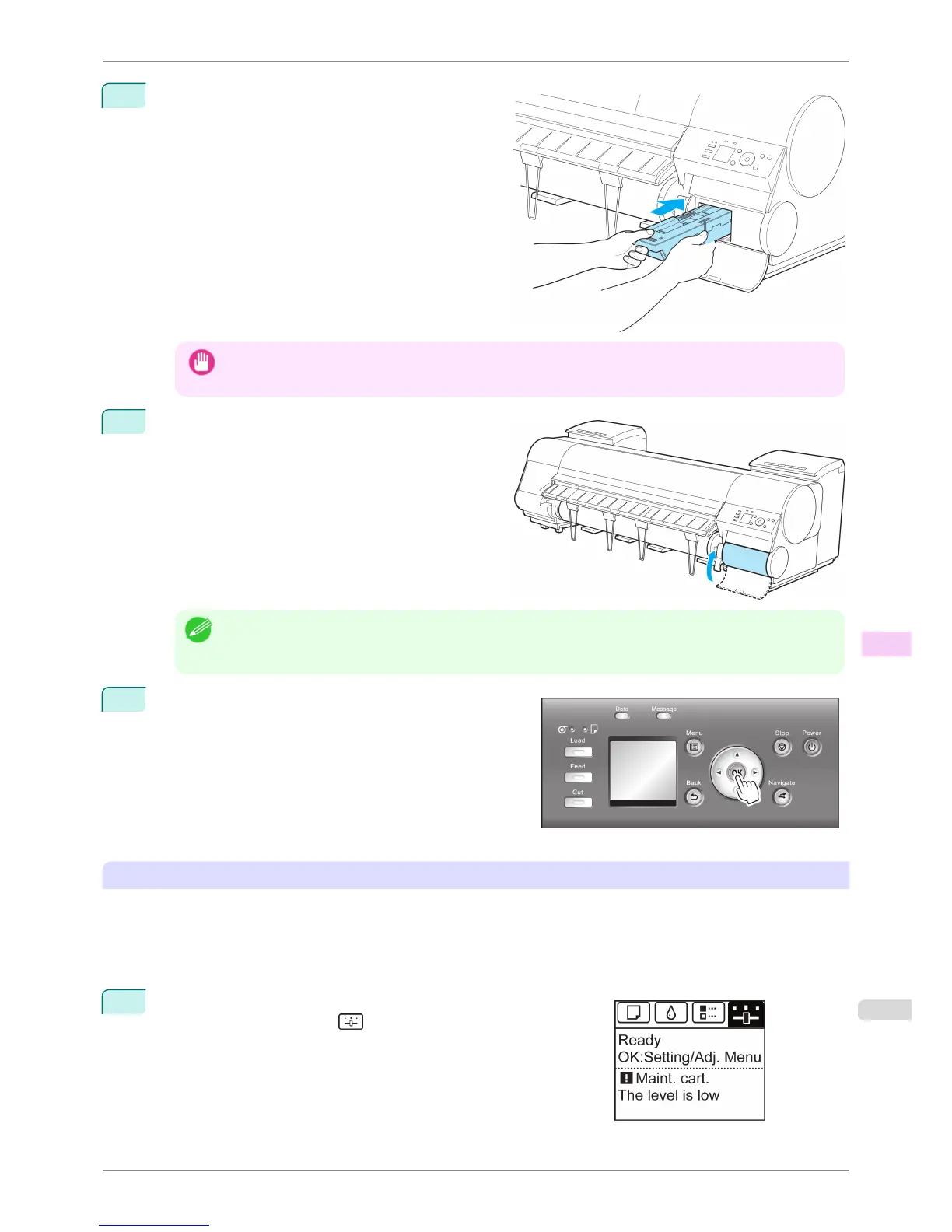
7
Keeping the new Maintenance Cartridge level, insert
it all the way in.
The printer now initializes the Maintenance Cartridge.
Important
• Do not remove the Maintenance Cartridge during initialization immediately after replacing the Maintenance
Cartridge. The Maintenance Cartridge may become damaged.
8
Close the Maintenance Cartridge Cover.
Note
• If you did not perform the operation in Access the menu for Maintenance Cartridge replacement, this is the
end of the procedure and you do not need to press the OK key in the next step.
Next, replace the Shaft Cleaner.
9
Press the OK button.
Next, replace the Shaft Cleaner.
Replacing the Shaft Cleaner
Replace the Shaft Cleaner when you replace the Maintenance Cartridge. New Shaft Cleaner is included with re-
placement Maintenance Cartridge.
After you execute Repl. maint cart and replace the Maintenance Cartridge, a message will appear on the Display
Screen requesting you to replace the Shaft Cleaner. Select Yes and press the OK button. When a message re-
quests you to open the Top Cover, go to step 5.
1
On the Tab Selection screen of the Control Panel, press ◀ or ▶ to
select the Settings/Adj. tab ( ).
iPF8400S
Replacing the Maintenance Cartridge
User's Guide
Maintenance and Consumables Maintenance Cartridge
835














 To Next Page