Advanced Guide
Troubleshooting
Contents
>
Preparing for Faxing
>
Specifying the Basic Settings for Faxing
> Sender Information
Sender Information
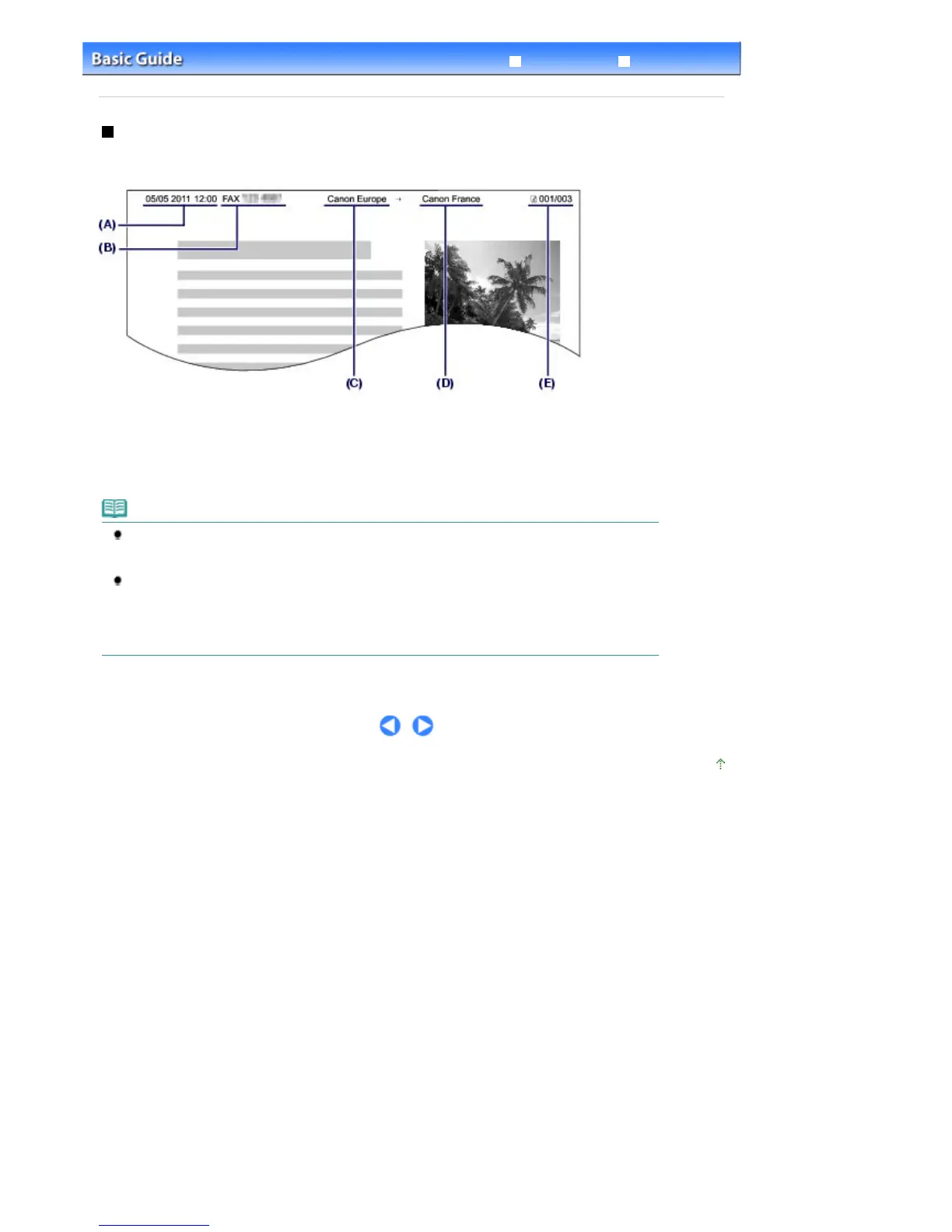
If the unit name and unit fax/telephone number are registered, they are printed with date and time as
sender information on the recipient's fax.
(A) Date and time of transmission
(B) Unit fax/telephone number
(C) Unit name
(D) The registered recipient's name is printed when sending faxes with the coded speed dial.
(E) Page number
Note
You can print User's data list to confirm the sender information you have registered.
For details, refer to the on-screen manual:
.
Available sender information settings
The following settings are available.
- When sending faxes in black & white, you can select whether to print the sender information
inside or outside the image area (TTI position).
- You can select the date print format from three formats: YYYY/MM/DD, MM/DD/YYYY, DD/MM/
YYYY (Date display format in Device user settings).
Page top
Seite 19 von 922 SeitenSender Information















 To Next Page