Advanced Guide
Troubleshooting
Contents
> Loading Paper / Originals > Loading Originals
> How to Load Originals for Each Function
C078
How to Load Originals for Each Function
Loading the Original to Be Aligned with the Alignment Mark
Load originals to copy or fax
In the scan mode,
-
select
USB flash drive
to scan originals
-
select
PC
, and select
Auto scan
for
Document type
to scan text documents, magazines, or
newspapers
-
select
PC
, and select
Document
or
Photo
for
Document type
and specify a standard size (A4,
Letter, etc.) for
Scan size
to scan originals
With a software application on a computer,
-
scan text documents, magazines, or newspapers
-
select a standard size (A4, Letter, etc.) in
Document Size
to scan originals
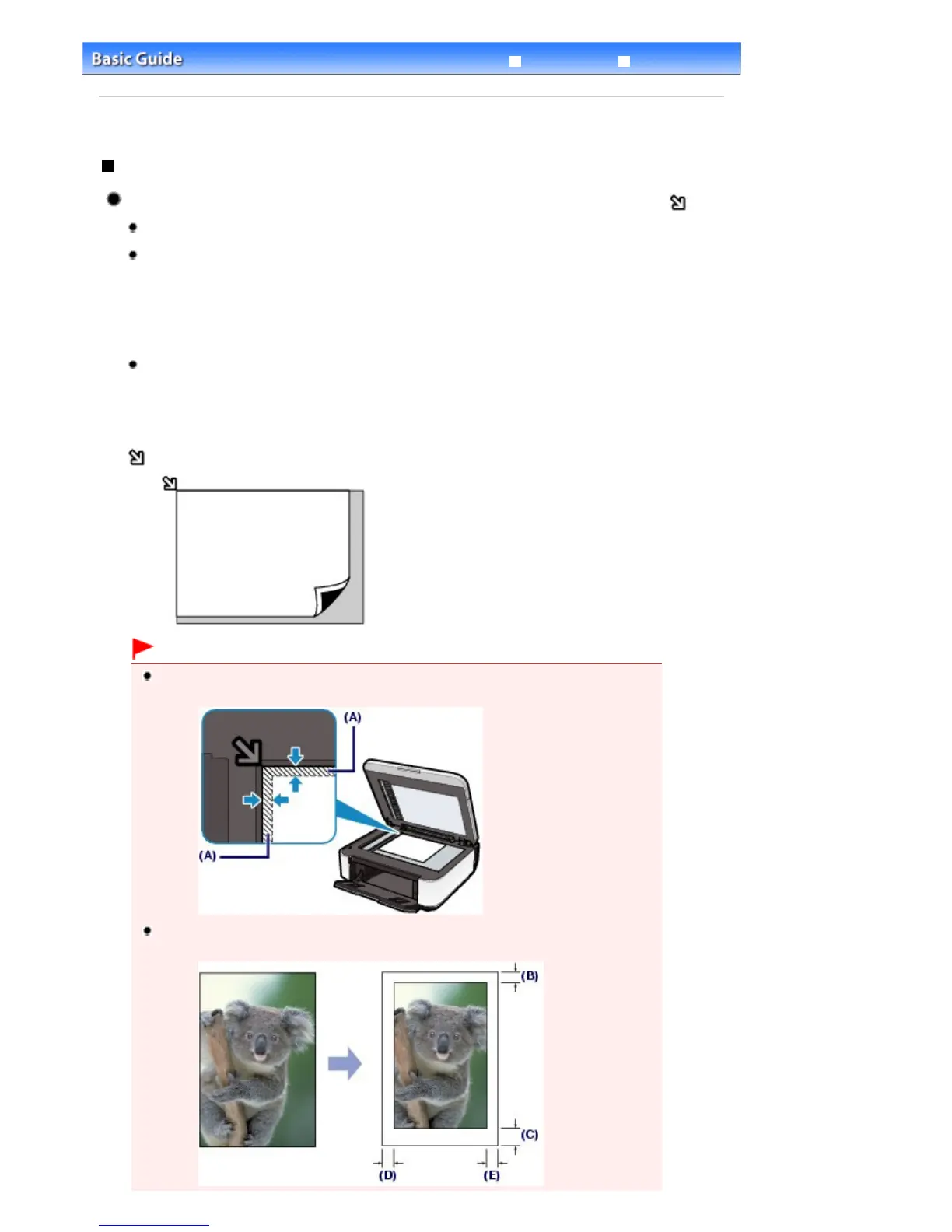
Load the original WITH THE SIDE TO SCAN FACING DOWN and align it with the alignment mark
.
Important
The machine cannot scan the shaded area (A) (0.04 inches / 1 mm from the edges of the
Platen Glass).
To ensure the best print quality, the machine allows a margin along each edge of media. The
actual printable area will be the area inside these margins.
Seite 90 von 922 SeitenHow to Load Originals for Each Function















 To Next Page