Advanced Guide
>
Printing from a Computer
>
Printing with Other Application Software
>
Various Printing
Methods > Execute Borderless Printing
P003
Execute Borderless Printing
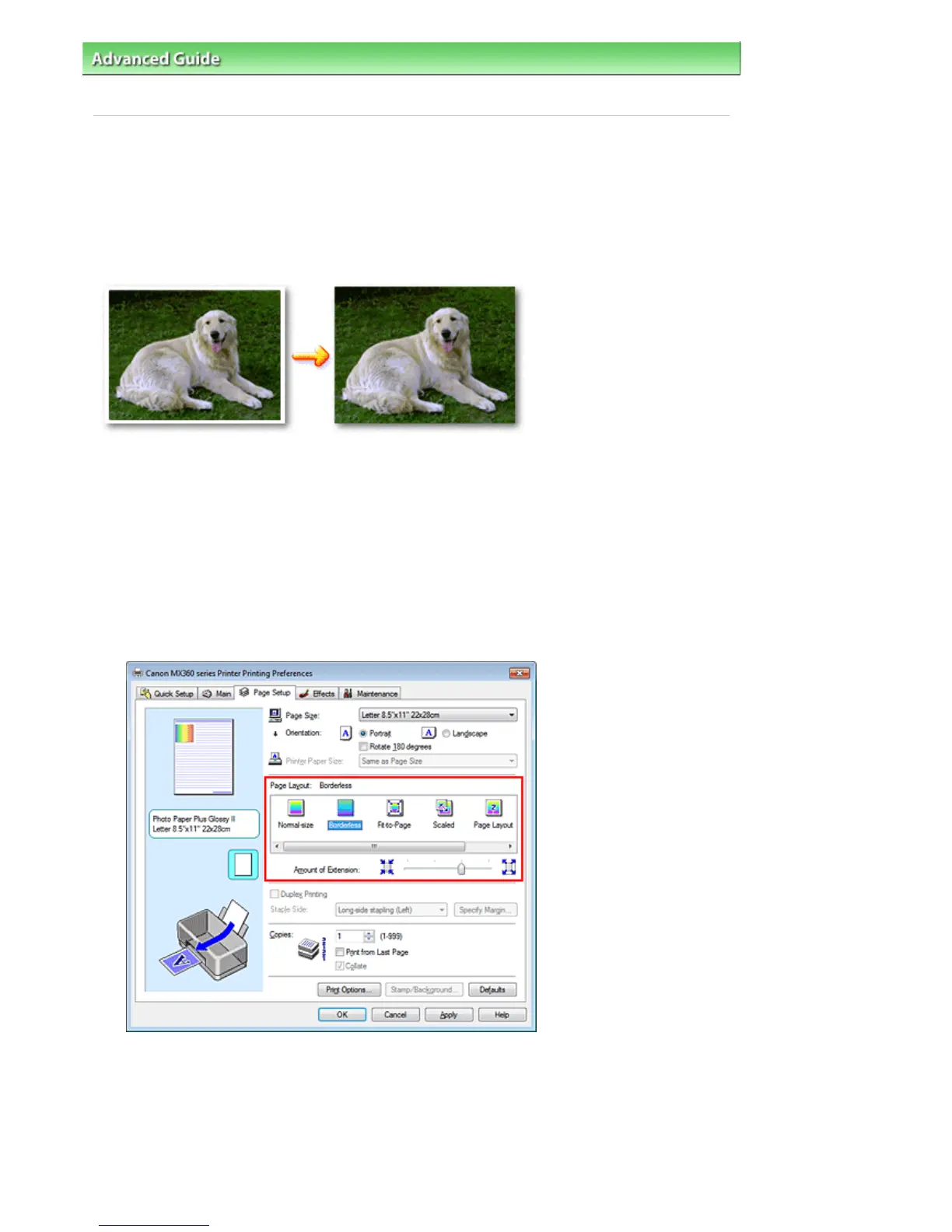
The borderless printing function allows you to print data without any margin by enlarging the data so that
it extends slightly off the paper. Without the borderless printing function, a margin is provided around the
printed data. When you want to print data such as a photo without providing any margin around it, set
borderless printing.
The procedure for performing borderless printing is as follows:
You can also set borderless printing in Additional Features on the Quick Setup tab.
Setting Borderless Printing
1.
Open the
printer driver setup window
2.
Set borderless printing
Select Borderless from the Page Layout list on the Page Setup tab.
Click OK when the confirmation message appears.
When a message prompting you to change the media type appears, select a media type from the
list and click OK.
3.
Check the paper size
Check the Page Size list. When you want to change, select another page size from the list. The list
displays only sizes that can be used for borderless printing.
Seite 278 von 922 SeitenExecute Borderless Printing















 To Next Page