Advanced Guide
>
Scanning
>
Scanning with Other Application Software
>
Correcting Images and
Adjusting Colors with ScanGear (Scanner Driver)
> Adjusting Brightness and Contrast
S304
Adjusting Brightness and Contrast
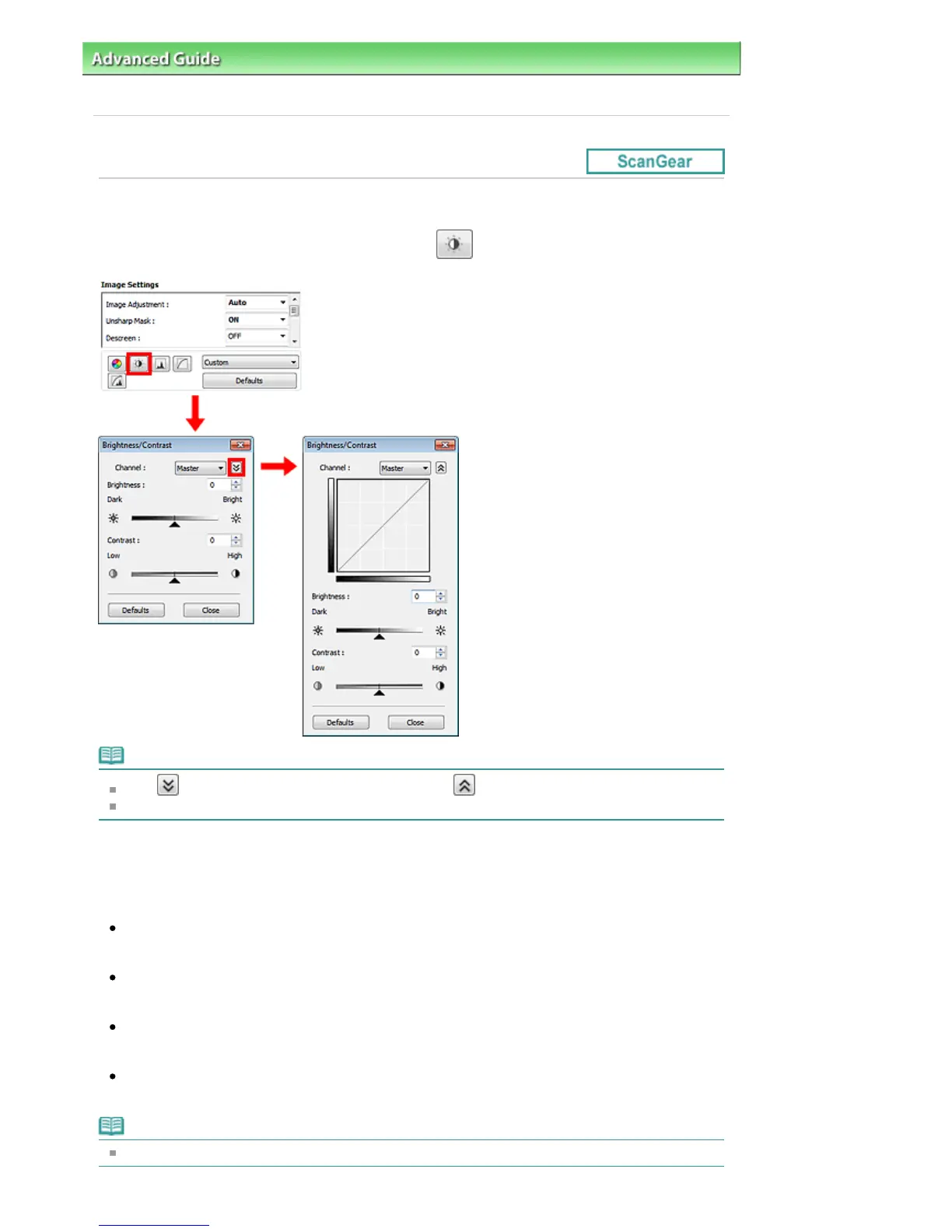
In ScanGear (scanner driver)'s Advanced Mode tab, click
(Brightness/Contrast).
Note
Click (Down arrow) to switch to detailed view. Click
(Up arrow) to return to the previous view.
Click Defaults to reset all adjustments in the current window.
Channel
Each dot of an image is a mixture of Red, Green, and Blue in various proportions (gradation). These
colors can be adjusted individually as a "channel."
Master
Adjust the Red, Green, and Blue combined.
Red
Adjust the Red channel.
Green
Adjust the Green channel.
Blue
Adjust the Blue channel.
Note
Only Grayscale will be displayed in Channel when Color Mode is Grayscale.
Seite 564 von 922 SeitenAdjusting Brightness and Contrast















 To Next Page